Marvis Minis 概述
熟悉 Marvis Minis,了解它如何主动验证您的网络和应用服务。
什么是 Marvis Minis?
Marvis Minis 是一种网络数字孪生,它使用您的网络基础架构来评估网络的网络连接性、客户端连接性和服务可达性。通过主动模拟用户连接,Marvis Minis 可以帮助检测并解决有线和无线网络上的问题,以免影响用户。
Marvis Minis 在站点内的活动 VLAN 上运行验证,以评估用户的网络连接和应用可达性。Marvis Minis 始终开启,定期自动运行验证,也可以按需启动。Marvis Minis 的一个关键功能是,即使没有实际用户,它也能够检测网络或应用问题。这种主动方法能够在潜在问题影响用户之前识别并加以解决。
Marvis Minis 验证涵盖有线和无线领域:
-
适用于无线网络的 Marvis Minis 直接在 Mist 接入点上运行,模拟无线客户端以验证 DHCP、DNS、ARP、RADIUS 等服务,以及应用通过无线网络的可达性。
-
适用于有线网络的 Marvis Minis 可以在瞻博网络 EX 系列交换机上运行,在特定 VLAN 上模拟物理连接的有线客户端。并验证 DHCP、ARP、DNS、CURL、RADIUS (802.1X) 和 traceroute。
本视频介绍了 Marvis Minis。
Marvis Minis, the first AI native networking digital experience twin, shifts network operations from reactive to proactive, elevating end-user experiences while enabling IT to spend less time and money chasing down problems. This is achieved by proactively simulating user connections to instantly validate network configurations and find problems, without users having to be present. Marvis Minis are always on, constantly monitoring your network in real-time.
Minis find misconfigured VLANs, bad firewall rules, application errors, and more, and converts issues into Marvis Actions for proactive resolution and validation. Packet captures can also be initiated to ensure all the right data is present for additional troubleshooting. Marvis Minis are self-configuring and auto-learning, minimizing any need for manual setup and hand-holding.
They are fully integrated with your network infrastructure and come standard with the Marvis Virtual Network Assistant. No extra hardware, software, or clients are required. And because they're AI native, data from Minis is continuously fed back into the MIST AI engine, providing an additional source of insight for the best ongoing AIOps responses.
Find and fix problems more quickly and cost-effectively. Optimize user experiences by solving issues before they even know they exist. And drive more value to your existing network and VNA investment.
That is the power of the industry's only AI native digital experience twin. That's the power of Marvis Minis.
软件要求
Marvis Minis 不需要任何其他软件或外部传感器硬件,但以下内容除外:
-
适用于无线网络的 Marvis Minis — 所有瞻博网络 Mist™ 接入点型号均支持 Marvis Minis。默认情况下,在固件版本为 0.14.29313 及更高版本的接入点上启用 Marvis Minis。
注意:站点中的所有接入点必须运行固件版本 0.14.29313 或更高版本,Marvis Minis 才能运行验证。如果将运行早于 0.14.29313 的固件版本的接入点添加到站点,则 Marvis Minis 验证可能会中断,直到 AP 固件升级到所需的最低接入点版本。
-
适用于有线网络的 Marvis Minis — 运行 Junos OS 版本 25.4R2 或更高版本的 EX4100、EX4400、EX4650 和 QFX5120 交换机支持 Marvis Minis。
Marvis Minis 会在固件版本为 0.14 及更高版本的接入点上,每小时对 DHCP、ARP、DNS 和 CURL 进行验证。持续运行的关键验证具有特定于接入点型号和固件的接入点要求。此功能目前作为测试计划的一部分提供,在运行固件 0.15.x 及更高版本的 Wi-Fi 6E AP(AP64、AP45/AP45E、AP34 和 AP24)上受支持。请联系您的客户团队以参与测试计划。
Marvis Minis 订阅
Marvis Minis 不需要单独订阅。如果您的组织已经拥有有效的 Marvis 无线版订阅,您将自动获得无线网络版 Marvis Minis。适用于有线网络的 Marvis Minis 需要订阅 Marvis 适用于有线网络。
Marvis Minis 验证频率
Marvis Minis 每小时运行一次验证,即使没有客户端连接到网络也是如此。如果只有少数客户端遇到网络故障,Marvis Minis 会运行验证来确认问题是特定于客户端的问题,还是网络问题。
验证作为可下载 Minis 的一部分持续运行。
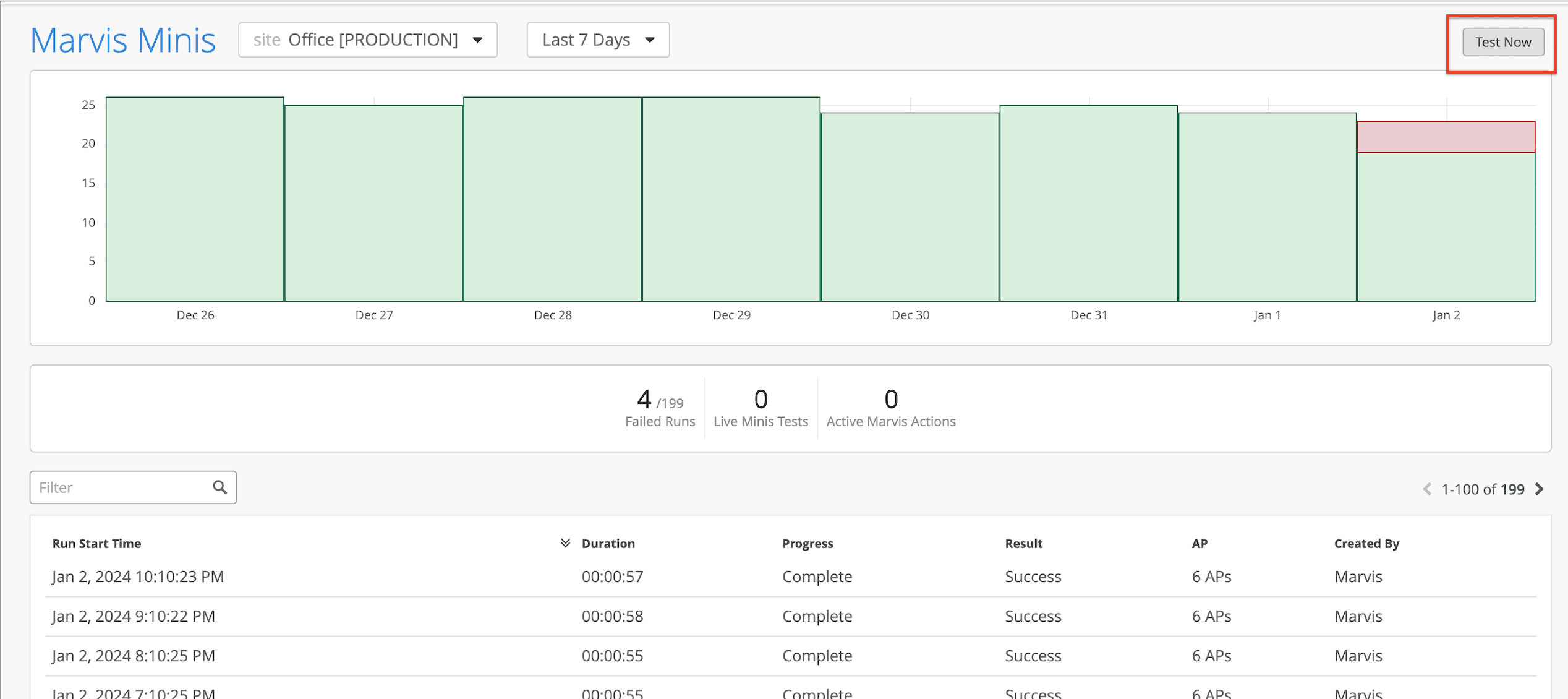
作为管理员,您可以随时启动无线网络的按需验证。当无线网络上发生配置更改或硬件更改时,管理员可以单击Marvis Minis页面右上角的立即 测试 按钮 (Marvis>Marvis Minis) 立即启动验证。确保已从站点选择器下拉列表中选择要测试的站点。
请注意, “实时 Minis 测试” 统计信息显示值 1,表示验证正在进行中。该表还显示了验证的进度。另请注意,列出“ 创建者” 列, User 因为验证是手动触发的。
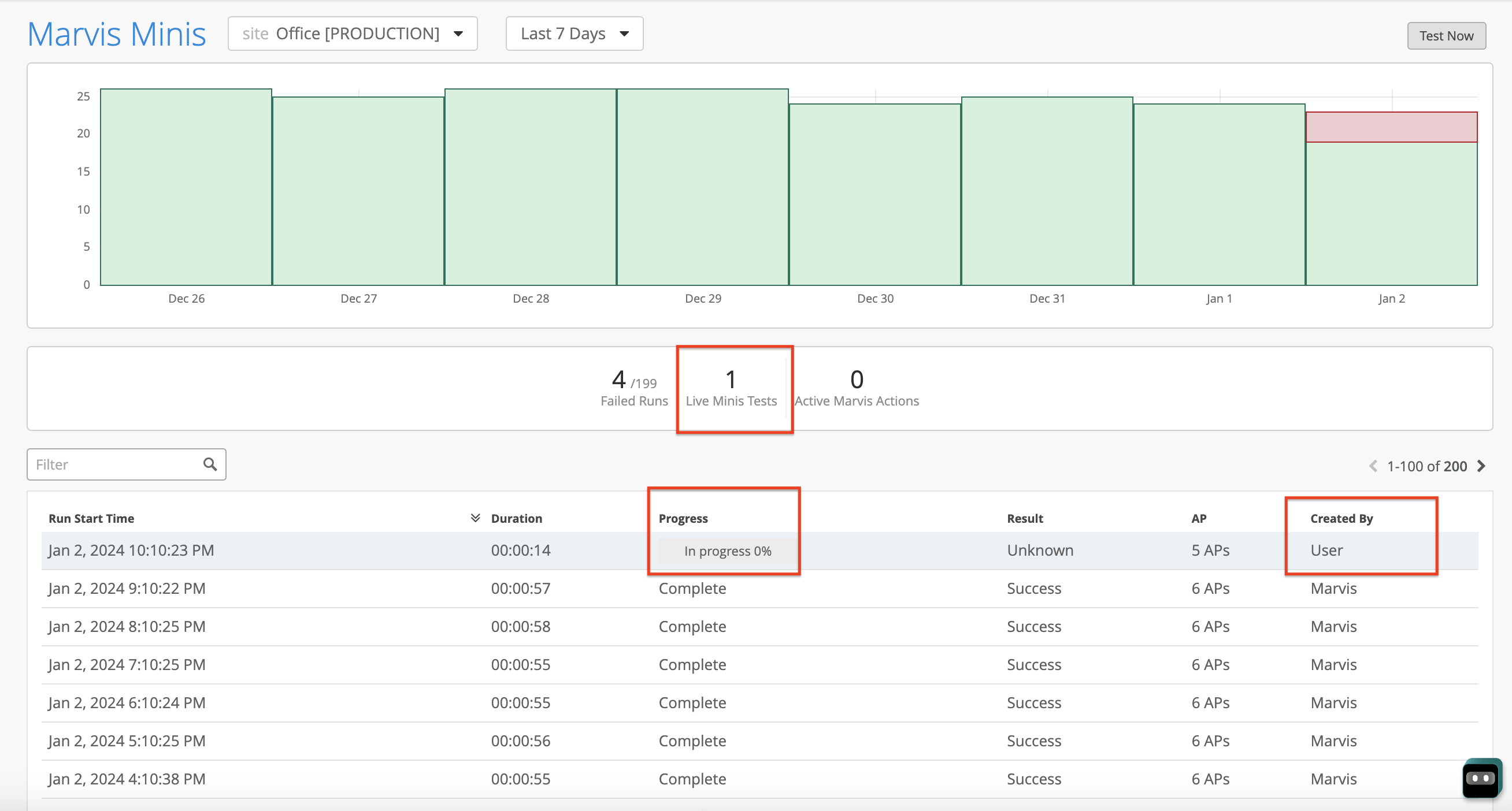
如果正在进行自动验证,则无法触发手册验证。
无线验证和有线验证可以同时运行,但在不同的 VLAN 上运行。
适用于 Marvis Minis 的 Marvis 操作
Marvis 操作提供对影响组织用户体验的所有持续问题的可见性。Marvis 不断接收 Marvis Minis 观察到的数据。Marvis 会提取这些附加数据,并在 Marvis 操作页面的 连接 类别下列出 Marvis Minis 检测到的故障。
当 Marvis Minis 在所有接入点(包括扩展验证范围内的接入点)或交换机上检测到给定 VLAN ID 的 DHCP 或 ARP 或 DNS 故障时,故障会立即列在 “连接” 类别下。
这是一个示例,展示了 Marvis Minis 检测到的故障如何列为操作。请注意,Marvis 将失败原因归因于 Marvis Minis 验证。
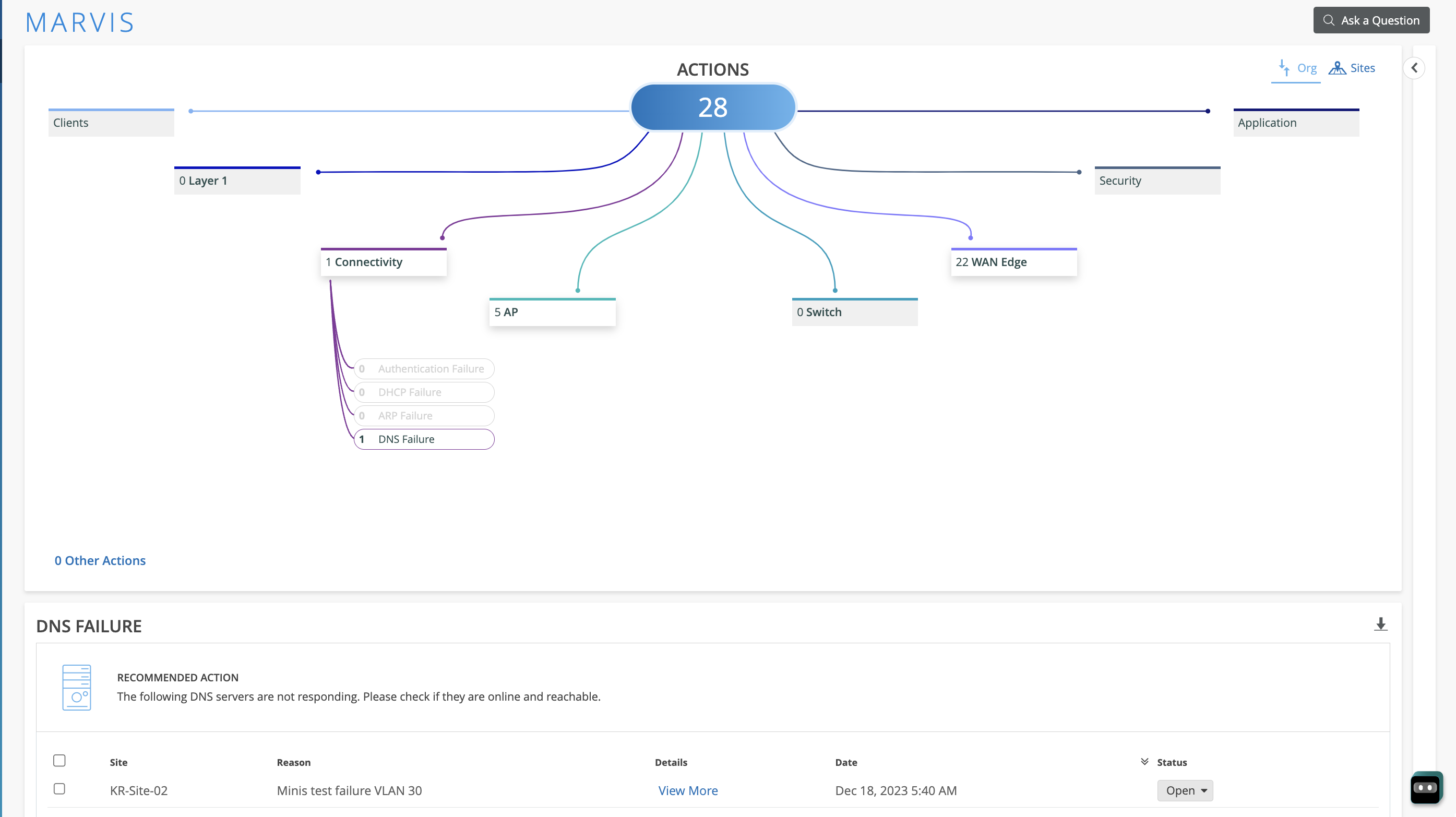
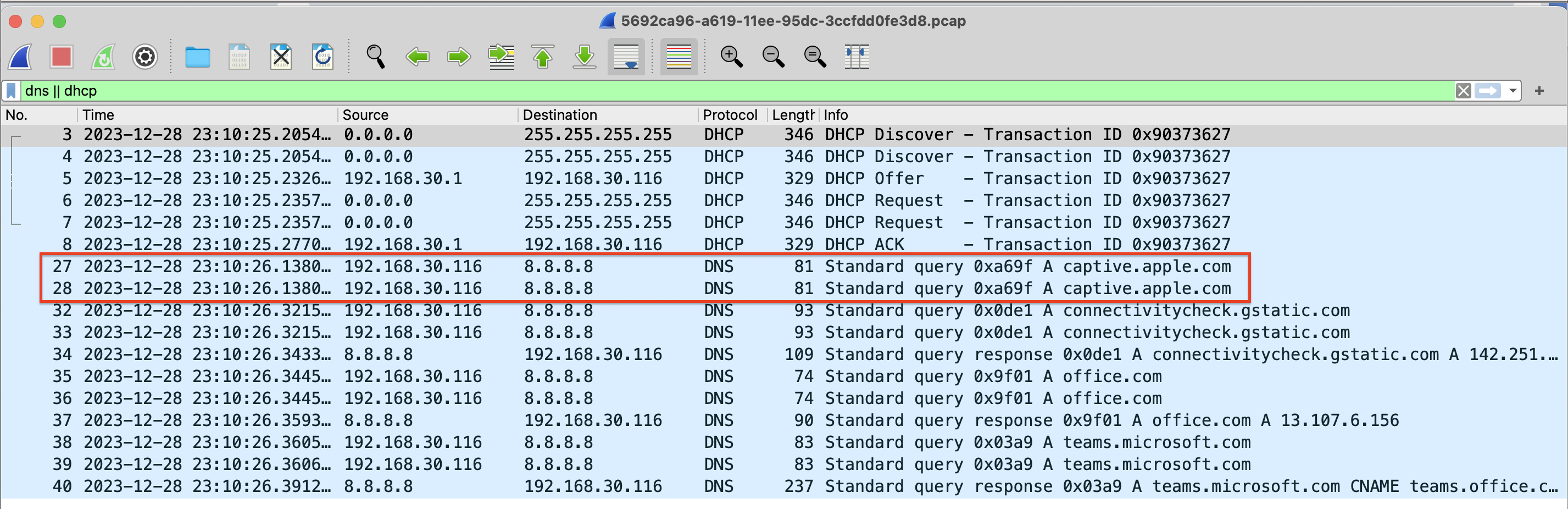
您可以点击查看 更多 链接,在 Marvis Minis 页面上查看故障的详细信息和范围。您可以像下载最终用户客户端一样,针对任何 Marvis Minis 观察到的故障下载动态数据包捕获 (.pcap) 文件。接入点名称旁边的回形针图标表示动态数据包捕获可用于接入点。以下屏幕截图显示了回形针图标的位置。单击下载 (↓) 按钮以访问数据包捕获。
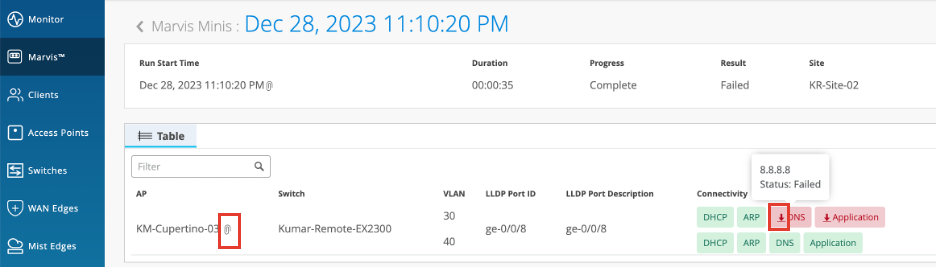
以下是下载的数据包捕获示例:
修复问题后,Marvis 操作可能需要长达 24 小时才能从 Marvis 操作页面中消失。此解决时间可确保 Marvis 不会再次生成相同的操作,并排除在 24 小时内同一问题再次发生的可能性。