选择要监视的警报范围、收件人和类型

要选择警报:

  1. 从左侧菜单中,选择 “监控 > 警报”,然后单击 “警报配置”。
  2. 在页面左侧,单击要配置的模板。

    所有组织都预先配置了默认模板。您可以为不同的位置或目的创建不同的模板。

  3. 在 “适用于范围”下,选择以下选项之一:
    • 整个组织 - 您在此模板中选择的警报将应用于整个组织。

    • 站点 - 您在此模板中选择的警报将应用于指定的站点。单击 + 添加站点。或者单击 X 以删除选定站点。

  4. (可选)在 电子邮件收件人设置下,确定接收您启用的任何电子邮件通知的人员。
    注意:在这里,您可以识别收件人。在“警报类型”部分中,你将为要通过电子邮件监视的警报启用通知。

    您可以选择所有组织管理员、范围部分中指定站点的所有管理员或非瞻博网络 Mist 管理员的其他收件人。

    注意:此功能要求选定的管理员在其帐户设置中启用电子邮件通知。他们可以通过单击 Mist 门户右上角的 Mist 帐户按钮(人员图标)找到自己的帐户设置。
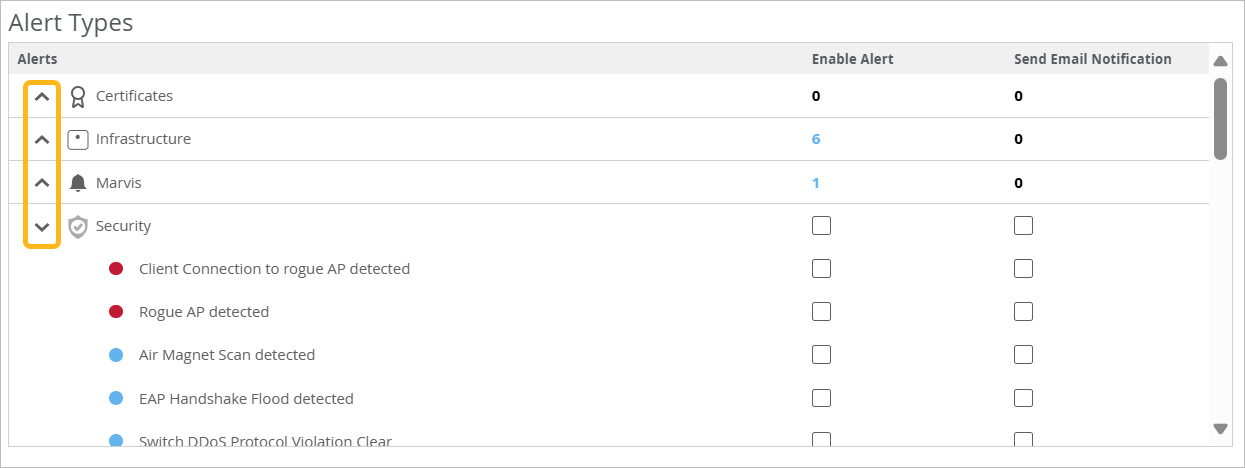
  5. 在 “警报类型”下,选择要在“监视>警报”页(“启用警报” 复选框)或通过电子邮件(“发送电子邮件通知 ”复选框)上监视的事件。
    • 有关各种告警的信息,请参阅 瞻博网络 Mist 告警类型。

    • 使用警报类型部分左侧的展开/折叠图标可重点关注特定的警报类型。

      User interface for managing alert types, divided into categories like Certificates, Infrastructure, Marvis, and Security. Categories can be expanded or collapsed using arrows. Enable Alert and Send Email Notification columns allow configuring alerts and notifications. Security category lists specific alerts like Client Connection to rogue AP detected and Rogue AP detected with checkboxes for enabling or disabling. Numbers next to categories indicate active alerts or configurations.

  6. 如果警报有铅笔图标,请单击它以配置设置。

    例如,如果单击 DNS 故障的铅笔图标,则可以根据故障次数、受影响的客户端和持续时间设置阈值。
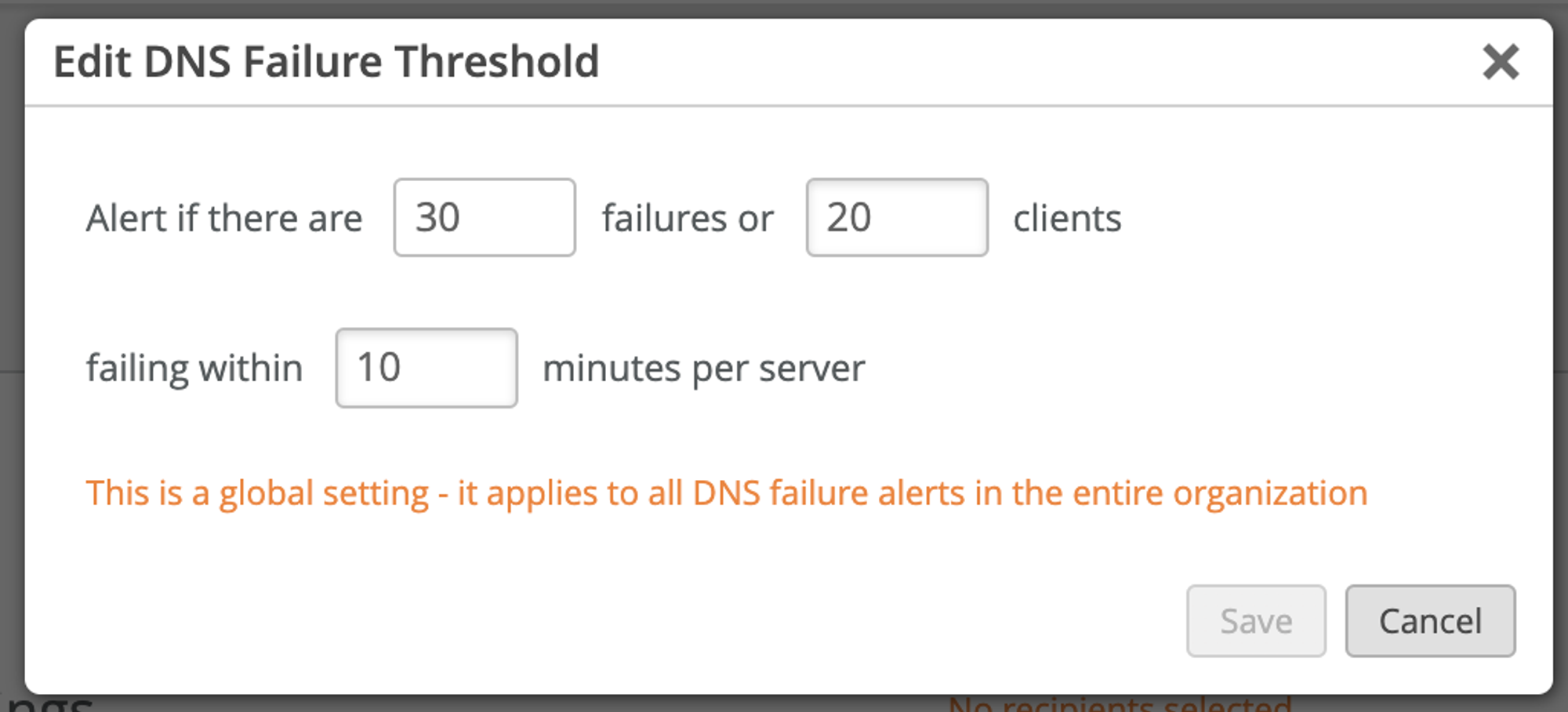
    Edit DNS Failure Threshold configuration window with options to set alerts for 30 failures or 20 clients failing within 10 minutes per server. Save and Cancel buttons at the bottom.
  7. 单击配置区域右上角的 保存 。