示例:为 AS 路径前缀配置路由策略
此示例说明了如何配置路由策略,以便在 BGP 播发的特定路由上前置 AS 路径。
要求
开始之前,请确保路由器接口和协议配置正确。我们提供本文档中使用的接口和 BGP 协议配置。
此示例在 Junos 22.1R1 版上进行了更新和重新验证。
概述
在此示例中,您将创建一个名为 prependpolicy1 的路由策略和一个名为 prependterm1的术语。当掩码长度等于或长于指定的掩码时,路由策略会将 AS 编号 65001 前置三次到与 172.16.0.0/12、192.168.0.0/16 和 10.0.0.0/8 前缀匹配的路由。当路由的掩码长度等于或长于指定的网络掩码时,结果将发生匹配。该 prependpolicy1 策略将作为导出策略应用于由 AS 65001 中的 R1 向 AS 编号 65000 中的 R2 播发的 BGP 路由。与指定前缀范围不匹配的路由不会进行 AS 路径前置。
拓扑结构
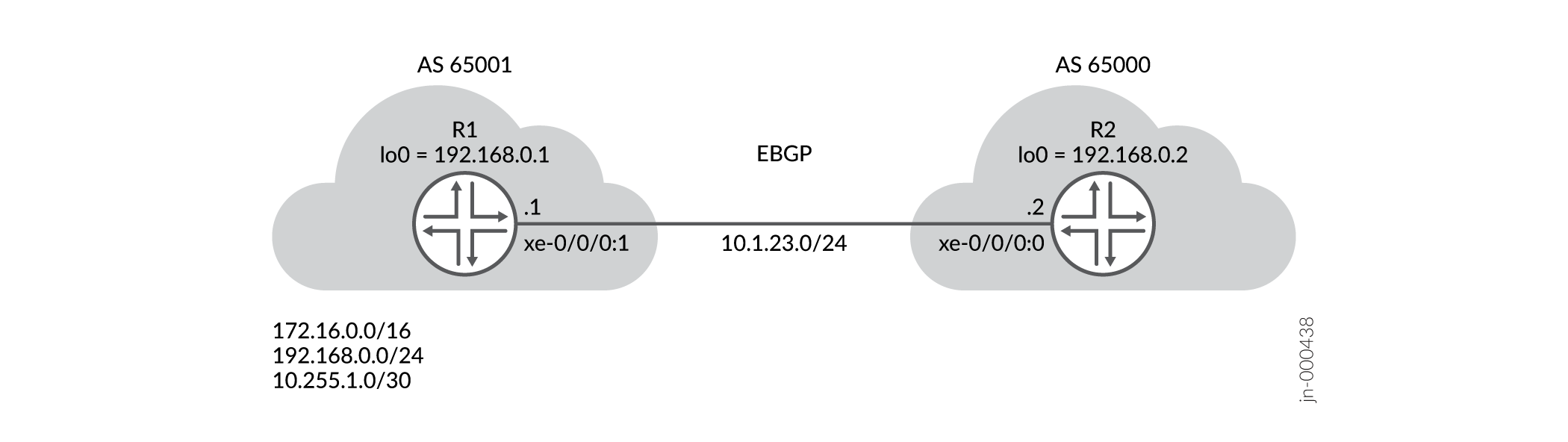
在拓扑中,EBGP 对等配置在 R1 和 R2 之间。使用与 10.1.23.0/24 子网地址的直接接口对等互连。R1 属于 AS 编号 65001,配置为在播发至 R2 时将其 AS 编号前置到一组特定的匹配路由。
通过将 AS 编号添加到 AS 路径,路由不太可能被选中进行转发。AS 65001 的所有者可以这样做,以减少从 AS 65000 的运营商接收的入口流量。
在此示例中,我们演示了通过导出策略前置 AS 路径。您还可以使用导入策略在路由上进行匹配,以便进行属性操作。一般来说,最好只将本地 AS 编号前置到路由中。前置属于远程网络的 AS 编号可能会导致意外结果。
有关 BGP 路径选择的详细信息,请参阅 了解 BGP 路径选择。
配置
过程
CLI 快速配置
在本节中,我们将重点介绍 R1 设备的配置。有关此示例中使用的所有设备的完整配置,请参阅附录。
要快速配置此示例,请复制以下命令,将其粘贴到文本文件中,移除所有换行符,更改任何必要的详细信息以匹配您的网络配置,然后将命令复制粘贴到 [edit] 层级的 CLI 中。
在此示例中,我们将三个测试前缀分配给 R1 上未使用的接口。第四个测试前缀被分配给 R1 的环路地址。这提供了四个可播发到 BGP 的直接路由。我们的策略使用 and route-filter 语句的protocol direct组合来控制哪些前缀要进行 AS 路径前置。
set system host-name R1

set interfaces xe-0/0/0:1 unit 0 family inet address 10.1.23.1/24
set interfaces xe-0/0/0:0 unit 0 family inet address 10.255.1.1/30
set interfaces xe-0/0/0:0 unit 0 family inet address 172.16.0.1/24
set interfaces xe-0/0/0:0 unit 0 family inet address 10.200.1.1/24
set interfaces lo0 unit 0 family inet address 192.168.0.1/32

set policy-options policy-statement prependpolicy1 term prependterm1 from protocol direct
set policy-options policy-statement prependpolicy1 term prependterm1 from route-filter 172.16.0.0/16 orlonger
set policy-options policy-statement prependpolicy1 term prependterm1 from route-filter 192.168.0.0/24 orlonger
set policy-options policy-statement prependpolicy1 term prependterm1 from route-filter 10.255.1.0/24 orlonger
set policy-options policy-statement prependpolicy1 term prependterm1 then as-path-prepend "65001 65001 65001"
set policy-options policy-statement prependpolicy1 term prependterm1 then accept
set policy-options policy-statement prependpolicy1 term else from protocol direct
set policy-options policy-statement prependpolicy1 term else from route-filter 10.200.0.0/16 orlonger
set policy-options policy-statement prependpolicy1 term else then accept

set routing-options autonomous-system 65001
set routing-options router-id 192.168.0.1

set protocols bgp group ebgp type external
set protocols bgp group ebgp export prependpolicy1
set protocols bgp group ebgp peer-as 65000
set protocols bgp group ebgp neighbor 10.1.23.2
分步程序
执行以下步骤时,您需要在各个配置层级中进行导航。有关操作说明,请参阅《Junos OS CLI 用户指南》中的在配置模式下使用CLI编辑器。
要创建将 AS 编号前置到特定路由的路由策略,请执行以下操作:
-
配置对等接口和环路接口。
user@R1#
[edit]
set interfaces xe-0/0/0:1 unit 0 family inet address 10.1.23.1/24
set interfaces lo0 unit 0 family inet address 192.168.0.1/32
-
配置 AS 编号、RID 和外部 BGP 对等体组。您在下一步中定义 prependpolicy1 策略。该策略作为导出策略应用,以影响 R1 播发的路由。
user@R1#
[edit]
set routing-options autonomous-system 65001
set routing-options router-id 192.168.0.1

set protocols bgp group ebgp type external
set protocols bgp group ebgp export prependpolicy1
set protocols bgp group ebgp peer-as 65000
set protocols bgp group ebgp neighbor 10.1.23.2
-
配置prependpolicy1策略。
or-longer当掩码长度等于或长于指定掩码时,使用 switch to route filter 语句允许匹配。其他选项(如exact仅当前缀和掩码长度相等时才匹配)。术语演示else了如何通过匹配else术语来播发与术语不匹配prependterm1的路由而不增加 AS 路径前置。user@R1# [edit] set policy-options policy-statement prependpolicy1 term prependterm1 from protocol direct set policy-options policy-statement prependpolicy1 term prependterm1 from route-filter 172.16.0.0/16 orlonger set policy-options policy-statement prependpolicy1 term prependterm1 from route-filter 192.168.0.0/24 orlonger set policy-options policy-statement prependpolicy1 term prependterm1 from route-filter 10.255.1.0/24 orlonger set policy-options policy-statement prependpolicy1 term prependterm1 then as-path-prepend "65001 65001 65001" set policy-options policy-statement prependpolicy1 term prependterm1 then accept set policy-options policy-statement prependpolicy1 term else from protocol direct set policy-options policy-statement prependpolicy1 term else from route-filter 10.200.0.0/16 orlonger set policy-options policy-statement prependpolicy1 term else then accept
注意:输入多个 AS 编号时,必须用空格分隔每个编号。用双引号将 AS 编号字符串括起来。
-
定义测试路由。在示例拓扑中,我们将前缀分配给未使用的接口,该接口已正常运行。这为 BGP 提供了要播发以测试导出策略操作的直接路由。
user@R1#
[edit]
set interfaces xe-0/0/0:0 unit 0 family inet address 10.255.1.1/30
set interfaces xe-0/0/0:0 unit 0 family inet address 172.16.0.1/24
set interfaces xe-0/0/0:0 unit 0 family inet address 10.200.1.1/24
结果
从配置模式输入 show policy-options、 show protocols bgp、 show routing-options 和 show interfaces 命令,以确认您的配置。如果输出未显示预期的配置,请重复此示例中的配置说明进行更正。
user@R1#[edit]
user@R1# show policy-options
policy-statement prependpolicy1 {
    term prependterm1 {
        from {
            protocol direct;
            route-filter 172.16.0.0/16 orlonger;
            route-filter 192.168.0.0/24 orlonger;
            route-filter 10.255.1.0/24 orlonger;
        }
        then {
            as-path-prepend "65001 65001 65001";
            accept;
        }
    }
    term else {
        from {
            protocol direct;
            route-filter 10.200.0.0/16 orlonger;
        }
        then accept;
    }
}

[edit]
user@R1# show protocols bgp
group ebgp {
    type external;
    export direct;
    peer-as 65000;
    neighbor 10.1.23.2;
}

[edit]
user@R1# show routing-options
autonomous-system 65001;
router-id 192.168.0.1

user@R1# show interfaces xe-0/0/0:0
unit 0 {
    family inet {
        address 10.255.1.1/30;
        address 172.16.0.1/24;
        address 10.200.1.1/24;
    }
}
[edit]
user@R1# show interfaces xe-0/0/0:1
unit 0 {
    family inet {
        address 10.1.23.1/24;
    }
}
[edit]
user@R1# show interfaces lo0
unit 0 {
    family inet {
        address 192.168.0.1/32;
    }
}
如果完成 R1 设备的配置,请从配置模式输入 commit 。
验证
要确认配置工作正常,请执行以下任务:
验证 AS 前置策略
目的
验证是否已在设备上配置策略,以及是否指定了要在前面附加 AS 编号的相应路由。
行动
在操作模式下,输入 show policy prependpolicy1 命令。
user@R1> show policy prependpolicy1
Policy prependpolicy1:  [CHANGED/RESOLVED/]
    Term prependterm1:
        from proto Direct
             route filter:
                 172.16.0.0/16 orlonger
                 192.168.0.0/24 orlonger
                 10.255.1.0/24 orlonger
        then aspathprepend 65001 65001 65001 accept
    Term else:
        from proto Direct
             route filter:
                 10.200.0.0/16 orlonger
        then accept
策略显示正确的匹配条件和操作。
验证路由策略应用和 BGP 对等互连
目的
验证路由策略是否已作为导出策略应用于 EBGP 对等方组。此步骤还确认到 R2 的 BGP 会话已正确建立。
行动
在操作模式下,输入 show bgp neighbor 10.1.23.2 命令。
user@R1> show bgp neighbor 10.1.23.2
Peer: 10.1.23.2+49642 AS 65000 Local: 10.1.23.1+179 AS 65001
  Group: ebgp                  Routing-Instance: master
  Forwarding routing-instance: master
  Type: External    State: Established    Flags: <Sync>
  Last State: OpenConfirm   Last Event: RecvKeepAlive
  Last Error: None
  Export: [ prependpolicy1 ]
  Options: <PeerAS Refresh>
  Options: <GracefulShutdownRcv>
  Holdtime: 90 Preference: 170
  Graceful Shutdown Receiver local-preference: 0
  Number of flaps: 1
  Last flap event: RecvNotify
  Error: 'Cease' Sent: 0 Recv: 1
  Peer ID: 192.168.0.2   Local ID: 192.168.0.1    Active Holdtime: 90
  . . .
  Input messages:  Total 2498   Updates 1       Refreshes 0     Octets 47510
  Output messages: Total 2500   Updates 3       Refreshes 0     Octets 47620
  Output Queue[1]: 0            (inet.0, inet-unicast)
命令输出确认已建立 BGP 会话,并且 R1 已将策略应用 prependpolicy1 为导出。
验证 AS 路径前置
目的
验证导出策略是否适合在设计中将 AS 编号前置到匹配路由。
行动
在操作模式下,在 R2 上输入 show route protocol bgp 命令。或者,在 R1 使用 show route advertising-protocol bgp 10.1.23.2 显示有关其播发至 R2 的路由的详细信息。
user@R2> show route protocol bgp

inet.0: 14 destinations, 14 routes (14 active, 0 holddown, 0 hidden)
+ = Active Route, - = Last Active, * = Both

10.200.1.0/24      *[BGP/170] 00:04:46, localpref 100
                      AS path: 65001 I, validation-state: unverified
                    >  to 10.1.23.1 via xe-0/0/0:0.0
10.255.1.0/30      *[BGP/170] 00:04:46, localpref 100
                      AS path: 65001 65001 65001 65001 I, validation-state: unverified
                    >  to 10.1.23.1 via xe-0/0/0:0.0
172.16.0.0/24      *[BGP/170] 00:04:46, localpref 100
                      AS path: 65001 65001 65001 65001 I, validation-state: unverified
                    >  to 10.1.23.1 via xe-0/0/0:0.0
192.168.0.1/32     *[BGP/170] 00:04:46, localpref 100
                      AS path: 65001 65001 65001 65001 I, validation-state: unverified
                    >  to 10.1.23.1 via xe-0/0/0:0.0
路由显示预期的 AS 路径前置。请注意,10.200.1.0/24 路由只有一个 AS 编号为 65001 的实例。此路由与策略中的prependterm1prependpolicy1路由过滤器语句不匹配,因此不会进行任何前置。
为了完整起见,提供了 R1 播发至 R2 的 BGP 路由视图:
user@R1> show route advertising-protocol bgp 10.1.23.2

inet.0: 16 destinations, 16 routes (16 active, 0 holddown, 0 hidden)
  Prefix                  Nexthop              MED     Lclpref    AS path
* 10.200.1.0/24           Self                                    I
* 10.255.1.0/30           Self                                    65001 65001 65001 [65001] I
* 172.16.0.0/24           Self                                    65001 65001 65001 [65001] I
* 192.168.0.1/32          Self                                    65001 65001 65001 [65001] I
附录 完整配置
R1 的完整配置。
set system host-name R1
set interfaces xe-0/0/0:0 unit 0 family inet address 10.255.1.1/30
set interfaces xe-0/0/0:0 unit 0 family inet address 172.16.0.1/24
set interfaces xe-0/0/0:0 unit 0 family inet address 10.200.1.1/24
set interfaces xe-0/0/0:1 unit 0 family inet address 10.1.23.1/24
set interfaces lo0 unit 0 family inet address 192.168.0.1/32
set policy-options policy-statement prependpolicy1 term prependterm1 from protocol direct
set policy-options policy-statement prependpolicy1 term prependterm1 from route-filter 172.16.0.0/16 orlonger
set policy-options policy-statement prependpolicy1 term prependterm1 from route-filter 192.168.0.0/24 orlonger
set policy-options policy-statement prependpolicy1 term prependterm1 from route-filter 10.255.1.0/24 orlonger
set policy-options policy-statement prependpolicy1 term prependterm1 then as-path-prepend "65001 65001 65001"
set policy-options policy-statement prependpolicy1 term prependterm1 then accept
set policy-options policy-statement prependpolicy1 term else from protocol direct
set policy-options policy-statement prependpolicy1 term else from route-filter 10.200.0.0/16 orlonger
set policy-options policy-statement prependpolicy1 term else then accept
set routing-options router-id 192.168.0.1
set routing-options autonomous-system 65001
set protocols bgp group ebgp type external
set protocols bgp group ebgp export prependpolicy1
set protocols bgp group ebgp peer-as 65000
set protocols bgp group ebgp neighbor 10.1.23.2
R2 的完整配置。
set system host-name R2
set interfaces xe-0/0/0:0 unit 0 family inet address 10.1.23.2/24
set interfaces lo0 unit 0 family inet address 192.168.0.2/32
set routing-options router-id 192.168.0.2
set routing-options autonomous-system 65000
set protocols bgp group ebgp type external
set protocols bgp group ebgp peer-as 65001
set protocols bgp group ebgp neighbor 10.1.23.1