示例:配置路由策略前缀列表
在 Junos OS 中,前缀列表提供了一种定义一组路由的方法。Junos OS 可提供其他方法来完成相同的任务,如路由过滤器。前缀列表是 IP 前缀的列表,表示在应用的策略中用作匹配标准的一组路由。此类列表可用于表示自治系统 (AS) 中的客户路由列表。前缀列表具有一个名称,并在配置层次结构中 [edit policy-options] 进行配置。
要求
配置此示例之前,不需要除设备初始化之外的特殊配置。
使用 Junos OS 22.1R1 版进行了更新和重新验证。
概述
前缀列表类似于路由过滤器列表。路由过滤器和前缀列表之间的功能区别在于,您无法使用前缀列表指定范围。您可以使用前缀列表模拟范围,方法是在列表中包含其他前缀,或者使用两个前缀列表(一个较短,一个较长),将一个设置为接受,另一个设置为拒绝。您还可以使用匹配条件过滤 prefix-list-filter 前缀列表。您的选择是 exact、 longer和 orlonger。
当在多个不同位置引用前缀时,可以看到前缀列表相对于路由过滤器列表的优势。例如,可以在 BGP 导入策略、导出策略、RPF 策略、防火墙过滤器、环路过滤器、设置组播范围等中引用前缀列表。
当前缀列表发生更改时,与其尝试记住配置前缀的许多不同位置,不如更新前缀列表,更改前缀一次,而不是多次。这有助于减少配置错误的可能性,例如输入错误的某个位置的地址或忘记更新一个或多个位置。
前缀列表在管理大量设备时也很有帮助。您可以尽可能通用地编写各种过滤器和策略,引用前缀列表而不是特定 IP 地址。筛选器和策略中更复杂的逻辑只需编写一次,每个设备和每个站点的自定义项最少。
如 图 1 所示,AS 65000 中的每台路由器都有客户路由。设备 R1 在 172.16.1.0/24 子网中分配客户路由。设备 R2 和设备 R3 分别在 172.16.2.0/24 和 172.16.3.0/24 子网中分配客户路由。设备 R1 已被指定为 AS 65000 中的中心点,用于维护客户路由的完整列表。设备 R1 有一个名为 customers的前缀列表,如下所示:
user@R1# show policy-options
prefix-list customers {
    172.16.1.16/28;
    172.16.1.32/28;
    172.16.1.48/28;
    172.16.1.64/28;
    172.16.2.16/28;
    172.16.2.32/28;
    172.16.2.48/28;
    172.16.2.64/28;
    172.16.3.16/28;
    172.16.3.32/28;
    172.16.3.48/28;
    172.16.3.64/28;
}
如您所见,前缀列表不包含每个路由的匹配类型(如使用路由过滤器时看到的那样)。在策略中使用前缀列表时,这一点很重要。只有当路由与列表中的某个前缀完全匹配时,路由才会匹配。换句话说,列表中的每个路由都必须与前缀列表中的配置完全一致地显示在路由表中。
您可以将前缀列表作为策略中的匹配条件引用,如下所示:
user@R1# show policy-options
policy-statement customer-routes {
    term get-routes {
        from {
            prefix-list customers;
        }
        then accept;
    }
    term others {
        then reject;
    }
}
在此示例中,前缀列表中的所有路由 customers 都显示在设备 R1 上的路由表中。设备 R2 和设备 R3 导出到设备 R1 静态路由到其客户。
如前所述,可以将匹配条件与 prefix-list-filter 、 longer或 orlonger 匹配类型一起使用exact。这提供了一种避免前缀列表完全匹配限制的方法。例如:
user@R1# show policy-options
policy-statement customer-routes {
    term get-routes {
        from {
            prefix-list-filter customers orlonger;
        }
        then accept;
    }
    term others {
        then reject;
    }
}
该示例演示了匹配条件和prefix-list-filter匹配条件的prefix-list效果。
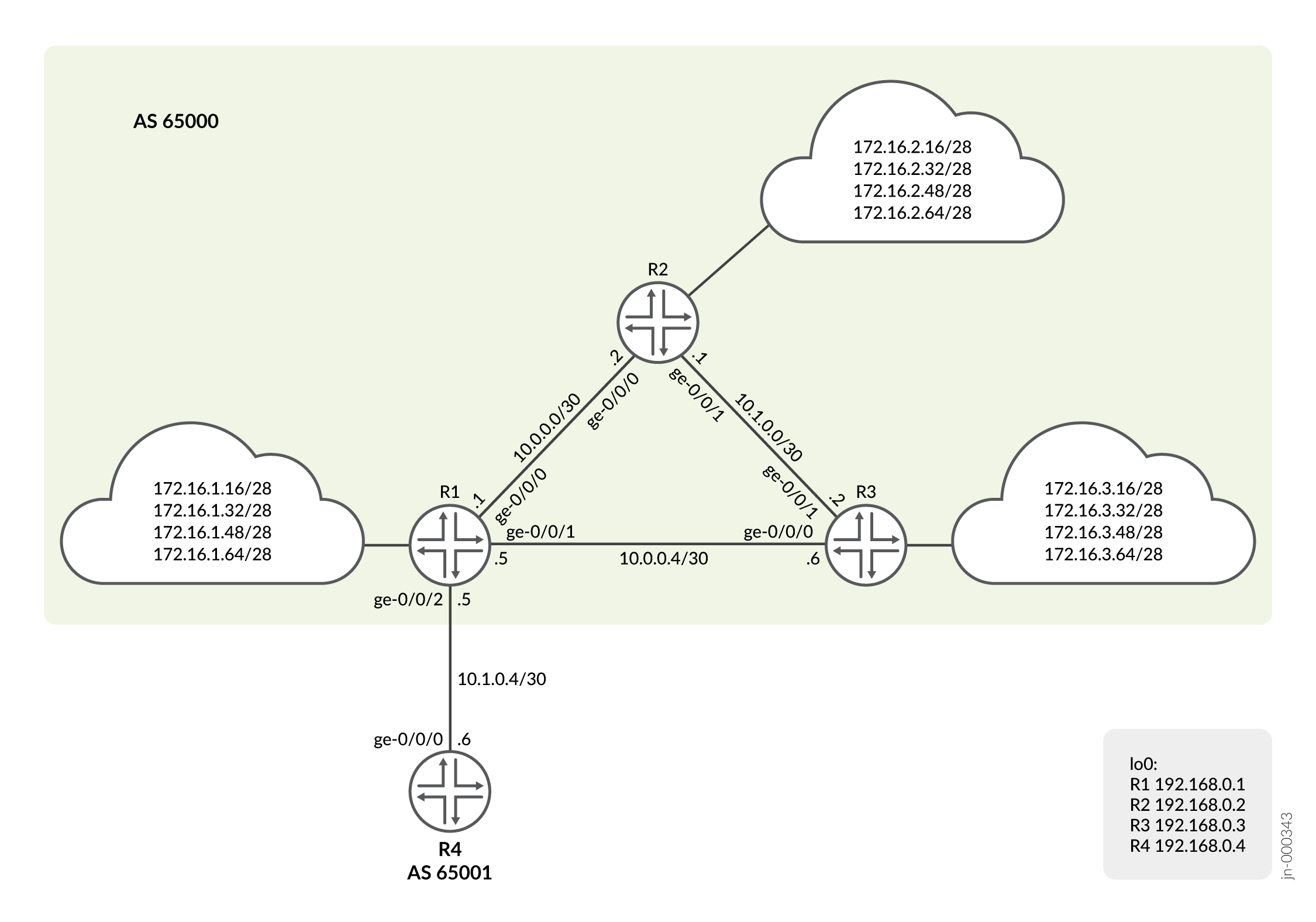
配置
CLI 快速配置
要快速配置此示例,请复制以下命令,将其粘贴到文本文件中,删除所有换行符,更改详细信息,以便与网络配置匹配,然后将命令复制并粘贴到层次结构级别的 [edit] CLI 中。
设备 R1
set interfaces ge-0/0/0 unit 0 description to_R2
set interfaces ge-0/0/0 unit 0 family inet address 10.0.0.1/30
set interfaces ge-0/0/1 unit 0 description to_R3
set interfaces ge-0/0/1 unit 0 family inet address 10.0.0.5/30
set interfaces ge-0/0/2 unit 0 description to_R4
set interfaces ge-0/0/2 unit 0 family inet address 10.1.0.5/30
set interfaces lo0 unit 0 family inet address 192.168.0.1/32
set policy-options prefix-list customers 172.16.1.16/28
set policy-options prefix-list customers 172.16.1.32/28
set policy-options prefix-list customers 172.16.1.48/28
set policy-options prefix-list customers 172.16.1.64/28
set policy-options prefix-list customers 172.16.2.16/28
set policy-options prefix-list customers 172.16.2.32/28
set policy-options prefix-list customers 172.16.2.48/28
set policy-options prefix-list customers 172.16.2.64/28
set policy-options prefix-list customers 172.16.3.16/28
set policy-options prefix-list customers 172.16.3.32/28
set policy-options prefix-list customers 172.16.3.48/28
set policy-options prefix-list customers 172.16.3.64/28
set policy-options policy-statement customer-routes term get-routes from prefix-list customers
set policy-options policy-statement customer-routes term get-routes then accept
set policy-options policy-statement customer-routes term others then reject
set routing-options router-id 192.168.0.1
set routing-options autonomous-system 65000
set routing-options static route 172.16.1.16/28 discard
set routing-options static route 172.16.1.32/28 discard
set routing-options static route 172.16.1.48/28 discard
set routing-options static route 172.16.1.64/28 discard
set protocols bgp group int type internal
set protocols bgp group int local-address 192.168.0.1
set protocols bgp group int neighbor 192.168.0.2
set protocols bgp group int neighbor 192.168.0.3
set protocols bgp group to_65001 type external
set protocols bgp group to_65001 export customer-routes
set protocols bgp group to_65001 neighbor 10.1.0.6 peer-as 65001
set protocols ospf area 0.0.0.0 interface ge-0/0/0.0
set protocols ospf area 0.0.0.0 interface ge-0/0/1.0
set protocols ospf area 0.0.0.0 interface lo0.0 passive
设备 R2
set interfaces ge-0/0/0 unit 0 description to_R1
set interfaces ge-0/0/0 unit 0 family inet address 10.0.0.2/30
set interfaces ge-0/0/1 unit 0 description to_R3
set interfaces ge-0/0/1 unit 0 family inet address 10.1.0.1/30
set interfaces lo0 unit 0 family inet address 192.168.0.2/32
set policy-options policy-statement send-static term 1 from protocol static
set policy-options policy-statement send-static term 1 then accept
set routing-options router-id 192.168.0.2
set routing-options autonomous-system 65000
set routing-options static route 172.16.2.16/28 discard
set routing-options static route 172.16.2.32/28 discard
set routing-options static route 172.16.2.48/28 discard
set routing-options static route 172.16.2.64/28 discard
set protocols bgp group int type internal
set protocols bgp group int local-address 192.168.0.2
set protocols bgp group int neighbor 192.168.0.1 export send-static
set protocols bgp group int neighbor 192.168.0.3
set protocols ospf area 0.0.0.0 interface ge-0/0/0.0
set protocols ospf area 0.0.0.0 interface ge-0/0/1.0
set protocols ospf area 0.0.0.0 interface lo0.0 passive
设备 R3
set interfaces ge-0/0/0 unit 0 description to_R1
set interfaces ge-0/0/0 unit 0 family inet address 10.0.0.6/30
set interfaces ge-0/0/1 unit 0 description to_R2
set interfaces ge-0/0/1 unit 0 family inet address 10.1.0.2/30
set interfaces lo0 unit 0 family inet address 192.168.0.3/32
set policy-options policy-statement send-static term 1 from protocol static
set policy-options policy-statement send-static term 1 then accept
set routing-options router-id 192.168.0.3
set routing-options autonomous-system 65000
set routing-options static route 172.16.3.16/28 discard
set routing-options static route 172.16.3.32/28 discard
set routing-options static route 172.16.3.48/28 discard
set routing-options static route 172.16.3.64/28 discard
set protocols bgp group int type internal
set protocols bgp group int local-address 192.168.0.3
set protocols bgp group int neighbor 192.168.0.1 export send-static
set protocols bgp group int neighbor 192.168.0.2
set protocols ospf area 0.0.0.0 interface ge-0/0/0.0
set protocols ospf area 0.0.0.0 interface ge-0/0/1.0
set protocols ospf area 0.0.0.0 interface lo0.0 passive
设备 R4
set interfaces ge-0/0/0 unit 0 description to_R1
set interfaces ge-0/0/0 unit 0 family inet address 10.1.0.6/30
set interfaces lo0 unit 0 family inet address 192.168.0.4/32
set routing-options autonomous-system 65001
set protocols bgp group ext type external
set protocols bgp group ext peer-as 65000
set protocols bgp group ext neighbor 10.1.0.5
过程
分步程序
我们将展示配置 R1 的分步过程。其他路由器也有类似的分步过程。下面的示例要求您在各个配置层级中进行导航。有关导航CLI的信息,请参阅《Junos OS CLI 用户指南》中的在配置模式下使用CLI编辑器。
要配置 R1:
-
配置接口。
[edit]
user@R1# set interfaces ge-0/0/0 unit 0 description to_R2
user@R1# set interfaces ge-0/0/0 unit 0 family inet address 10.0.0.1/30
user@R1# set interfaces ge-0/0/1 unit 0 description to_R3
user@R1# set interfaces ge-0/0/1 unit 0 family inet address 10.0.0.5/30
user@R1# set interfaces ge-0/0/2 unit 0 description to_R4
user@R1# set interfaces ge-0/0/2 unit 0 family inet address 10.1.0.5/30
user@R1# set interfaces lo0 unit 0 family inet address 192.168.0.1/32
-
配置到 R2 和 R3 的内部 BGP (IBGP) 对等互连。
[edit]
user@R1# set protocols bgp group int type internal
user@R1# set protocols bgp group int local-address 192.168.0.1
user@R1# set protocols bgp group int neighbor 192.168.0.2
user@R1# set protocols bgp group int neighbor 192.168.0.3
-
配置与 R4 的外部 BGP (EBGP) 对等。导出策略配置将在后面的步骤中显示。
[edit]
user@R1# set protocols bgp group to_65001 type external
user@R1# set protocols bgp group to_65001 export customer-routes
user@R1# set protocols bgp group to_65001 neighbor 10.1.0.6 peer-as 65001
-
配置到 R2 和 R3 的 OSPF 对等互连。OSPF 协议提供每台设备的环路地址学习,允许建立 IBGP 对等。
[edit]
user@R1# set protocols ospf area 0.0.0.0 interface ge-0/0/0.0
user@R1# set protocols ospf area 0.0.0.0 interface ge-0/0/1.0
user@R1# set protocols ospf area 0.0.0.0 interface lo0.0 passive
-
配置前缀列表。
[edit]
user@R1# set policy-options prefix-list customers 172.16.1.16/28
user@R1# set policy-options prefix-list customers 172.16.1.32/28
user@R1# set policy-options prefix-list customers 172.16.1.48/28
user@R1# set policy-options prefix-list customers 172.16.1.64/28
user@R1# set policy-options prefix-list customers 172.16.2.16/28
user@R1# set policy-options prefix-list customers 172.16.2.32/28
user@R1# set policy-options prefix-list customers 172.16.2.48/28
user@R1# set policy-options prefix-list customers 172.16.2.64/28
user@R1# set policy-options prefix-list customers 172.16.3.16/28
user@R1# set policy-options prefix-list customers 172.16.3.32/28
user@R1# set policy-options prefix-list customers 172.16.3.48/28
user@R1# set policy-options prefix-list customers 172.16.3.64/28
-
配置引用前缀列表作为匹配标准的路由策略。
[edit]
user@R1# set policy-options policy-statement customer-routes term get-routes from prefix-list customers
user@R1# set policy-options policy-statement customer-routes term get-routes then accept
user@R1# set policy-options policy-statement customer-routes term others then reject
-
为 172.16.1.0/24 网络配置静态路由。我们使用静态路由来模拟客户路由。
[edit]
user@R1# set routing-options static route 172.16.1.16/28 discard
user@R1# set routing-options static route 172.16.1.32/28 discard
user@R1# set routing-options static route 172.16.1.48/28 discard
user@R1# set routing-options static route 172.16.1.64/28 discard
-
配置自治系统 (AS) 编号和路由器 ID。
[edit]
user@R1# set routing-options router-id 192.168.0.1
user@R1# set routing-options autonomous-system 65000
结果
在配置模式下,输入 show interfaces、 show protocols、 show policy-options和 show routing-options 命令以确认您的配置。如果输出未显示预期的配置,请重复此示例中的说明以更正配置。
user@R1# show interfaces
ge-0/0/0 {
    unit 0 {
        description to_R2;
        family inet {
            address 10.0.0.1/30;
        }
    }
}
ge-0/0/1 {
    unit 0 {
        description to_R3;
        family inet {
            address 10.0.0.5/30;
        }
    }
}
ge-0/0/2 {
    unit 0 {
        description to_R4;
        family inet {
            address 10.1.0.5/30;
        }
    }
}
lo0 {
    unit 0 {
        family inet {
            address 192.168.0.1/32;
        }
    }
}
user@R1# show protocols
bgp {
    group int {
        type internal;
        local-address 192.168.0.1;
        neighbor 192.168.0.2;
        neighbor 192.168.0.3;
    }
    group to_65001 {
        type external;
        export customer-routes;
        neighbor 10.1.0.6 {
            peer-as 65001;
        }
    }
}
ospf {
    area 0.0.0.0 {
        interface ge-0/0/0.0;
        interface ge-0/0/1.0;
        interface lo0.0 {
            passive;
        }
    }
}
user@R1# show policy-options
prefix-list customers {
    172.16.1.16/28;
    172.16.1.32/28;
    172.16.1.48/28;
    172.16.1.64/28;
    172.16.2.16/28;
    172.16.2.32/28;
    172.16.2.48/28;
    172.16.2.64/28;
    172.16.3.16/28;
    172.16.3.32/28;
    172.16.3.48/28;
    172.16.3.64/28;
}
policy-statement customer-routes {
    term get-routes {
        from {
            prefix-list customers;
        }
        then accept;
    }
    term others {
        then reject;
    }
}
user@R1# show routing-options
static {
    route 172.16.1.16/28 discard;
    route 172.16.1.32/28 discard;
    route 172.16.1.48/28 discard;
    route 172.16.1.64/28 discard;
}
router-id 192.168.0.1;
autonomous-system 65000;
如果完成设备配置,请从配置模式进入。commit
验证
确认配置工作正常。
验证 R1 上的路由
目的
在 R1 上,检查路由表中的路由。
行动
user@R1> show route terse 172.16/16

inet.0: 30 destinations, 30 routes (30 active, 0 holddown, 0 hidden)
+ = Active Route, - = Last Active, * = Both

A V Destination        P Prf   Metric 1   Metric 2  Next hop        AS path
* ? 172.16.1.16/28     S   5                        Discard
* ? 172.16.1.32/28     S   5                        Discard
* ? 172.16.1.48/28     S   5                        Discard
* ? 172.16.1.64/28     S   5                        Discard
* ? 172.16.2.16/28     B 170        100                             I
  unverified                                       >10.0.0.2
* ? 172.16.2.32/28     B 170        100                             I
  unverified                                       >10.0.0.2
* ? 172.16.2.48/28     B 170        100                             I
  unverified                                       >10.0.0.2
* ? 172.16.2.64/28     B 170        100                             I
  unverified                                       >10.0.0.2
* ? 172.16.3.16/28     B 170        100                             I
  unverified                                       >10.0.0.6
* ? 172.16.3.32/28     B 170        100                             I
  unverified                                       >10.0.0.6
* ? 172.16.3.48/28     B 170        100                             I
  unverified                                       >10.0.0.6
* ? 172.16.3.64/28     B 170        100                             I
  unverified                                       >10.0.0.6
意义
设备 R1 已从设备 R2 和 R3 (B) 学习自己的静态路由 (S) 和 BGP 路由。
验证 R4 的路由播发
目的
在 R1 上,确保将客户路由播发至 R4。
行动
user@R1> show route advertising-protocol bgp 10.1.0.6

inet.0: 30 destinations, 30 routes (30 active, 0 holddown, 0 hidden)
  Prefix                  Nexthop              MED     Lclpref    AS path
* 172.16.1.16/28          Self                                    I
* 172.16.1.32/28          Self                                    I
* 172.16.1.48/28          Self                                    I
* 172.16.1.64/28          Self                                    I
* 172.16.2.16/28          Self                                    I
* 172.16.2.32/28          Self                                    I
* 172.16.2.48/28          Self                                    I
* 172.16.2.64/28          Self                                    I
* 172.16.3.16/28          Self                                    I
* 172.16.3.32/28          Self                                    I
* 172.16.3.48/28          Self                                    I
* 172.16.3.64/28          Self                                    I
意义
正如预期一样,只有来自客户前缀列表的路由才会播发至 R4。
试验 prefix-list-filter 语句
目的
看看当你使用 prefix-list-filter prefix-list而不是 时会发生什么。
行动
-
在 R3 上,添加比现有静态路由之一长的静态路由。
[edit routing-options static]
user@R3# set route 172.16.3.65/32 discard
user@R3# commit
-
在 R1 上,停用前缀列表,并使用匹配类型配置
orlonger前缀列表过滤器。[edit policy-options policy-statement customer-routes term get-routes] user@R1# deactivate from prefix-list customers user@R1# set from prefix-list-filter customers orlonger user@R1# commit
-
在 R1 上,检查哪些路由播发到 R4。
user@R1> show route advertising-protocol bgp 10.1.0.6

inet.0: 31 destinations, 31 routes (31 active, 0 holddown, 0 hidden)
  Prefix                  Nexthop              MED     Lclpref    AS path
* 172.16.1.16/28          Self                                    I
* 172.16.1.32/28          Self                                    I
* 172.16.1.48/28          Self                                    I
* 172.16.1.64/28          Self                                    I
* 172.16.2.16/28          Self                                    I
* 172.16.2.32/28          Self                                    I
* 172.16.2.48/28          Self                                    I
* 172.16.2.64/28          Self                                    I
* 172.16.3.16/28          Self                                    I
* 172.16.3.32/28          Self                                    I
* 172.16.3.48/28          Self                                    I
* 172.16.3.64/28          Self                                    I
* 172.16.3.65/32          Self                                    I
意义
正如预期一样,R1 现在正在向 R4 播发 172.16.3.65/32 路由,即使 172.16.3.65/32 不在前缀列表中。