示例:在 QFX 系列交换机上配置带有辅助 VLAN 中继端口和混合接入端口的 PVLAN
此示例说明如何在专用 VLAN 配置中配置辅助 VLAN 中继端口和混合接入端口。辅助 VLAN 中继端口承载辅助 VLAN 流量。
此示例将 Junos OS 用于不支持增强型第 2 层软件 (ELS) 配置样式的交换机。有关 ELS 的更多信息,请参阅 使用增强型第 2 层软件 CLI。
对于给定的专用 VLAN,一个备用 VLAN 中继端口只能承载一个备用 VLAN 的流量。但是,只要每个辅助 VLAN 都是不同专用(主)VLAN 的成员,辅助 VLAN 中继端口就可以承载多个辅助 VLAN 的流量。例如,辅助 VLAN 中继端口可以为作为主 VLAN pvlan100 一部分的社区 VLAN 传输流量,也可以为作为主 VLAN pvlan400 一部分的隔离 VLAN 传输流量。
要将中继端口配置为承载辅助 VLAN 流量,请使用隔离 的 and interface 语句,如交换机 1 配置示例的步骤 12 和 13 所示。
当流量从辅助 VLAN 中继端口流出时,通常带有辅助端口所属的主 VLAN 的标记。如果您希望从辅助 VLAN 中继端口出口的流量保留其辅助 VLAN 标记,请使用 extend-secondary-vlan-id 语句。
混合接入端口可传输未标记的流量,并且只能是一个主 VLAN 的成员。进入混合访问端口的流量将被转发至辅助 VLAN 的端口,而辅助 VLAN 是混合访问端口所属的主 VLAN 的成员。如果备用 VLAN 端口是中继端口,则此流量在从备用 VLAN 端口流出时,会携带相应的备用 VLAN 标记。
要将接入端口配置为混合,请使用 promiscuous 语句,如交换机 2 配置示例的步骤 12 中所示。
如果流量从辅助 VLAN 端口进入,然后通过混合接入端口出去,则流量在出口时不带标记。如果标记的流量进入混合接入端口,则该流量将被丢弃。
要求
此示例使用以下硬件和软件组件:
-
两台 QFX 设备
-
适用于 QFX 系列的 Junos OS 12.2 或更高版本
概述和拓扑
图 1 显示了此示例中使用的拓扑。交换机 1 包括多个主专用 VLAN 和辅助专用 VLAN,还包括两个辅助 VLAN 中继端口,配置用于承载作为主 VLAN pvlan100 和 pvlan400 成员的辅助 VLAN。
交换机 2 包含相同的专用 VLAN。该图显示交换机 2 上的 xe-0/0/0 配置了混合接入端口或混合中继端口。此处包含的示例配置将此端口配置为混合接入端口。
该图还显示了流量进入交换机 1 上的辅助 VLAN 中继端口后将如何流动。
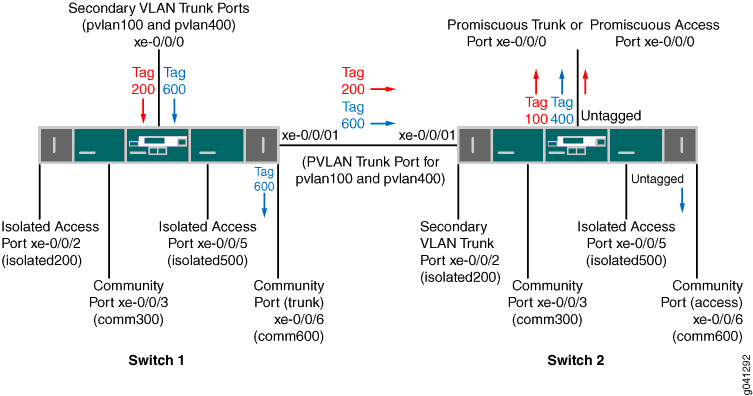 的 PVLAN 拓扑
| 组件 | 描述 |
|---|---|
|
PVLAN100,ID 100 |
主 VLAN |
|
PVLAN400,ID 400 |
主 VLAN |
|
comm300,ID 300 |
社区 VLAN,PVLAN100 成员 |
|
comm600,ID 600 |
公共组 VLAN,PVLAN400 成员 |
|
隔离 VLAN-ID 200 |
pvlan100 成员隔离 VLAN 的 VLAN ID |
|
隔离 - VLAN-ID 500 |
PVLAN400 成员隔离 VLAN 的 VLAN ID |
|
xe-0/0/0.0 |
用于主 VLAN PVLAN100 和 PVLAN400 的辅助 VLAN 中继端口 |
|
xe-0/0/1.0 |
用于主 VLAN PVLAN100 和 PVLAN400 的 PVLAN 中继端口 |
|
xe-0/0/2.0 |
PVLAN100 的隔离接入端口 |
|
xe-0/0/3.0 |
comm300 的社区接入端口 |
|
xe-0/0/5.0 |
PVLAN400 隔离接入端口 |
|
xe-0/0/6.0 |
comm600 的公共中继端口 |
| 组件 | 描述 |
|---|---|
|
PVLAN100,ID 100 |
主 VLAN |
|
PVLAN400,ID 400 |
主 VLAN |
|
comm300,ID 300 |
社区 VLAN,PVLAN100 成员 |
|
comm600,ID 600 |
公共组 VLAN,PVLAN400 成员 |
|
隔离 VLAN-ID 200 |
pvlan100 成员隔离 VLAN 的 VLAN ID |
|
隔离 - VLAN-ID 500 |
PVLAN400 成员隔离 VLAN 的 VLAN ID |
|
xe-0/0/0.0 |
主 VLAN 的混合访问端口 PVLAN100 |
|
xe-0/0/1.0 |
用于主 VLAN PVLAN100 和 PVLAN400 的 PVLAN 中继端口 |
|
xe-0/0/2.0 |
PVLAN100 成员隔离 VLAN 的辅助中继端口 |
|
xe-0/0/3.0 |
comm300 的社区接入端口 |
|
xe-0/0/5.0 |
PVLAN400 隔离接入端口 |
|
xe-0/0/6.0 |
comm600 的公共接入端口 |
在交换机 1 上配置 PVLAN
CLI 快速配置
要在交换机 1 上快速创建和配置 PVLAN,请将以下命令复制粘贴到交换机终端窗口中:
[edit]
set interfaces xe-0/0/0 unit 0 family ethernet-switching port-mode trunk
set interfaces xe-0/0/1 unit 0 family ethernet-switching port-mode trunk
set interfaces xe-0/0/1 unit 0 family ethernet-switching vlan members pvlan100
set interfacesxe-0/0/1 unit 0 family ethernet-switching vlan members pvlan400

set interfaces xe-0/0/2 unit 0 family ethernet-switching port-mode access
set interfaces xe-0/0/3 unit 0 family ethernet-switching port-mode access
set interfaces xe-0/0/5 unit 0 family ethernet-switching port-mode access
set interfaces xe-0/0/6 unit 0 family ethernet-switching port-mode trunk
set vlans pvlan100 vlan-id 100
set vlans pvlan400 vlan-id 400
set vlans pvlan100 pvlan
set vlans pvlan400 pvlan
set vlans pvlan100 interface xe-0/0/1.0 pvlan-trunk

set vlans pvlan400 interface xe-0/0/1.0 pvlan-trunk
set vlans comm300 vlan-id 300
set vlans comm300 primary-vlan pvlan100
set vlans comm300 interface xe-0/0/3.0
set vlans comm600 vlan-id 600
set vlans comm600 primary-vlan pvlan400
set vlans comm600 interface xe-0/0/6.0
set vlans pvlan100 pvlan isolation-vlan-id 200
set vlans pvlan400 pvlan isolation-vlan-id 500
set vlans pvlan100 interface xe-0/0/0.0 isolated
set vlans pvlan400 interface xe-0/0/0.0 isolated
set vlans comm600 interface xe-0/0/0.0
set vlans pvlan100 interface xe-0/0/2.0 isolated
set vlans pvlan400 interface xe-0/0/5.0 isolated
过程
分步程序
要配置专用 VLAN 和辅助 VLAN 中继端口,请执行以下操作:
-
配置接口和端口模式:
[edit interfaces]
user@switch# set xe-0/0/0 unit 0 family ethernet-switching port-mode trunk
user@switch# set xe-0/0/1 unit 0 family ethernet-switching port-mode trunk
user@switch# set xe-0/0/1 unit 0 family ethernet-switching vlan members pvlan100
user@switch# set xe-0/0/1 unit 0 family ethernet-switching vlan members pvlan400
user@switch# set xe-0/0/2 unit 0 family ethernet-switching port-mode access
user@switch# set xe-0/0/3 unit 0 family ethernet-switching port-mode access
user@switch# set xe-0/0/5 unit 0 family ethernet-switching port-mode access
user@switch# set xe-0/0/6 unit 0 family ethernet-switching port-mode access
-
创建主 VLAN:
[edit vlans]
user@switch# set pvlan100 vlan-id 100
user@switch# set pvlan400 vlan-id 400
注意:主 VLAN 必须始终是标记的 VLAN,即使它们只存在于一台设备上也是如此。
-
将主 VLAN 配置为专用:
 [edit vlans]
user@switch# set pvlan100 pvlan
user@switch# set pvlan400 pvlan
-
配置 PVLAN 中继端口以在交换机之间传输专用 VLAN 流量:
[edit vlans]
user@switch# set pvlan100 interface xe-0/0/1.0 pvlan-trunk
user@switch# set pvlan400 interface xe-0/0/1.0 pvlan-trunk
-
创建 VLAN ID 为 300 的辅助 VLAN comm300:
[edit vlans]
user@switch# set comm300 vlan-id 300
-
为 comm300 配置主 VLAN:
[edit vlans]
user@switch# set comm300 primary-vlan pvlan100
-
配置 comm300 的接口:
[edit vlans]
user@switch# set comm300 interface xe-0/0/3.0
-
创建 VLAN ID 为 600 的辅助 VLAN comm600:
[edit vlans]
user@switch# set comm600 vlan-id 600
-
为 comm600 配置主 VLAN:
[edit vlans]
user@switch# set comm600 primary-vlan pvlan400
-
配置 comm600 的接口:
[edit vlans]
user@switch# set comm600 interface xe-0/0/6.0
-
配置交换机间隔离 VLAN:
[edit vlans]
user@switch# set pvlan100 pvlan isolation-vlan-id 200
user@switch# set pvlan400 pvlan isolation-vlan-id 500
注意:将辅助 VLAN 中继端口配置为承载隔离 VLAN 时,还必须配置隔离 vlan-id。即使隔离的 VLAN 仅存在于一台交换机上,也是如此。
-
启用中继端口 xe-0/0/0 以便为主 VLAN 承载辅助 VLAN:
[edit vlans]
user@switch# set pvlan100 interface xe-0/0/0.0 isolated
user@switch# set pvlan400 interface xe-0/0/0.0 isolated
-
将中继端口 xe-0/0/0 配置为承载 comm600(PVLAN400 的成员):
[edit vlans]
user@switch# set comm600 interface xe-0/0/0.0
注意:您无需显式配置 xe-0/0/0 来承载隔离 VLAN 流量(标记 200 和 500),因为 PVLAN100 和 PVLAN400 中的所有隔离端口(包括 xe-0/0/0.0)都会自动包含在配置
isolation-vlan-id 200和isolation-vlan-id 500时创建的隔离 VLAN 中。 -
配置 xe-0/0/2 和 xe-0/0/6 进行隔离:
[edit vlans]
user@switch# set pvlan100 interface xe-0/0/2.0 isolated
user@switch# set pvlan400 interface xe-0/0/5.0 isolated
结果
检查交换机 1 上的配置结果:
[edit]
user@switch#  show
interfaces {
    xe-0/0/0 {
        unit 0 {
            family ethernet-switching {
                port-mode trunk;
                vlan {
                    members pvlan100;
                    members pvlan400;
                }
            }
        }
    }
    xe-0/0/1 {
        unit 0 {
            family ethernet-switching {
                port-mode trunk;
                vlan {
                    members pvlan100;
                    members pvlan400;
                }
            }
        }
    }
    xe-0/0/2 {
        unit 0 {
            family ethernet-switching {
                port-mode access;
            }
        }
    }
    xe-0/0/3 {
        unit 0 {
            family ethernet-switching {
                port-mode access;
            }
        }
    }
    xe-0/0/5 {
        unit 0 {
            family ethernet-switching {
                port-mode access;
            }
        }
    }
    xe-0/0/6 {
        unit 0 {
            family ethernet-switching {
                port-mode trunk;
            }
        }
    }
}
vlans {
    comm300 {
        vlan-id 300;
            interface {
            xe-0/0/3.0;
        }
        primary-vlan pvlan100;
    }
    comm600 {
        vlan-id 600;
            interface {
            xe-0/0/6.0;
        }
        primary-vlan pvlan400;
    }
    pvlan100 {
        vlan-id 100;
        interface {
            xe-0/0/0.0;
            xe-0/0/2.0;
            xe-0/0/3.0;
            xe-0/0/1.0 {
                pvlan-trunk;
            }
        }
        no-local-switching;
        isolation-id 200;
    }
    pvlan400 {
        vlan-id 400;
        interface {
            xe-0/0/0.0;
            xe-0/0/5.0;
            xe-0/0/6.0;
            xe-0/0/1.0 {
                pvlan-trunk;
            }
        }
        no-local-switching;
        isolation-id 500;
    }
}
在交换机 2 上配置 PVLAN
交换机 2 的配置与交换机 1 的配置几乎相同。最显着的区别是,交换机 2 上的 xe-0/0/0 配置为混合中继端口或混合接入端口,如 图 1 所示。在以下配置中,xe-0/0/0 被配置为主 VLAN pvlan100 的混合访问端口。
如果流量从启用 VLAN 的端口进入,而通过混合接入端口出口,则 VLAN 标记将在出口时被丢弃,并且流量此时未标记。例如,comm600 流量进入交换机 1 上 xe-0/0/0.0 上配置的辅助 VLAN 中继端口,并且在通过辅助 VLAN 转发时带有标记 600。当它从交换机 2 上的 xe-0/0/0.0 出口时,如果将 xe-0/0/0.0 配置为混合接入端口,则其将未标记,如本例所示。如果将 xe-0/0/0.0 配置为混合中继端口(端口模式中继),则 comm600 的流量在出口时将带有其主 VLAN 标记 (400)。
CLI 快速配置
要在交换机 2 上快速创建和配置 PVLAN,请复制以下命令并将其粘贴到交换机终端窗口中:
[edit]
set interfaces xe-0/0/0 unit 0 family ethernet-switching port-mode access
set interfaces xe-0/0/1 unit 0 family ethernet-switching port-mode trunk
set interfaces xe-0/0/1 unit 0 family ethernet-switching vlan members pvlan100
set interfaces xe-0/0/1 unit 0 family ethernet-switching vlan members pvlan400

set interfaces xe-0/0/2 unit 0 family ethernet-switching port-mode trunk
set interfaces xe-0/0/3 unit 0 family ethernet-switching port-mode access
set interfaces xe-0/0/5 unit 0 family ethernet-switching port-mode access
set interfaces xe-0/0/6 unit 0 family ethernet-switching port-mode access
set vlans pvlan100 vlan-id 100
set vlans pvlan400 vlan-id 400
set vlans pvlan100 pvlan
set vlans pvlan400 pvlan
set vlans pvlan100 interface xe-0/0/1.0 pvlan-trunk

set vlans pvlan400 interface xe-0/0/1.0 pvlan-trunk
set vlans comm300 vlan-id 300
set vlans comm300 primary-vlan pvlan100
set vlans comm300 interface xe-0/0/3.0
set vlans comm600 vlan-id 600
set vlans comm600 primary-vlan pvlan400
set vlans comm600 interface xe-0/0/6.0
set vlans pvlan100 pvlan isolation-vlan-id 200
set vlans pvlan400 pvlan isolation-vlan-id 500
set vlans pvlan100 interface xe-0/0/0.0 promiscuous
set vlans pvlan100 interface xe-0/0/2.0 isolated
set vlans pvlan400 interface xe-0/0/5.0 isolated
过程
分步程序
要配置专用 VLAN 和辅助 VLAN 中继端口,请执行以下操作:
-
配置接口和端口模式:
[edit interfaces]
user@switch# set xe-0/0/0 unit 0 family ethernet-switching port-mode access
user@switch# set xe-0/0/1 unit 0 family ethernet-switching port-mode trunk
user@switch# set xe-0/0/1 unit 0 family ethernet-switching vlan members pvlan100
user@switch# set xe-0/0/1 unit 0 family ethernet-switching vlan members pvlan400

user@switch# set xe-0/0/2 unit 0 family ethernet-switching port-mode trunk
user@switch# set xe-0/0/3 unit 0 family ethernet-switching port-mode access
user@switch# set xe-0/0/5 unit 0 family ethernet-switching port-mode access
user@switch# set xe-0/0/6 unit 0 family ethernet-switching port-mode access
-
创建主 VLAN:
[edit vlans]
user@switch# set pvlan100 vlan-id 100
user@switch# set pvlan400 vlan-id 400
-
将主 VLAN 配置为专用:
 [edit vlans]
user@switch# set pvlan100 pvlan
user@switch# set pvlan400 pvlan
-
配置 PVLAN 中继端口以在交换机之间传输专用 VLAN 流量:
[edit vlans]
user@switch# set pvlan100 interface xe-0/0/1.0 pvlan-trunk
user@switch# set pvlan400 interface xe-0/0/1.0 pvlan-trunk
-
创建 VLAN ID 为 300 的辅助 VLAN comm300:
[edit vlans]
user@switch# set comm300 vlan-id 300
-
为 comm300 配置主 VLAN:
[edit vlans]
user@switch# set comm300 primary-vlan pvlan100
-
配置 comm300 的接口:
[edit vlans]
user@switch# set comm300 interface xe-0/0/3.0
-
创建 VLAN ID 为 600 的辅助 VLAN comm600:
[edit vlans]
user@switch# set comm600 vlan-id 600
-
为 comm600 配置主 VLAN:
[edit vlans]
user@switch# set comm600 primary-vlan pvlan400
-
配置 comm600 的接口:
[edit vlans]
user@switch# set comm600 interface xe-0/0/6.0
- 在交换机 1 上配置 PVLAN
配置交换机间隔离 VLAN:
[edit vlans]
user@switch# set pvlan100 pvlan isolation-vlan-id 200
user@switch# set pvlan400 pvlan isolation-vlan-id 500
-
将接入端口 xe-0/0/0 配置为对 PVLAN100 混合:
[edit vlans]
user@switch# set pvlan100 interface xe-0/0/0.0 promiscuous
注意:一个混合接入端口只能是一个主 VLAN 的成员。
-
配置 xe-0/0/2 和 xe-0/0/6 进行隔离:
[edit vlans]
user@switch# set pvlan100 interface xe-0/0/2.0 isolated
user@switch# set pvlan400 interface xe-0/0/5.0 isolated
结果
检查交换机 2 上的配置结果:
[edit]
user@switch#  show
interfaces {
    xe-0/0/0 {
        unit 0 {
            family ethernet-switching {
                port-mode access;
                vlan {
                    members pvlan100;
                }
            }
        }
    }

        xe-0/0/1 {
        unit 0 {
            family ethernet-switching {
                port-mode trunk;
                vlan {
                    members pvlan100;
                    members pvlan400;
                }
            }
        }
    }
    xe-0/0/2 {
        unit 0 {
            family ethernet-switching {
                port-mode trunk;
            }
        }
    }
    xe-0/0/3 {
        unit 0 {
            family ethernet-switching {
                port-mode access;
            }
        }
    }
    xe-0/0/5 {
        unit 0 {
            family ethernet-switching {
                port-mode access;
            }
        }
    }
    xe-0/0/6 {
        unit 0 {
            family ethernet-switching {
                port-mode access;
            }
        }
    }
vlans {
    comm300 {
        vlan-id 300;
            interface {
            xe-0/0/3.0;
        }
        primary-vlan pvlan100;
    }
    comm600 {
        vlan-id 600;
            interface {
            xe-0/0/6.0;
        }
        primary-vlan pvlan400;
    }
    pvlan100 {
        vlan-id 100;
        interface {
            xe-0/0/0.0;
            xe-0/0/2.0;
            xe-0/0/3.0;
            xe-0/0/1.0 {
                pvlan-trunk;
            }
        }
        no-local-switching;
        isolation-id 200;
    }
    pvlan400 {
        vlan-id 400;
        interface {
            xe-0/0/5.0;
            xe-0/0/6.0;
            xe-0/0/1.0 {
                pvlan-trunk;
            }
        }
        no-local-switching;
        isolation-id 500;
    }
}
验证
要确认配置工作正常,请执行以下任务:
验证是否已创建专用 VLAN 和辅助 VLAN
目的
验证是否已在交换机 1 上正确创建主 VLAN 和辅助 VLAN。
行动
使用以下命令:show vlans
user@switch>  show vlans private-vlan

Name               Role        Tag      Interfaces
pvlan100           Primary     100  	   xe-0/0/0.0, xe-0/0/1.0, xe-0/0/2.0, xe-0/0/3.0
__iso_pvlan100__   Isolated    200      xe-0/0/2.0
comm300            Community   300      xe-0/0/3.0

pvlan400           Primary     400      xe-0/0/0.0, xe-0/0/1.0, xe-0/0/5.0, xe-0/0/6.0
__iso_pvlan400__   Isolated    500      xe-0/0/5.0
comm600            Community   600     xe-0/0/6.0
意义
输出显示已创建专用 VLAN,并标识了与之关联的接口和辅助 VLAN。
验证以太网交换表条目
目的
验证是否已为主 VLAN pvlan100 创建了以太网交换表条目。
行动
显示 pvlan100 的以太网交换表条目。
user@switch> show ethernet-switching table vlan pvlan100 private-vlan
Ethernet-switching table: 0 unicast entries
  pvlan100             *                 Flood          - All-members
  pvlan100             00:10:94:00:00:02 Learn            xe-0/0/2.0
  __iso_pvlan100__     *                 Flood          - All-members
  __iso_pvlan100__     00:10:94:00:00:02 Replicated      - xe-0/0/2.0