示例:为点对多点 LSP 配置多点 LDP 带内信令
了解点对多点 LSP 的多点 LDP 带内信令
用于使用带内信令的点对多点标签交换路径 (LSP) 的多点标签分发协议 (M-LDP) 在需要承载组播流量(例如 IPTV)的现有 IP/MPLS 骨干网的部署中非常有用。
多年来,最广泛使用的组播流量传输解决方案是在服务提供商核心中使用具有多点 IP 隧道的本地 IP 组播来隔离客户流量。部署组播路由协议(通常是协议无关组播 (PIM))以设置转发路径。IP 组播路由用于转发,在核心中使用 PIM 信令。要使此模型正常工作,必须启用核心网络组播。这样,即使在自治系统 (AS) 间场景中,也能实现有效且稳定的部署。
但是,在现有 IP/MPLS 网络中,部署 PIM 可能不是首选。部分服务提供商有意用 MPLS 标签封装取代 IP 隧道。迁移到 MPLS 标签交换的动机是利用 MPLS 流量工程和保护功能,并减少提供商核心中的控制流量开销。
为此,服务提供商有兴趣利用现有部署的扩展来允许组播流量通过。现有的 IP/MPLS 组播扩展是 RSVP-流量工程的点对多点扩展,以及 LDP 的点对多点和多点对多点扩展。RFC 6826《 点到多点和多点到多点标签交换路径的多点 LDP 带内信令》中讨论了这些部署方案。此功能概述仅限于 LDP 的点对多点扩展。
- M-LDP 的工作原理
- 术语
- 入口加入转换和伪接口处理
- 入口熔接
- 反向路径转发
- LSP 根检测
- 出口加入转换和伪接口处理
- 出口熔接
- 支持的功能
- 不受支持的功能
- LDP 功能
- 出口 LER 功能
- 传送标签交换路由器功能
- 入口 LER 功能
M-LDP 的工作原理
M-LDP 信号传导中的标记结合
LDP 的多点扩展使用点到多点和多点到多点转发同等类 (FEC) 元素(在 RFC 5036,LDP 规范中定义),以及功能播发、标签映射和信令程序。FEC 元素包括 LSP 根(IP 地址)和“不透明”值(用于将共享相同不透明值的叶节点组合在一起的选择器)。不透明值对中间节点是透明的,但对 LSP 根有意义。每个 LDP 节点都会在到 FEC 中找到的根 IP 地址的最短路径上将其本地传入标签绑定播发到上游 LDP 节点。接收标签绑定的上游节点创建自己的本地标签和传出接口。如果有多个传出分支,则此标签分配过程可能会导致数据包复制。如 图 1 所示,如果 LDP 节点发现共享同一上游节点的下游节点,则会合并相同不透明值的标签绑定。这样便可有效构建点对多点 LSP 并进行标签保护。
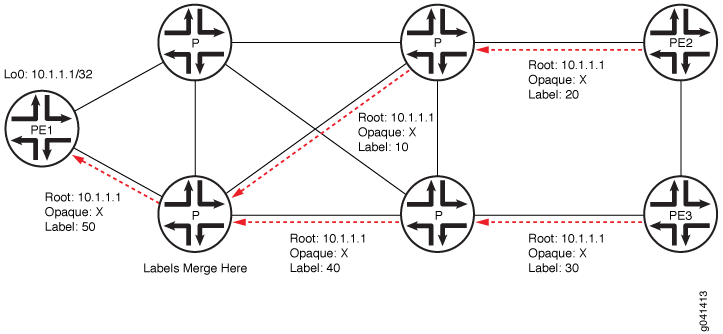 中的标记结合
无 PIM MPLS 核心中的 M-LDP
图 2 显示了缩减后的部署方案。两个独立的 PIM 域通过一个无 PIM 的核心站点互连。此核心站点中的边界路由器支持边界接口上的 PIM。此外,这些边界路由器还会收集路由信息,并将其从相邻站点分发到核心网络。站点 C 中的边缘路由器运行 BGP 进行根节点发现。内部网关协议 (IGP) 路由不能用于入口发现,因为在大多数情况下,IGP 提供的转发下一跃点不会提供有关指向源的入口设备的信息。M-LDP 带内信令在点对多点 LSP 与 (S,G) 流之间具有一对一映射。借助带内信令,PIM 消息可直接转换为 M-LDP FEC 绑定。相比之下,带外信令基于手册配置。M-LDP 带内信令的一个应用是在 MPLS 骨干网中传输 IPTV 组播流量。
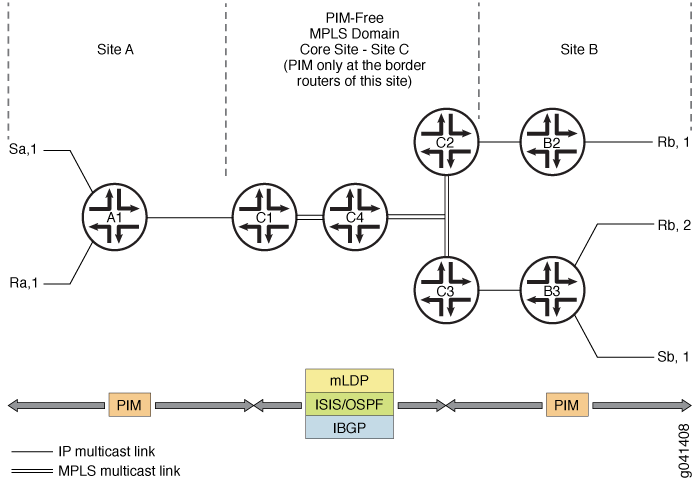 中的 M-LDP 拓扑示例
配置
当 LER 未检测到 PIM 上游邻接方时,标签边缘路由器 (LER) 上的配置语句mldp-inband-signalling使 PIM 能够为上游邻接方使用 M-LDP 带内信令。使用策略,MPLS LSP 根的静态配置包含在 PIM 配置中。当 IBGP 在核心站点中不可用或覆盖基于 IBGP 的 LSP 根检测时,需要这样做。
例如:
protocols {
    pim {
        mldp-inband-signalling {
            policy lsp-mapping-policy-example;
        }
    }
}
policy-options {
    policy-statement lsp-mapping-policy-example {
        term channel1 {
            from {
                source-address-filter ip-prefix</prefix-length>;  #policy filter for channel1
            }
            then {
                p2mp-lsp-root {
                    # Statically configured ingress address of edge
                    # used by channel1
                    address ip-address;
                }
                accept;
            }
        }
    }
}
启用 PIM 的 MPLS 核心中的 M-LDP
从 Junos OS 14.1 版开始,为了将现有 IPTV 服务从本机 IP 组播迁移到 MPLS 组播,您需要在尽量减少中断的情况下从 PIM 顺利过渡到 M-LDP 点对多点 LSP。 图 3 显示了与 图 2 类似的 M-LDP 拓扑结构,但情况不同。核心启用了 PIM,一个源流式传输所有 IPTV 频道。电视频道作为 ASM 流发送,每个频道都由其组地址标识。以前,这些信道作为 IP 流在核心上进行流传输,并使用 PIM 发出信号。
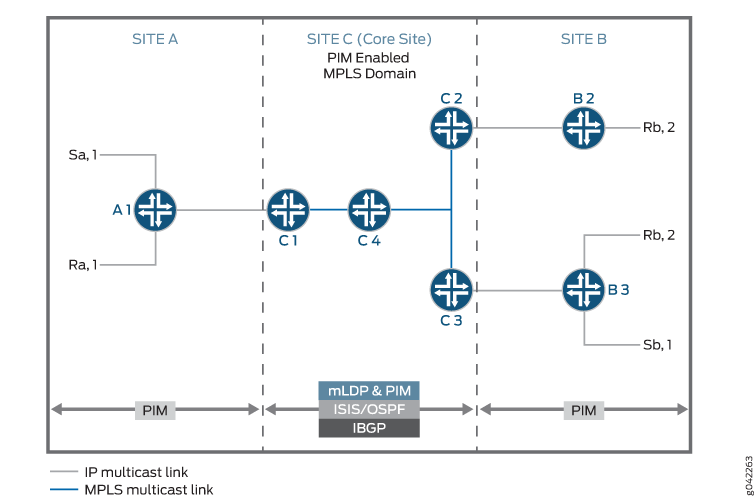 中的 M-LDP 拓扑示例
在此场景中,通过配置 mldp-inband-signaling 仅当没有面向源的 PIM 邻接方时,才会启动 M-LDP 信令。但是,由于除非在出口 PE 的上游接口上停用 PIM,否则始终存在面向源的 PIM 邻接方,因此 PIM 优先于 M-LDP,而 M-LDP 不会生效。
配置
要逐个通道逐步迁移到 M-LDP MPLS 核心,其中少数流使用 M-LDP 上游,而其他流使用现有 PIM 上游,请在 M-LDP 带内信令的策略过滤器中包括 selected-mldp-egress 配置语句以及基于组的过滤器。
M-LDP 带内信令策略过滤器可以包含语句或route-filter语句,或两source-address-filter者的组合。
例如:
protocols {
    pim {
        mldp-inband-signalling {
            policy lsp-mapping-policy-example;
        }
    }
}
policy-options {
    policy-statement lsp-mapping-policy-example {
        term channel1 {
            from {
                source-address-filter ip-prefix</prefix-length>;  #policy filter for channel1
            }
            then {
                selected-mldp-egress;
                accept;
            }
        }
        term channel2 {
            from {
                source-address-filter ip-prefix</prefix-length>;  #policy filter for channel2
                route-filter ip-prefix</prefix-length>;  #policy filter on multicast group address
            }
            then {
                selected-mldp-egress;
                p2mp-lsp-root {
                    # Statically configured ingress address of edge
                    # used by channel2
                    address ip-address;
                }
                accept;
            }
        }
        term channel3 {
            from {
                route-filter ip-prefix</prefix-length>;  #policy filter on multicast group address
            }
            then {
                selected-mldp-egress;
                accept;
            }
        }
    }
}
上述配置的一些限制如下:
-
selected-mldp-egress该语句只能在 LER 上配置。在非出口 PIM 路由器上配置selected-mldp-egress该语句可能会导致路径设置失败。 -
对流量从 PIM 上游切换到 M-LDP 上游(反之亦然)进行策略更改时,由于在控制平面上执行了中断和制造机制,因此可能会发生数据包丢失。
术语
以下术语对于理解组播流量的 M-LDP 带内信令非常重要。
| Point-to-point LSP |
具有一个入口标签交换路由器(标签交换路由器)和一个出口标签交换路由器的 LSP。 |
| Multipoint LSP |
点对多点或多点对多点 LSP。 |
| Point-to-multipoint LSP |
具有一个入口标签交换路由器和一个或多个出口 LSR 的 LSP。 |
| Multipoint-to-point LSP |
具有一个或多个入口 LSR 和一个唯一出口标签交换路由器的 LSP。 |
| Multipoint-to-multipoint LSP |
连接一组节点的 LSP,以便 LSP 中任何节点发送的流量都传递给所有其他节点。 |
| Ingress LSR |
特定 LSP 的入口标签交换路由器是一种可以沿 LSP 发送数据包的标签交换路由器。多点到多点 LSP 可以有多个入口 LSR。点对多点 LSP 只有一个,该节点通常称为根节点。 |
| Egress LSR |
特定 LSP 的出口标签交换路由器是一种标签交换路由器,可从该 LSP 中移除数据包以进行进一步处理。点对点和多点对点 LSP 只有一个出口节点。点对多点和多点对多点 LSP 可以有多个出口节点。 |
| Transit LSR |
通过直连的上游标签交换路由器和一个或多个直连的下游 LSR 可访问多点 LSP 根的标签交换路由器。 |
| Bud LSR |
作为出口但也具有一个或多个直接连接下游 LSR 的标签交换路由器。 |
| Leaf node |
点对多点 LSP 环境中的出口或芽标签交换路由器。在多点到多点 LSP 的环境中,标签交换路由器是同一多点到多点 LSP 的入口和出口,也可以是芽式标签交换路由器。 |
入口加入转换和伪接口处理
在入口 LER,LDP 会通知 PIM 有关通过带内信令接收的 (S,G) 消息。PIM 将每条 (S,G) 消息与一个伪接口相关联。随后,向源发起最短路径树 (SPT) 加入消息。PIM 将其视为一种新型的本地接收器。当 LSP 被拆除时,PIM 会根据 LDP 的通知移除此本地接收器。
入口熔接
LDP 为 PIM 提供与每个 (S,G) 条目关联的下一跃点。PIM 安装带有 LDP 下一跃点和其他 PIM 接收器的 PIM (S,G) 组播路由。下一跃点是本地接收器的复合下一跃点 + PIM 下游邻接方列表 + LDP 隧道的子级下一跃点。
反向路径转发
PIM 的反向路径转发 (RPF) 计算在出口节点上执行。
当满足以下所有条件时,PIM 将执行 M-LDP 带内信令:
-
没有面向源的 PIM 邻接方。
-
配置了 M-LDP 带内信令语句。
-
下一跃点通过 BGP 获知,或存在于静态映射(在 M-LDP 带内信令策略中指定)中。
否则,如果 LSP 根检测失败,PIM 将保留 (S,G) 条目,RPF 状态为未解析。
每次单播路由信息发生变化时,PIM RPF 都会注册此源地址。因此,如果朝向源的路由发生变化,RPF 重新计算将重复进行。也监控指向源的 BGP 协议下一跃点,以了解 LSP 根中的更改。此类更改可能会导致短时间内的流量中断。
LSP 根检测
如果 RPF 操作检测到上游需要 M-LDP 带内信令,则会检测到 LSP 根(入口)。此根是 LDP LSP 信令的参数。
按如下方式检测到根节点:
-
如果现有静态配置指定了源地址,则按照配置中给定的方式获取根地址。
-
查找在单播路由表中执行。如果找到源地址,则朝向源的协议下一跃点将用作 LSP 根。
在 Junos OS 16.1 之前,M-LDP 点对多点 LSP 使用入口标签交换路由器的根地址从出口到入口发出信号。此根地址只能通过 IGP 访问,从而将 M-LDP 点对多点 LSP 限制在单个自治系统中。如果根地址无法通过 IGP 访问,但可通过 BGP 访问,并且该 BGP 路由通过 MPLS LSP 递归解析,则点对多点 LSP 不会从该点进一步向入口标签交换路由器根地址发出信号。
这些非分段点到多点 LSP 需要在多个自治系统之间发出信号,可用于以下应用:
-
具有非分段点到多点 LSP 的 AS 间 MVPN。
-
通过 MPLS 核心网络连接的客户端网络之间的 AS 间 M-LDP 带内信令。
-
使用非分段点到多点 LSP(无缝 MPLS 组播)的区域间 MVPN 或 M-LDP 带内信令。
从 Junos OS 16.1 版开始,当根地址是通过MPLS LSP 进一步递归解析的BGP路由时,M-LDP 可以在 ASBR 或中转或出口向点对多点 LSP 发出信号。
-
出口加入转换和伪接口处理
在出口 LER 处,PIM 会通知 LDP 要与 LSP 根一起发出信号的 (S,G) 消息。PIM 会创建一个伪接口作为此 (S,G) 消息的上游接口。当收到 (S,G) 删除消息时,将删除此关联。
出口熔接
在核心网络的出口节点上,如果接收到来自下行站点的 (S,G) 加入消息,则此加入消息将转换为 M-LDP 带内信令参数,并通知 LDP。此外,当 (S,G) 条目丢失、LSP 根更改或可通过 PIM 邻接方访问 (S,G) 条目时,都会发生 LSP 拆解。
支持的功能
对于 M-LDP 带内信令,Junos OS 支持以下功能:
-
PIM 下一跃点与 LDP 路由的出口拼接
-
PIM 路由与 LDP 下一跃点的入口拼接
-
PIM 加入消息到 LDP 的转换 点对多点 LSP 设置参数
-
转换 M-LDP 带内 LSP 参数以设置 PIM 加入消息
-
静态配置和基于 BGP 协议下一跃点的 LSP 根检测
-
PIM 源特定组播 (SSM) 和所有源组播 (ASM) 范围内的 PIM (S,G) 状态
-
入口和出口 LER 上的配置语句,使其能够充当边缘路由器
-
LER 上的 IGMP 加入消息
-
将 IPv6 源地址和组地址作为不透明信息传输到 IPv4 根节点
-
用于将 IPv6 (S,G) 映射到 IPv4 根地址的静态配置
不受支持的功能
对于 M-LDP 带内信令,Junos OS 不 支持以下功能:
-
完全支持 PIM ASM
-
带有 (S,G) 选项的
mpls lsp point-to-multipoint ping命令 -
不间断活动路由 (NSR)
-
PIM 的先合后断 (MBB)
-
IPv6 LSP 根地址(LDP 不支持 IPv6 LSP。
-
未直接连接的 PIM 发送方之间的邻居关系
-
平滑重启
-
PIM 密集模式
-
PIM 双向模式
LDP 功能
PIM (S,G) 信息以 M-LDP 不透明类型长度值 (TLV) 编码的形式传输。点对多点 FEC 元素由根节点地址组成。对于新一代组播 VPN (NGEN MVPN),点到多点 LSP 由根节点地址和 LSP ID 标识。
出口 LER 功能
在出口 LER 上,PIM 使用以下信息触发 LDP,以创建点对多点 LSP:
-
根节点
-
(S,G)
-
下一跳跃
PIM 根据组播树的源查找根节点。如果为此 (S,G) 条目配置了根地址,则配置的地址将用作点对多点 LSP 根。否则,路由表将用于查找到源的路由。如果到组播树源的路由是 BGP 获知的路由,则 PIM 将检索 BGP 下一跃点地址,并将其用作点对多点 LSP 的根节点。
LDP 根据根节点查找上游节点,分配标签,并将标签映射发送到上游节点。LDP 不将倒数第二个跃点弹出 (PHP) 用于带内 M-LDP 信令。
如果组播树源的根地址发生变化,PIM 将删除点对多点 LSP,并触发 LDP 创建新的点对多点 LSP。发生这种情况时,传出接口列表变为 NULL,PIM 会触发 LDP 删除点对多点 LSP,LDP 会向上游节点发送标签撤回消息。
传送标签交换路由器功能
中转标签交换路由器将标签播发到上游标签交换路由器,指向点对多点 FEC 的源,并安装必要的转发状态以转发数据包。传输标签交换路由器可以是任何支持 M-LDP 的路由器。
入口 LER 功能
在入口 LER 上,LDP 在收到标签映射后向 PIM 提供以下信息:
-
(S,G)
-
泛洪下一跃点
然后 PIM 安装转发状态。如果添加或删除了新分支,泛洪下一跃点将相应更新。如果由于标签被撤销而删除了所有分支,LDP 会向 PIM 发送更新的信息。如果上游和下游邻接方之间存在多个链路,则点对多点 LSP 不会负载均衡。
也可以看看
示例:为点对多点 LSP 配置多点 LDP 带内信令
此示例说明如何为组播流量配置多点 LDP (M-LDP) 带内信令,作为协议无关组播 (PIM) 协议的扩展或替代 PIM。
要求
可以使用以下硬件和软件组件配置此示例:
-
Junos OS 13.2 或更高版本
-
MX 系列5G通用路由平台或M Series用于提供商边缘 (PE) 路由器的多服务边缘路由器
-
充当中转标签交换路由器的 PTX 系列数据包传输路由器
-
用于核心路由器的 T Series 核心路由器
PE 路由器也可以是 T Series 核心路由器,但这并不常见。根据您的扩展要求,核心路由器也可以MX 系列5G通用路由平台或M Series多服务边缘路由器。客户边缘 (客户边缘) 设备可以是瞻博网络或其他供应商的其他路由器或交换机。
配置此示例之前,不需要除设备初始化之外的特殊配置。
概述
CLI 快速配置 显示了图 4 中所有设备的配置。第 #d484e113__d484e932 节介绍了有关设备 EgressPE 的步骤。
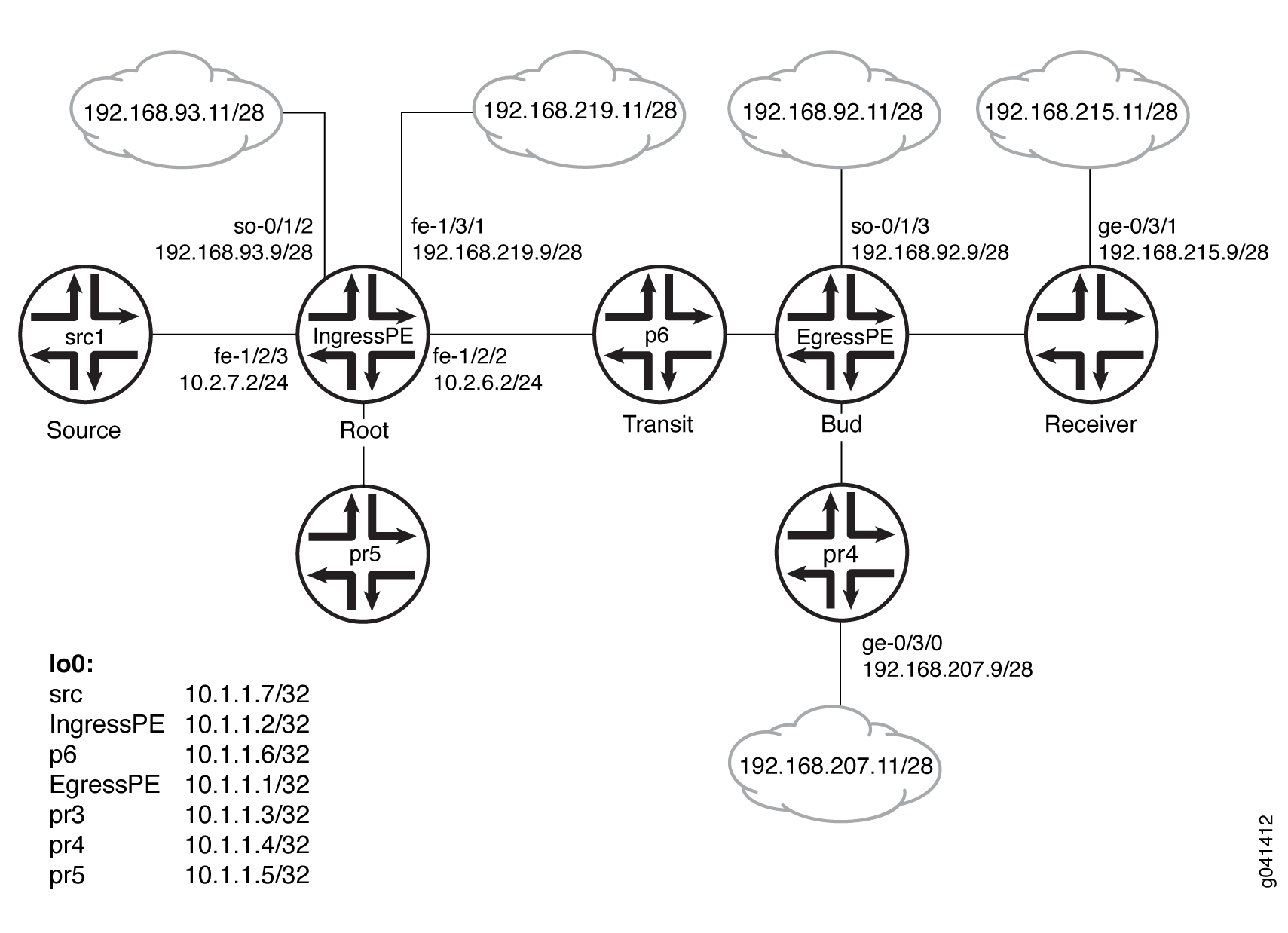 示例
示例
配置
过程
CLI 快速配置
要快速配置此示例,请复制以下命令,将其粘贴到文本文件中,删除所有换行符,更改详细信息,以便与网络配置匹配,然后将命令复制并粘贴到层次结构级别的 [edit] CLI 中。
设备 src1
                  set logical-systems src1 interfaces fe-1/2/0 unit 0 family inet address 10.2.7.7/24

                  set logical-systems src1 interfaces lo0 unit 0 family inet address 10.1.1.7/32

                  set logical-systems src1 protocols ospf area 0.0.0.0 interface all
设备入口 PE
                  set interfaces so-0/1/2 unit 0 family inet address 192.168.93.9/28

                  set interfaces fe-1/2/0 unit 0 family inet address 10.2.3.2/24

                  set interfaces fe-1/2/0 unit 0 family mpls

                  set interfaces fe-1/2/1 unit 0 family inet address 10.2.5.2/24

                  set interfaces fe-1/2/2 unit 0 family inet address 10.2.6.2/24

                  set interfaces fe-1/2/2 unit 0 family mpls

                  set interfaces fe-1/2/3 unit 0 family inet address 10.2.7.2/24

                  set interfaces fe-1/3/1 unit 0 family inet address 192.168.219.9/28

                  set interfaces lo0 unit 0 family inet address 10.1.1.2/32

                  set protocols igmp interface fe-1/2/1.0 version 3

                  set protocols igmp interface fe-1/2/1.0 static group 232.1.1.1 source 192.168.219.11

                  set protocols bgp group ibgp type internal

                  set protocols bgp group ibgp local-address 10.1.1.2

                  set protocols bgp group ibgp family inet any

                  set protocols bgp group ibgp family inet-vpn any

                  set protocols bgp group ibgp neighbor 10.1.1.3

                  set protocols bgp group ibgp neighbor 10.1.1.4

                  set protocols bgp group ibgp neighbor 10.1.1.1

                  set protocols ospf area 0.0.0.0 interface all

                  set protocols ldp interface fe-1/2/0.0

                  set protocols ldp interface fe-1/2/2.0

                  set protocols ldp interface lo0.0

                  set protocols ldp p2mp

                  set protocols pim mldp-inband-signalling policy mldppim-ex

                  set protocols pim rp static address 10.1.1.5

                  set protocols pim interface fe-1/3/1.0

                  set protocols pim interface lo0.0

                  set protocols pim interface fe-1/2/0.21

                  set protocols pim interface fe-1/2/3.0

                  set protocols pim interface fe-1/2/1.0

                  set protocols pim interface so-0/1/2.0

                  set policy-options policy-statement mldppim-ex term B from source-address-filter 192.168.0.0/24 orlonger

                  set policy-options policy-statement mldppim-ex term B from source-address-filter 192.168.219.11/32 orlonger

                  set policy-options policy-statement mldppim-ex term B then accept

                  set policy-options policy-statement mldppim-ex term A from source-address-filter 10.1.1.7/32 orlonger

                  set policy-options policy-statement mldppim-ex term A from source-address-filter 10.2.7.0/24 orlonger

                  set policy-options policy-statement mldppim-ex term A then accept

                  set routing-options autonomous-system 64510
设备出口 PE
                  set interfaces so-0/1/3 unit 0 point-to-point

                  set interfaces so-0/1/3 unit 0 family inet address 192.168.92.9/28

                  set interfaces fe-1/2/0 unit 0 family inet address 10.1.3.1/24

                  set interfaces fe-1/2/0 unit 0 family mpls

                  set interfaces fe-1/2/1 unit 0 family inet address 10.1.4.1/24

                  set interfaces fe-1/2/2 unit 0 family inet address 10.1.6.1/24

                  set interfaces fe-1/2/2 unit 0 family mpls

                  set interfaces fe-1/3/0 unit 0 family inet address 192.168.209.9/28

                  set interfaces lo0 unit 0 family inet address 10.1.1.1/32

                  set routing-options autonomous-system 64510

                  set protocols igmp interface fe-1/3/0.0 version 3

                  set protocols igmp interface fe-1/3/0.0 static group 232.1.1.1 group-count 3

                  set protocols igmp interface fe-1/3/0.0 static group 232.1.1.1 source 192.168.219.11

                  set protocols igmp interface fe-1/3/0.0 static group 227.1.1.1

                  set protocols igmp interface so-0/1/3.0 version 3

                  set protocols igmp interface so-0/1/3.0 static group 232.1.1.1 group-count 2

                  set protocols igmp interface so-0/1/3.0 static group 232.1.1.1 source 192.168.219.11

                  set protocols igmp interface so-0/1/3.0 static group 232.2.2.2 source 10.2.7.7

                  set protocols mpls interface fe-1/2/0.0

                  set protocols mpls interface fe-1/2/2.0

                  set protocols bgp group ibgp type internal

                  set protocols bgp group ibgp local-address 10.1.1.1

                  set protocols bgp group ibgp family inet any

                  set protocols bgp group ibgp neighbor 10.1.1.2

                  set protocols msdp local-address 10.1.1.1

                  set protocols msdp peer 10.1.1.5

                  set protocols ospf area 0.0.0.0 interface all

                  set protocols ospf area 0.0.0.0 interface fxp0.0 disable

                  set protocols ldp interface fe-1/2/0.0

                  set protocols ldp interface fe-1/2/2.0

                  set protocols ldp interface lo0.0

                  set protocols ldp p2mp

                  set protocols pim mldp-inband-signalling policy mldppim-ex

                  set protocols pim rp local address 10.1.1.1

                  set protocols pim rp local group-ranges 227.0.0.0/8

                  set protocols pim rp static address 10.1.1.4

                  set protocols pim rp static address 10.2.7.7 group-ranges 226.0.0.0/8

                  set protocols pim interface lo0.0

                  set protocols pim interface fe-1/3/0.0

                  set protocols pim interface fe-1/2/0.0

                  set protocols pim interface fe-1/2/1.0

                  set protocols pim interface so-0/1/3.0

                  set policy-options policy-statement mldppim-ex term B from source-address-filter 192.168.0.0/24 orlonger

                  set policy-options policy-statement mldppim-ex term B from source-address-filter 192.168.219.11/32 orlonger

                  set policy-options policy-statement mldppim-ex term B then p2mp-lsp-root address 10.1.1.2

                  set policy-options policy-statement mldppim-ex term B then accept

                  set policy-options policy-statement mldppim-ex term A from source-address-filter 10.2.7.0/24 orlonger

                  set policy-options policy-statement mldppim-ex term A then accept
设备 p6
                  set interfaces fe-1/2/0 unit 0 family inet address 10.1.6.6/24

                  set interfaces fe-1/2/0 unit 0 family mpls

                  set interfaces fe-1/2/1 unit 0 family inet address 10.2.6.6/24

                  set interfaces fe-1/2/1 unit 0 family mpls

                  set interfaces lo0 unit 0 family inet address 10.1.1.6/32

                  set interfaces lo0 unit 0 family mpls

                  set protocols ospf area 0.0.0.0 interface all

                  set protocols ldp interface fe-1/2/0.0

                  set protocols ldp interface fe-1/2/1.0

                  set protocols ldp interface lo0.0

                  set protocols ldp p2mp
设备 pr3
                  set interfaces ge-0/3/1 unit 0 family inet address 192.168.215.9/28

                  set interfaces fe-1/2/0 unit 0 family inet address 10.1.3.3/24

                  set interfaces fe-1/2/0 unit 0 family mpls

                  set interfaces fe-1/2/1 unit 0 family inet address 10.2.3.3/24

                  set interfaces fe-1/2/1 unit 0 family mpls

                  set interfaces lo0 unit 0 family inet address 10.1.1.3/32

                  set protocols igmp interface ge-0/3/1.0 version 3

                  set protocols igmp interface ge-0/3/1.0 static group 232.1.1.2 source 192.168.219.11

                  set protocols igmp interface ge-0/3/1.0 static group 232.2.2.2 source 10.2.7.7

                  set protocols bgp group ibgp local-address 10.1.1.3

                  set protocols bgp group ibgp type internal

                  set protocols bgp group ibgp neighbor 10.1.1.2

                  set protocols ospf area 0.0.0.0 interface all

                  set protocols ospf area 0.0.0.0 interface fe-1/2/1.0 metric 2

                  set protocols ldp interface fe-1/2/0.0

                  set protocols ldp interface fe-1/2/1.0

                  set protocols ldp interface lo0.0

                  set protocols ldp p2mp

                  set protocols pim mldp-inband-signalling policy mldppim-ex

                  set protocols pim interface fe-0/3/1.0

                  set protocols pim interface lo0.0

                  set policy-options policy-statement mldppim-ex term B from source-address-filter 192.168.0.0/24 orlonger

                  set policy-options policy-statement mldppim-ex term B from source-address-filter 192.168.219.11/32 orlonger

                  set policy-options policy-statement mldppim-ex term B then p2mp-lsp-root address 10.1.1.2

                  set policy-options policy-statement mldppim-ex term B then accept

                  set policy-options policy-statement mldppim-ex term B from source-address-filter 192.168.0.0/24 orlonger

                  set policy-options policy-statement mldppim-ex term B from source-address-filter 192.168.219.11/32 orlonger

                  set policy-options policy-statement mldppim-ex term B from source-address-filter 10.2.7.7/32 orlonger

                  set policy-options policy-statement mldppim-ex term B then p2mp-lsp-root address 10.1.1.2

                  set policy-options policy-statement mldppim-ex term B then accept

                  set routing-options autonomous-system 64510
设备 pr4
                  set interfaces ge-0/3/0 unit 0 family inet address 192.168.207.9/28

                  set interfaces fe-1/2/0 unit 0 family inet address 10.1.4.4/24

                  set interfaces fe-1/2/0 unit 0 family iso

                  set interfaces lo0 unit 0 family inet address 10.1.1.4/32

                  set protocols igmp interface ge-0/3/0.0 version 3

                  set protocols igmp interface ge-0/3/0.0 static group 232.1.1.2 source 192.168.219.11

                  set protocols igmp interface ge-0/3/0.0 static group 225.1.1.1

                  set protocols bgp group ibgp local-address 10.1.1.4

                  set protocols bgp group ibgp type internal

                  set protocols bgp group ibgp neighbor 10.1.1.2

                  set protocols msdp local-address 10.1.1.4

                  set protocols msdp peer 10.1.1.5

                  set protocols ospf area 0.0.0.0 interface all

                  set protocols pim rp local address 10.1.1.4

                  set protocols pim interface ge-0/3/0.0

                  set protocols pim interface lo0.0

                  set protocols pim interface fe-1/2/0.0

                  set routing-options autonomous-system 64510
设备 pr5
                  set interfaces fe-1/2/0 unit 0 family inet address 10.2.5.5/24

                  set interfaces lo0 unit 0 family inet address 10.1.1.5/24

                  set protocols igmp interface lo0.0 version 3

                  set protocols igmp interface lo0.0 static group 232.1.1.1 source 192.168.219.11

                  set protocols msdp local-address 10.1.1.5

                  set protocols msdp peer 10.1.1.4

                  set protocols msdp peer 10.1.1.1

                  set protocols ospf area 0.0.0.0 interface all

                  set protocols pim rp local address 10.1.1.5

                  set protocols pim interface all
分步程序
下面的示例要求您在各个配置层级中进行导航。有关导航 CLI 的信息,请参阅《CLI 用户指南》中的在配置模式下使用 CLI 编辑器。
要配置设备 EgressPE:
-
配置接口。
在面向核心的接口上启用 MPLS。在出口下一跃点上,无需启用 MPLS。
[edit interfaces] user@EgressPE# set fe-1/2/0 unit 0 family inet address 10.1.3.1/24 user@EgressPE# set fe-1/2/0 unit 0 family mpls user@EgressPE# set fe-1/2/2 unit 0 family inet address 10.1.6.1/24 user@EgressPE# set fe-1/2/2 unit 0 family mpls user@EgressPE# set so-0/1/3 unit 0 point-to-point user@EgressPE# set so-0/1/3 unit 0 family inet address 192.168.92.9/28 user@EgressPE# set fe-1/2/1 unit 0 family inet address 10.1.4.1/24 user@EgressPE# set fe-1/3/0 unit 0 family inet address 192.168.209.9/28 user@EgressPE# set lo0 unit 0 family inet address 10.1.1.1/32 -
在出口接口上配置 IGMP。
出于测试目的,此示例包含静态组地址和源地址。
[edit protocols igmp] user@EgressPE# set interface fe-1/3/0.0 version 3 user@EgressPE# set interface fe-1/3/0.0 static group 232.1.1.1 group-count 3 user@EgressPE# set interface fe-1/3/0.0 static group 232.1.1.1 source 192.168.219.11 user@EgressPE# set interface fe-1/3/0.0 static group 227.1.1.1 user@EgressPE# set interface so-0/1/3.0 version 3 user@EgressPE# set interface so-0/1/3.0 static group 232.1.1.1 group-count 2 user@EgressPE# set interface so-0/1/3.0 static group 232.1.1.1 source 192.168.219.11 user@EgressPE# set interface so-0/1/3.0 static group 232.2.2.2 source 10.2.7.7 -
在面向核心的接口上配置 MPLS。
[edit protocols mpls] user@EgressPE# set interface fe-1/2/0.0 user@EgressPE# set interface fe-1/2/2.0 -
配置 BGP。
BGP 是一种由策略驱动的协议,因此还要配置和应用任何所需的路由策略。
例如,您可能希望将静态路由导出到 BGP。
[edit protocols bgp group ibgp] user@EgressPE# set type internal user@EgressPE# set local-address 10.1.1.1 user@EgressPE# set family inet any user@EgressPE# set neighbor 10.1.1.2 -
(选答)配置与设备 pr5 的 MSDP 对等连接,以便互连不同的 PIM 域,从而启用冗余 RP。
[edit protocols msdp] user@EgressPE# set local-address 10.1.1.1 user@EgressPE# set peer 10.1.1.5 -
配置 OSPF。
[edit protocols ospf area 0.0.0.0] user@EgressPE# set interface all user@EgressPE# set interface fxp0.0 disable -
在面向核心的接口和环路接口上配置 LDP。
[edit protocols ldp] user@EgressPE# set interface fe-1/2/0.0 user@EgressPE# set interface fe-1/2/2.0 user@EgressPE# set interface lo0.0 -
启用点对多点 MPLS LSP。
[edit protocols ldp] user@EgressPE# set p2mp -
在下游接口上配置 PIM。
[edit protocols pim] user@EgressPE# set interface lo0.0 user@EgressPE# set interface fe-1/3/0.0 user@EgressPE# set interface fe-1/2/1.0 user@EgressPE# set interface so-0/1/3.0 -
配置 RP 设置,因为此设备用作 PIM 汇聚点 (RP)。
[edit protocols pim] user@EgressPE# set rp local address 10.1.1.1 user@EgressPE# set rp local group-ranges 227.0.0.0/8 user@EgressPE# set rp static address 10.1.1.4 user@EgressPE# set rp static address 10.2.7.7 group-ranges 226.0.0.0/8 -
启用 M-LDP 带内信令并设置关联策略。
[edit protocols pim] user@EgressPE# set mldp-inband-signalling policy mldppim-ex -
配置指定点对多点 LSP 的根地址和关联源地址的路由策略。
[edit policy-options policy-statement mldppim-ex] user@EgressPE# set term B from source-address-filter 192.168.0.0/24 orlonger user@EgressPE# set term B from source-address-filter 192.168.219.11/32 orlonger user@EgressPE# set term B then p2mp-lsp-root address 10.1.1.2 user@EgressPE# set term B then accept user@EgressPE# set term A from source-address-filter 10.2.7.0/24 orlonger user@EgressPE# set term A then accept -
配置自治系统 (AS) ID。
[edit routing-options]
user@EgressPE# set autonomous-system 64510
结果
在配置模式下,输入 show interfaces、 show protocols、 show policy-options和 show routing-options 命令以确认您的配置。如果输出未显示预期的配置,请重复此示例中的说明以更正配置。
设备出口 PE
user@EgressPE#
                     show interfaces

so-0/1/3 {
    unit 0 {
        point-to-point;
        family inet {
            address 192.168.92.9/28;
        }
    }
}
fe-1/2/0 {
    unit 0 {
        family inet {
            address 10.1.3.1/24;
        }
        family mpls;
    }
}
fe-1/2/1 {
    unit 0 {
        family inet {
            address 10.1.4.1/24;
        }
    }
}
fe-1/2/2 {
    unit 0 {
        family inet {
            address 10.1.6.1/24;
        }
        family mpls;
    }
}
fe-1/3/0 {
    unit 0 {
        family inet {
            address 192.168.209.9/28;
        }
    }
}
lo0 {
    unit 0 {
        family inet {
            address 10.1.1.1/32;
        }
    }
}
user@EgressPE#
                     show protocols

igmp {
    interface fe-1/3/0.0 {
        version 3;
        static {
            group 232.1.1.1 {
                group-count 3;
                source 192.168.219.11;
            }
            group 227.1.1.1;
        }
    }
    interface so-0/1/3.0 {
        version 3;
        static {
            group 232.1.1.1 {
                group-count 2;
                source 192.168.219.11;
            }
            group 232.2.2.2 {
                source 10.2.7.7;
            }
        }
    }
}
mpls {
    interface fe-1/2/0.0;
    interface fe-1/2/2.0;
}
bgp {
    group ibgp {
        type internal;
        local-address 10.1.1.1;
        family inet {
            any;
        }
        neighbor 10.1.1.2;
    }
}
msdp {
    local-address 10.1.1.1;
    peer 10.1.1.5;
}
ospf {
    area 0.0.0.0 {
        interface all;
        interface fxp0.0 {
            disable;
        }
    }
}
ldp {
    interface fe-1/2/0.0;
    interface fe-1/2/2.0;
    interface lo0.0;
    p2mp;
}
pim {
    mldp-inband-signalling {
        policy mldppim-ex;
    }
    rp {
        local {
            address 10.1.1.1;
            group-ranges {
                227.0.0.0/8;
            }
        }
        static {
            address 10.1.1.4;
            address 10.2.7.7 {
                group-ranges {
                    226.0.0.0/8;
                }
            }
        }
    }
    interface lo0.0;
    interface fe-1/3/0.0;
    interface fe-1/2/0.0;
    interface fe-1/2/1.0;
    interface so-0/1/3.0;
}
user@EgressPE#
                     show policy-options

policy-statement mldppim-ex {
    term B {
        from {
            source-address-filter 192.168.0.0/24 orlonger;
            source-address-filter 192.168.219.11/32 orlonger;
        }
        then {
            p2mp-lsp-root {
                address 10.1.1.2;
            }
            accept;
        }
    }
    term A {
        from {
            source-address-filter 10.2.7.0/24 orlonger;
        }
        then accept;
    }
}
user@EgressPE#
                     show routing-options

autonomous-system 64510;
同样,配置其他出口设备。
如果完成设备配置,请从配置模式进入。commit
验证
确认配置工作正常。
检查 PIM 加入状态
目的
显示有关 PIM 连接状态的信息,以验证 M-LDP 带内上行和下行详细信息。在入口设备上, show pim join extensive 将显示 Pseudo-MLDP 下游接口的命令。在出口时, show pim join extensive 将显示 Pseudo-MLDP 上游接口的命令。
行动
在操作模式下,输入命令 show pim join extensive 。
user@IngressPE> show pim join extensive

Instance: PIM.master Family: INET
R = Rendezvous Point Tree, S = Sparse, W = Wildcard

Group: 232.1.1.1
    Source: 192.168.219.11
    Flags: sparse,spt
    Upstream interface: fe-1/3/1.0
    Upstream neighbor: Direct
    Upstream state: Local Source
    Keepalive timeout:
    Uptime: 1d 23:00:12
    Downstream neighbors:
        Interface: Pseudo-MLDP
        Interface: fe-1/2/1.0
            10.2.5.2 State: Join Flags: S   Timeout: Infinity
            Uptime: 1d 23:00:12 Time since last Join: 1d 23:00:12

Group: 232.1.1.2
    Source: 192.168.219.11
    Flags: sparse,spt
    Upstream interface: fe-1/3/1.0
    Upstream neighbor: Direct
    Upstream state: Local Source
    Keepalive timeout:
    Uptime: 1d 22:59:59
    Downstream neighbors:
        Interface: Pseudo-MLDP

Group: 232.1.1.3
    Source: 192.168.219.11
    Flags: sparse,spt
    Upstream interface: fe-1/3/1.0
    Upstream neighbor: Direct
    Upstream state: Local Source
    Keepalive timeout:
    Uptime: 1d 22:07:31
    Downstream neighbors:
        Interface: Pseudo-MLDP

Group: 232.2.2.2
    Source: 10.2.7.7
    Flags: sparse,spt
    Upstream interface: fe-1/2/3.0
    Upstream neighbor: Direct
    Upstream state: Local Source
    Keepalive timeout:
    Uptime: 1d 22:59:59
    Downstream neighbors:
        Interface: Pseudo-MLDP


user@EgressPE> show pim join extensive

Instance: PIM.master Family: INET
R = Rendezvous Point Tree, S = Sparse, W = Wildcard

Group: 227.1.1.1
    Source: *
    RP: 10.1.1.1
    Flags: sparse,rptree,wildcard
    Upstream interface: Local
    Upstream neighbor: Local
    Upstream state: Local RP
    Uptime: 1d 23:14:21
    Downstream neighbors:
        Interface: fe-1/3/0.0
            192.168.209.9 State: Join Flags: SRW  Timeout: Infinity
            Uptime: 1d 23:14:21 Time since last Join: 1d 20:12:35

Group: 232.1.1.1
    Source: 192.168.219.11
    Flags: sparse,spt
    Upstream protocol: MLDP
    Upstream interface: Pseudo MLDP
    Upstream neighbor: MLDP LSP root <10.1.1.2>
    Upstream state: Join to Source
    Keepalive timeout:
    Uptime: 1d 23:14:22
    Downstream neighbors:
        Interface: so-0/1/3.0
            192.168.92.9 State: Join Flags: S   Timeout: Infinity
            Uptime: 1d 20:12:35 Time since last Join: 1d 20:12:35
    Downstream neighbors:
        Interface: fe-1/3/0.0
            192.168.209.9 State: Join Flags: S   Timeout: Infinity
            Uptime: 1d 20:12:35 Time since last Join: 1d 20:12:35

Group: 232.1.1.2
    Source: 192.168.219.11
    Flags: sparse,spt
    Upstream protocol: MLDP
    Upstream interface: Pseudo MLDP
    Upstream neighbor: MLDP LSP root <10.1.1.2>
    Upstream state: Join to Source
    Keepalive timeout:
    Uptime: 1d 23:14:22
    Downstream neighbors:
        Interface: so-0/1/3.0
            192.168.92.9 State: Join Flags: S   Timeout: Infinity
            Uptime: 1d 20:12:35 Time since last Join: 1d 20:12:35
    Downstream neighbors:
        Interface: fe-1/2/1.0
            10.1.4.4 State: Join Flags: S Timeout: 198
            Uptime: 1d 22:59:59 Time since last Join: 00:00:12
    Downstream neighbors:
        Interface: fe-1/3/0.0
            192.168.209.9 State: Join Flags: S   Timeout: Infinity
            Uptime: 1d 20:12:35 Time since last Join: 1d 20:12:35

Group: 232.1.1.3
    Source: 192.168.219.11
    Flags: sparse,spt
    Upstream protocol: MLDP
    Upstream interface: Pseudo MLDP
    Upstream neighbor: MLDP LSP root <10.1.1.2>
    Upstream state: Join to Source
    Keepalive timeout:
    Uptime: 1d 20:12:35
    Downstream neighbors:
        Interface: fe-1/3/0.0
            192.168.209.9 State: Join Flags: S   Timeout: Infinity
            Uptime: 1d 20:12:35 Time since last Join: 1d 20:12:35

Group: 232.2.2.2
    Source: 10.2.7.7
    Flags: sparse,spt
    Upstream protocol: MLDP
    Upstream interface: Pseudo MLDP
    Upstream neighbor: MLDP LSP root <10.1.1.2>
    Upstream state: Join to Source
    Keepalive timeout:
    Uptime: 1d 20:12:35
    Downstream neighbors:
        Interface: so-0/1/3.0
            192.168.92.9 State: Join Flags: S   Timeout: Infinity
            Uptime: 1d 20:12:35 Time since last Join: 1d 20:12:35

user@pr3> show pim join extensive

Instance: PIM.master Family: INET
R = Rendezvous Point Tree, S = Sparse, W = Wildcard

Group: 232.1.1.2
    Source: 192.168.219.11
    Flags: sparse,spt
    Upstream protocol: MLDP
    Upstream interface: Pseudo MLDP

                  Upstream neighbor: MLDP LSP root <10.1.1.2>
    Upstream state: Join to Source
    Keepalive timeout:
    Uptime: 1d 20:14:40
    Downstream neighbors:
        Interface: Pseudo-GMP
            ge-0/3/1.0

Group: 232.2.2.2
    Source: 10.2.7.7
    Flags: sparse,spt
    Upstream protocol: MLDP
    Upstream interface: Pseudo MLDP
    Upstream neighbor: MLDP LSP root <10.1.1.2>
    Upstream state: Join to Source
    Keepalive timeout:
    Uptime: 1d 20:14:40
    Downstream neighbors:
        Interface: Pseudo-GMP
            ge-0/3/1.0


user@pr4> show pim join extensive
Instance: PIM.master Family: INET
R = Rendezvous Point Tree, S = Sparse, W = Wildcard

Group: 225.1.1.1
    Source: *
    RP: 10.1.1.4
    Flags: sparse,rptree,wildcard
    Upstream interface: Local
    Upstream neighbor: Local
    Upstream state: Local RP
    Uptime: 1d 23:13:43
    Downstream neighbors:
        Interface: ge-0/3/0.0
            192.168.207.9 State: Join Flags: SRW  Timeout: Infinity
            Uptime: 1d 23:13:43 Time since last Join: 1d 23:13:43

Group: 232.1.1.2
    Source: 192.168.219.11
    Flags: sparse,spt
    Upstream interface: fe-1/2/0.0
    Upstream neighbor: 10.1.4.1
    Upstream state: Local RP, Join to Source
    Keepalive timeout: 0
    Uptime: 1d 23:13:43
    Downstream neighbors:
        Interface: ge-0/3/0.0
            192.168.207.9 State: Join Flags: S   Timeout: Infinity
            Uptime: 1d 23:13:43 Time since last Join: 1d 23:13:43


user@pr5> show pim join extensive
            ge-0/3/1.0

Instance: PIM.master Family: INET
R = Rendezvous Point Tree, S = Sparse, W = Wildcard

Instance: PIM.master Family: INET6
R = Rendezvous Point Tree, S = Sparse, W = Wildcard
检查 PIM 源
目的
验证 PIM 源是否具有预期的 M-LDP 带内上行和下游详细信息。
行动
在操作模式下,输入命令 show pim source 。
user@IngressPE> show pim source

Instance: PIM.master Family: INET

Source 10.1.1.1
    Prefix 10.1.1.1/32
    Upstream interface Local
    Upstream neighbor Local

Source 10.2.7.7
    Prefix 10.2.7.0/24
    Upstream protocol MLDP
    Upstream interface Pseudo MLDP
    Upstream neighbor MLDP LSP root <10.1.1.2>

Source 192.168.219.11
    Prefix 192.168.219.0/28
    Upstream protocol MLDP
    Upstream interface Pseudo MLDP
    Upstream neighbor MLDP LSP root <10.1.1.2>
user@EgressPE> show pim source
Instance: PIM.master Family: INET

Source 10.2.7.7
    Prefix 1.2.7.0/24
    Upstream interface fe-1/2/3.0
    Upstream neighbor 10.2.7.2

Source 10.2.7.7
    Prefix 10.2.7.0/24
    Upstream interface fe-1/2/3.0
    Upstream neighbor Direct

Source 192.168.219.11
    Prefix 192.168.219.0/28
    Upstream interface fe-1/3/1.0
    Upstream neighbor 192.168.219.9

Source 192.168.219.11
    Prefix 192.168.219.0/28
    Upstream interface fe-1/3/1.0
    Upstream neighbor Direct
user@pr3> show pim source

Instance: PIM.master Family: INET

Source 10.2.7.7
    Prefix 1.2.7.0/24
    Upstream protocol MLDP
    Upstream interface Pseudo MLDP
    Upstream neighbor MLDP LSP root <10.1.1.2>

Source 192.168.219.11
    Prefix 192.168.219.0/28
    Upstream protocol MLDP
    Upstream interface Pseudo MLDP
    Upstream neighbor MLDP LSP root <10.1.1.2>
user@pr4> show pim source
Instance: PIM.master Family: INET

Source 10.1.1.4
    Prefix 10.1.1.4/32
    Upstream interface Local
    Upstream neighbor Local

Source 192.168.219.11
    Prefix 192.168.219.0/28
    Upstream interface fe-1/2/0.0
    Upstream neighbor 10.1.4.1
检查 LDP 数据库
目的
确保命令 show ldp database 显示预期的根到 (S,G) 绑定。
行动
user@IngressPE> show ldp database
Input label database, 10.255.2.227:0--10.1.1.3:0
  Label     Prefix
 300096      10.1.1.2/32
      3      10.1.1.3/32
 299856      10.1.1.6/32
 299776      10.255.2.227/32

Output label database, 10.255.2.227:0--10.1.1.3:0
  Label     Prefix
 300144      10.1.1.2/32
 299776      10.1.1.3/32
 299856      10.1.1.6/32
      3      10.255.2.227/32

Input label database, 10.255.2.227:0--10.1.1.6:0
  Label     Prefix
 299936      10.1.1.2/32
 299792      10.1.1.3/32
      3      10.1.1.6/32
 299776      10.255.2.227/32

Output label database, 10.255.2.227:0--10.1.1.6:0
  Label     Prefix
 300144      10.1.1.2/32
 299776      10.1.1.3/32
 299856      10.1.1.6/32
      3      10.255.2.227/32
 300432      P2MP root-addr 10.1.1.2, grp: 232.2.2.2, src: 10.2.7.7
 300288      P2MP root-addr 10.1.1.2, grp: 232.1.1.1, src: 192.168.219.11
 300160      P2MP root-addr 10.1.1.2, grp: 232.1.1.2, src: 192.168.219.11
 300480      P2MP root-addr 10.1.1.2, grp: 232.1.1.3, src: 192.168.219.11
user@EgressPE> show ldp database

Input label database, 10.1.1.2:0--10.1.1.3:0
  Label     Prefix
 300096      10.1.1.2/32
      3      10.1.1.3/32
 299856      10.1.1.6/32
 299776      10.255.2.227/32
 300144      P2MP root-addr 10.1.1.2, grp: 232.2.2.2, src: 10.2.7.7
 300128      P2MP root-addr 10.1.1.2, grp: 232.1.1.2, src: 192.168.219.11

Output label database, 10.1.1.2:0--10.1.1.3:0
  Label     Prefix
      3      10.1.1.2/32
 299776      10.1.1.3/32
 299808      10.1.1.6/32
 299792      10.255.2.227/32

Input label database, 10.1.1.2:0--10.1.1.6:0
  Label     Prefix
 299936      10.1.1.2/32
 299792      10.1.1.3/32
      3      10.1.1.6/32
 299776      10.255.2.227/32
 300128      P2MP root-addr 10.1.1.2, grp: 232.2.2.2, src: 10.2.7.7
 299984      P2MP root-addr 10.1.1.2, grp: 232.1.1.1, src: 192.168.219.11
 299952      P2MP root-addr 10.1.1.2, grp: 232.1.1.2, src: 192.168.219.11
 300176      P2MP root-addr 10.1.1.2, grp: 232.1.1.3, src: 192.168.219.11
 300192      P2MP root-addr 10.1.1.2, grp: ff3e::1:2, src: 2001:db8:abcd::10:2:7:7

Output label database, 10.1.1.2:0--10.1.1.6:0
  Label     Prefix
      3      10.1.1.2/32
 299776      10.1.1.3/32
 299808      10.1.1.6/32
 299792      10.255.2.227/32
-----

logical-system: default

Input label database, 10.255.2.227:0--10.1.1.3:0
  Label     Prefix
 300096      10.1.1.2/32
      3      10.1.1.3/32
 299856      10.1.1.6/32
 299776      10.255.2.227/32

Output label database, 10.255.2.227:0--10.1.1.3:0
  Label     Prefix
 300144      10.1.1.2/32
 299776      10.1.1.3/32
 299856      10.1.1.6/32
      3      10.255.2.227/32

Input label database, 10.255.2.227:0--10.1.1.6:0
  Label     Prefix
 299936      10.1.1.2/32
 299792      10.1.1.3/32
      3      10.1.1.6/32
 299776      10.255.2.227/32

Output label database, 10.255.2.227:0--10.1.1.6:0
  Label     Prefix
 300144      10.1.1.2/32
 299776      10.1.1.3/32
 299856      10.1.1.6/32
      3      10.255.2.227/32
 300432      P2MP root-addr 10.1.1.2, grp: 232.2.2.2, src: 10.2.7.7
 300288      P2MP root-addr 10.1.1.2, grp: 232.1.1.1, src: 192.168.219.11
 300160      P2MP root-addr 10.1.1.2, grp: 232.1.1.2, src: 192.168.219.11
 300480      P2MP root-addr 10.1.1.2, grp: 232.1.1.3, src: 192.168.219.11
 300496      P2MP root-addr 10.1.1.2, grp: ff3e::1:2, src: 2001:db8:abcd::10:2:7:7
user@p6> show ldp database

Input label database, 10.1.1.6:0--10.1.1.2:0
  Label     Prefix
      3      10.1.1.2/32
 299776      10.1.1.3/32
 299808      10.1.1.6/32

Output label database, 10.1.1.6:0--10.1.1.2:0
  Label     Prefix
 299776      10.1.1.2/32
 299792      10.1.1.3/32
      3      10.1.1.6/32
user@pr3> show ldp database

Input label database, 10.1.1.3:0--10.1.1.2:0
  Label     Prefix
      3      10.1.1.2/32
 299776      10.1.1.3/32
 299808      10.1.1.6/32
 299792      10.255.2.227/32

Output label database, 10.1.1.3:0--10.1.1.2:0
  Label     Prefix
 300096      10.1.1.2/32
      3      10.1.1.3/32
 299856      10.1.1.6/32
 299776      10.255.2.227/32
 300144      P2MP root-addr 10.1.1.2, grp: 232.2.2.2, src: 10.2.7.7
 300128      P2MP root-addr 10.1.1.2, grp: 232.1.1.2, src: 192.168.219.11

Input label database, 10.1.1.3:0--10.255.2.227:0
  Label     Prefix
 300144      10.1.1.2/32
 299776      10.1.1.3/32
 299856      10.1.1.6/32
      3      10.255.2.227/32

Output label database, 10.1.1.3:0--10.255.2.227:0
  Label     Prefix
 300096      10.1.1.2/32
      3      10.1.1.3/32
 299856      10.1.1.6/32
 299776      10.255.2.227/32
查找 MPLS 标签的路由信息
目的
显示点对多点 FEC 信息。
行动
user@EgressPE> show route label 299808 detail

mpls.0: 14 destinations, 14 routes (14 active, 0 holddown, 0 hidden)
299808 (1 entry, 1 announced)
        *LDP    Preference: 9
                Next hop type: Flood
                Address: 0x931922c
                Next-hop reference count: 3
                Next hop type: Router, Next hop index: 1109
                Address: 0x9318b0c
                Next-hop reference count: 2
                Next hop: via so-0/1/3.0
                Label operation: Pop
                Next hop type: Router, Next hop index: 1110
                Address: 0x93191e0
                Next-hop reference count: 2
                Next hop: 192.168.209.11 via fe-1/3/0.0
                Label operation: Pop
                State: **Active Int AckRequest>
                Local AS:    10
                Age: 13:08:15   Metric: 1
                Validation State: unverified
                Task: LDP
                Announcement bits (1): 0-KRT
                AS path: I
                FECs bound to route: P2MP root-addr 10.1.1.2, grp: 232.1.1.1, src: 192.168.219.11
检查 LDP 流量统计信息
目的
监控点对多点 LSP 的数据流量统计信息。
行动
user@EgressPE> show ldp traffic-statistics p2mp
P2MP FEC Statistics:

FEC(root_addr:lsp_id/grp,src)     Nexthop              Packets             Bytes Shared
10.1.1.2:232.2.2.2,10.2.7.7         so-0/1/3.0                 0                 0 No
10.1.1.2:232.1.1.1,192.168.219.11  so-0/1/3.0                 0                 0 No
                                  fe-1/3/0.0                 0                 0 No
10.1.1.2:232.1.1.2,192.168.219.11  so-0/1/3.0                 0                 0 No
                                  fe-1/3/0.0                 0                 0 No
                                  lt-1/2/0.14                0                 0 No
10.1.1.2:232.1.1.3,192.168.219.11  fe-1/3/0.0                 0                 0 No
10.1.1.2:ff3e::1:2,2001:db8:abcd::1:2:7:7   fe-1/3/0.0                 0                 0 No
变更历史表
是否支持某项功能取决于您使用的平台和版本。使用 功能资源管理器 确定您的平台是否支持某个功能。