示例:配置多级 IS-IS 拓扑以控制区域间泛洪
此示例说明如何配置多级 IS-IS 拓扑。
要求
配置此示例之前,不需要除设备初始化之外的特殊配置。
概述
与 OSPF 类似,IS-IS 协议支持将路由域划分为多个区域,其级别可控制区域间泛洪。使用多个级别可以提高协议的可扩展性,因为级别 2(主干)链路状态 PDU 通常不会泛洪到级别 1 区域。
IS-IS 2 级区域类似于 OSPF 骨干区域 (0),而 1 级区域的工作方式与 OSPF 完全剩余区域非常相似,因为默认路由通常用于到达级别间和 AS 外部路由。
与 OSPF 不同,IS-IS 区域边界出现在路由器之间,因此给定路由设备始终完全包含在特定区域内。共享公共区号的路由器之间可形成第 1 级邻接,而可能共享或不共享区号的路由器之间可形成第 2 级邻接。
图 1 显示了此示例中使用的拓扑。
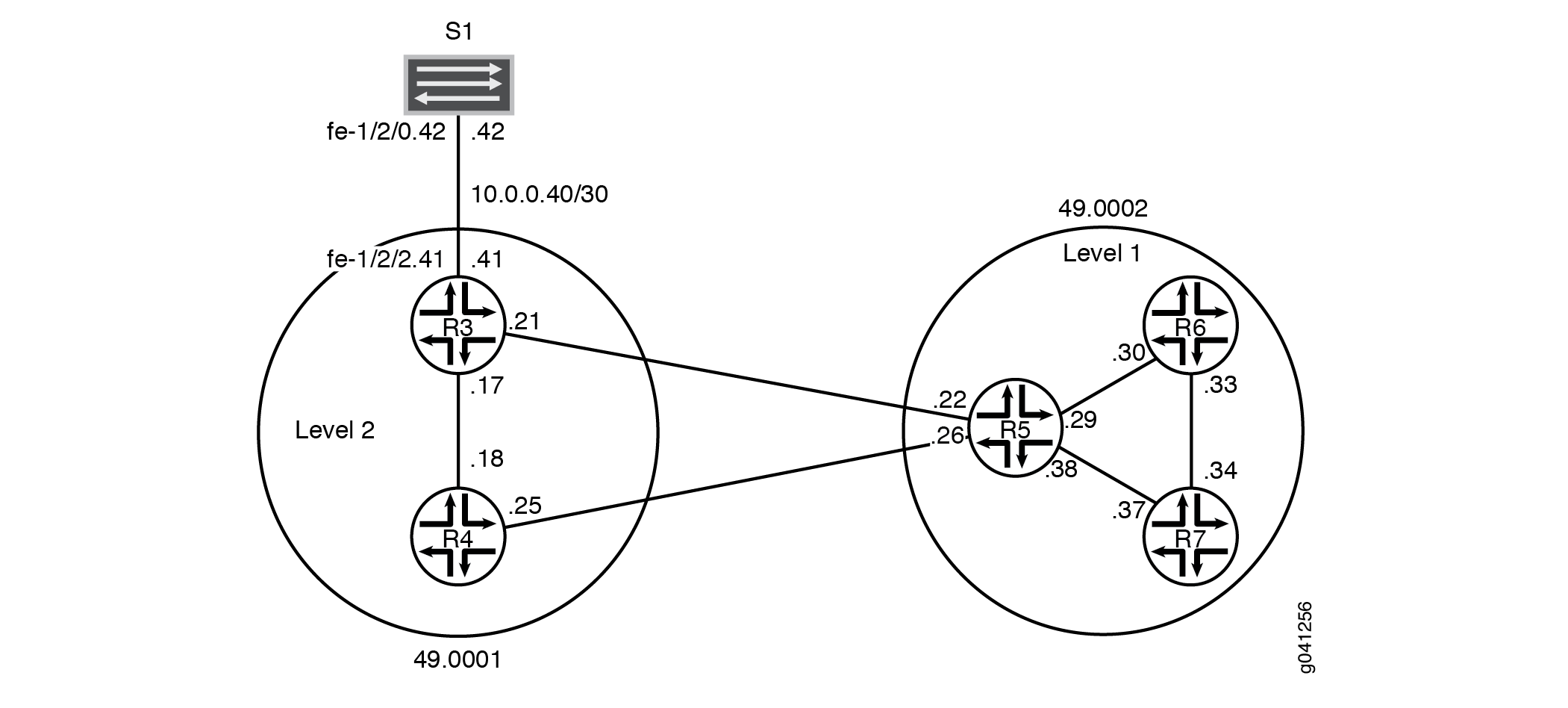
CLI 快速配置 显示了图 1 中所有设备的配置。 #configuration69__isis-multi-level-step-by-step 部分介绍了设备 R5 上的步骤。
此示例具有以下特征:
-
设备 R5 用作级别 1/级别 2 路由器,用于将级别 2 骨干区域 49.0001 和级别 1 区域 49.0002(包含设备 R6 和设备 R7)互连。
-
系统 ID 基于设备的 IPv4 lo0 地址。
-
任何单个接口丢失都不会完全中断 IS-IS 的操作。
-
所有路由器的 IPv4 lo0 地址都可通过 IS-IS 访问。
-
设备 R3 和设备 S1 之间的链路在区域 49.0001 中显示为区域内路由。此接口上不能建立 IS-IS 邻接。这是通过在设备 R3 的接口上配置
passive对设备 S1 的语句来实现的。 -
2 级设备的环路地址不会显示在 1 级区域中。
-
每个设备配对只有一个邻接。
拓扑结构
配置
过程
CLI 快速配置
要快速配置此示例,请复制以下命令,将其粘贴到文本文件中,删除所有换行符,更改详细信息,以便与网络配置匹配,然后将命令复制并粘贴到层次结构级别的 [edit] CLI 中。
设备 R3
set interfaces fe-1/2/0 unit 0 description to-R4
set interfaces fe-1/2/0 unit 0 family inet address 10.0.0.17/30
set interfaces fe-1/2/0 unit 0 family iso
set interfaces fe-1/2/1 unit 0 description to-R5
set interfaces fe-1/2/1 unit 0 family inet address 10.0.0.21/30
set interfaces fe-1/2/1 unit 0 family iso
set interfaces fe-1/2/2 unit 0 family inet address 10.0.0.41/30
set interfaces fe-1/2/2 unit 0 description to-S1
set interfaces lo0 unit 0 family inet address 192.168.0.3/32
set interfaces lo0 unit 0 family iso address 49.0001.1921.6800.0003.00
set protocols isis interface fe-1/2/0.0 level 1 disable
set protocols isis interface fe-1/2/1.0 level 1 disable
set protocols isis interface lo0.0 level 1 disable
set protocols isis interface fe-1/2/2.0 passive
设备 R4
set interfaces fe-1/2/0 unit 0 description to-R3
set interfaces fe-1/2/0 unit 0 family inet address 10.0.0.18/30
set interfaces fe-1/2/0 unit 0 family iso
set interfaces fe-1/2/1 unit 0 description to-R5
set interfaces fe-1/2/1 unit 0 family inet address 10.0.0.25/30
set interfaces fe-1/2/1 unit 0 family iso
set interfaces lo0 unit 0 family inet address 192.168.0.4/32
set interfaces lo0 unit 0 family iso address 49.0001.0192.0168.0004.00
set protocols isis interface fe-1/2/0.0 level 1 disable
set protocols isis interface fe-1/2/1.0 level 1 disable
set protocols isis interface lo0.0 level 1 disable
设备 R5
set interfaces fe-1/2/0 unit 0 description to-R3
set interfaces fe-1/2/0 unit 0 family inet address 10.0.0.22/30
set interfaces fe-1/2/0 unit 0 family iso
set interfaces fe-1/2/1 unit 0 description to-R4
set interfaces fe-1/2/1 unit 0 family inet address 10.0.0.26/30
set interfaces fe-1/2/1 unit 0 family iso
set interfaces fe-1/2/2 unit 0 description to-R6
set interfaces fe-1/2/2 unit 0 family inet address 10.0.0.29/30
set interfaces fe-1/2/2 unit 0 family iso
set interfaces fe-1/2/3 unit 0 description to-R7
set interfaces fe-1/2/3 unit 0 family inet address 10.0.0.38/30
set interfaces fe-1/2/3 unit 0 family iso
set interfaces lo0 unit 0 family inet address 192.168.0.5/32
set interfaces lo0 unit 0 family iso address 49.0002.0192.0168.0005.00
set protocols isis interface fe-1/2/0.0 level 1 disable
set protocols isis interface fe-1/2/1.0 level 1 disable
set protocols isis interface fe-1/2/2.0 level 2 disable
set protocols isis interface fe-1/2/3.0 level 2 disable
set protocols isis interface lo0.0 level 1 disable
设备 R6
set interfaces fe-1/2/0 unit 0 description to-R5
set interfaces fe-1/2/0 unit 0 family inet address 10.0.0.30/30
set interfaces fe-1/2/0 unit 0 family iso
set interfaces fe-1/2/1 unit 0 description to-R7
set interfaces fe-1/2/1 unit 0 family inet address 10.0.0.33/30
set interfaces fe-1/2/1 unit 0 family iso
set interfaces lo0 unit 0 family inet address 192.168.0.6/32
set interfaces lo0 unit 0 family iso address 49.0002.0192.0168.0006.00
set protocols isis interface fe-1/2/0.0 level 2 disable
set protocols isis interface fe-1/2/1.0 level 2 disable
set protocols isis interface lo0.0 level 2 disable
设备 R7
set interfaces fe-1/2/0 unit 0 description to-R6
set interfaces fe-1/2/0 unit 0 family inet address 10.0.0.34/30
set interfaces fe-1/2/0 unit 0 family iso
set interfaces fe-1/2/1 unit 0 description to-R5
set interfaces fe-1/2/1 unit 0 family inet address 10.0.0.37/30
set interfaces fe-1/2/1 unit 0 family iso
set interfaces lo0 unit 0 family inet address 192.168.0.7/32
set interfaces lo0 unit 0 family iso address 49.0002.0192.0168.0007.00
set protocols isis interface fe-1/2/0.0 level 2 disable
set protocols isis interface fe-1/2/1.0 level 2 disable
set protocols isis interface lo0.0 level 2 disable
设备 S1
set interfaces fe-1/2/0 unit 0 family inet address 10.0.0.42/30
set interfaces fe-1/2/0 unit 0 description to-R3
分步程序
下面的示例要求您在各个配置层级中进行导航。有关导航 CLI 的信息,请参阅《CLI 用户指南》中的在配置模式下使用 CLI 编辑器。
要配置多级 IS-IS,请执行以下操作:
-
配置网络接口。
通过在每个接口上包含 ISO 地址族,在接口上启用 IS-IS。
[edit interfaces]
user@R5# set fe-1/2/0 unit 0 description to-R3
user@R5# set fe-1/2/0 unit 0 family inet address 10.0.0.22/30
user@R5# set fe-1/2/0 unit 0 family iso
user@R5# set fe-1/2/1 unit 0 description to-R4
user@R5# set fe-1/2/1 unit 0 family inet address 10.0.0.26/30
user@R5# set fe-1/2/1 unit 0 family iso
user@R5# set fe-1/2/2 unit 0 description to-R6
user@R5# set fe-1/2/2 unit 0 family inet address 10.0.0.29/30
user@R5# set fe-1/2/2 unit 0 family iso
user@R5# set fe-1/2/3 unit 0 description to-R7
user@R5# set fe-1/2/3 unit 0 family inet address 10.0.0.38/30
user@R5# set fe-1/2/3 unit 0 family iso
-
配置两个环路接口地址。
一个地址用于 IPv4。
另一个用于 IS-IS 区域 49.0002,以便设备 R5 可以与区域 49.0002 中的其他 1 级设备形成邻接。即使设备 R5 的 NET 将自己标识为属于第 1 级区域 49.0002,其环路接口也未配置为第 1 级接口。这样做会导致到设备 R5 环路的路由注入到 1 级区域。
[edit interfaces lo0 unit 0]
user@R5# set family inet address 192.168.0.5/32
user@R5# set family iso address 49.0002.0192.0168.0005.00
-
为每个接口指定 IS-IS 级别。
设备 R5 在每个链路上与同一级别上的其他路由设备相邻。
默认情况下,在层次结构级别上
[edit interfaces interface-name unit logical-unit-number],所有接口上的 IS-IS 区域都会启用 IS-IS。要在接口上的任何特定级别禁用 IS-IS,请包含该disable语句。设备 R5 的环路接口配置为仅运行级别 2。如果在 lo0.0 上启用了级别 1 操作,则设备 R5 会将其环路地址包含在其级别 1 链路状态 PDU 中,这对于此示例来说是不正确的,其中级别 2 设备的环路地址不得出现在级别 1 区域中。
与 OSPF 不同,您必须在层次结构级别显
[edit protocols isis]式列出路由器的 lo0 接口,因为此接口是路由器 NET 的源,因此必须配置为 IS-IS 接口。在 IS-IS 中,lo0 接口默认以被动模式运行,这是理想的选择,因为虚拟接口上永远不会发生邻接形成。[edit protocols isis] user@R5# set interface fe-1/2/0.0 level 1 disable user@R5# set interface fe-1/2/1.0 level 1 disable user@R5# set interface fe-1/2/2.0 level 2 disable user@R5# set interface fe-1/2/3.0 level 2 disable user@R5# set interface lo0.0 level 1 disable
结果
在配置模式下,输入和show interfacesshow protocols命令以确认您的配置。如果输出未显示预期的配置,请重复此示例中的说明以更正配置。
user@R5# show interfaces
fe-1/2/0 {
    unit 0{
        description to-R3;
        family inet {
            address 10.0.0.22/30;
        }
        family iso;
    }
}
fe-1/2/1 {
    unit 0 {
        description to-R4;
        family inet {
            address 10.0.0.26/30;
        }
        family iso;
    }
}
fe-1/2/2 {
    unit 0 {
        description to-R6;
        family inet {
            address 10.0.0.29/30;
        }
        family iso;
    }
}
fe-1/2/3 {
    unit 0 {
        description to-R7;
        family inet {
            address 10.0.0.38/30;
        }
        family iso;
    }
}
lo0 {
    unit 0 {
        family inet {
            address 192.168.0.5/32;
        }
        family iso {
            address 49.0002.0192.0168.0005.00;
        }
    }
}
user@R5# show protocols
isis {
    interface fe-1/2/0.0 {
        level 1 disable;
    }
    interface fe-1/2/1.0 {
        level 1 disable;
    }
    interface fe-1/2/2.0 {
        level 2 disable;
    }
    interface fe-1/2/3.0 {
        level 2 disable;
    }
    interface lo0.0 {
        level 1 disable;
    }
}
如果完成设备配置,请从配置模式进入。commit
验证
确认配置工作正常。
检查接口到区域的关联
目的
确保按预期配置了接口到区域的关联。
行动
在操作模式下,输入命令 show isis interface 。
user@R5> show isis interface
IS-IS interface database:
Interface             L CirID Level 1 DR       Level 2 DR       L1/L2 Metric
lo0.0                 3   0x1 Disabled          Passive             0/0
fe-1/2/0.0           2   0x3 Disabled          R5.03              10/10
fe-1/2/1.0           2   0x2 Disabled          R5.02              10/10
fe-1/2/2.0           1   0x1 R6.02         Disabled               10/10
fe-1/2/3.0           1   0x4 R5.04         Disabled               10/10
意义
输出显示设备 R5 的接口已正确配置 ISO 家族,并且接口已放置在正确的级别中。
您还可以看到,设备 R5 已将自身选为其支持广播的 IS-IS 接口上的指定中间系统 (DIS)。
验证 IS-IS 邻接
目的
验证设备 R5 与其 IS-IS 邻接方之间是否已形成预期的邻接。
行动
在操作模式下,输入命令 show isis adjacency detail 。
user@R5> show isis adjacency detail
R3
  Interface: fe-1/2/0.0, Level: 2, State: Up, Expires in 25 secs
  Priority: 64, Up/Down transitions: 1, Last transition: 03:19:31 ago
  Circuit type: 2, Speaks: IP, IPv6, MAC address: 0:5:85:8f:c8:bc
  Topologies: Unicast
  Restart capable: Yes, Adjacency advertisement: Advertise
  LAN id: R5.03, IP addresses: 10.0.0.21

R4
  Interface: fe-1/2/1.0, Level: 2, State: Up, Expires in 24 secs
  Priority: 64, Up/Down transitions: 1, Last transition: 03:19:36 ago
  Circuit type: 2, Speaks: IP, IPv6, MAC address: 0:5:85:8f:c8:bc
  Topologies: Unicast
  Restart capable: Yes, Adjacency advertisement: Advertise
  LAN id: R5.02, IP addresses: 10.0.0.25

R6
  Interface: fe-1/2/2.0, Level: 1, State: Up, Expires in 6 secs
  Priority: 64, Up/Down transitions: 1, Last transition: 03:20:24 ago
  Circuit type: 1, Speaks: IP, IPv6, MAC address: 0:5:85:8f:c8:bd
  Topologies: Unicast
  Restart capable: Yes, Adjacency advertisement: Advertise
  LAN id: R6.02, IP addresses: 10.0.0.30

R7
  Interface: fe-1/2/3.0, Level: 1, State: Up, Expires in 21 secs
  Priority: 64, Up/Down transitions: 1, Last transition: 03:19:29 ago
  Circuit type: 1, Speaks: IP, IPv6, MAC address: 0:5:85:8f:c8:bc
  Topologies: Unicast
  Restart capable: Yes, Adjacency advertisement: Advertise
  LAN id: R5.04, IP addresses: 10.0.0.37
意义
这些结果证实设备 R5 具有两个级别 2 邻接和两个级别 1 邻接。
检查 IS-IS 数据库
目的
由于设备 R5 是第 1 级/第 2 级 (L1/L2) 连接的路由器,因此请检查与区域 49.0002 关联的第 1 级链路状态数据库,以确认来自骨干路由器的环路地址未播发到第 1 级区域。
行动
在操作模式下,输入命令 show isis database detail 。
user@R5> show isis database detail
IS-IS level 1 link-state database:

R5.00-00 Sequence: 0x19, Checksum: 0x7488, Lifetime: 727 secs
   IS neighbor: R5.04                     Metric:       10
   IS neighbor: R6.02                     Metric:       10
   IP prefix: 10.0.0.28/30                    Metric:       10 Internal Up
   IP prefix: 10.0.0.36/30                    Metric:       10 Internal Up

R5.04-00 Sequence: 0x14, Checksum: 0x2668, Lifetime: 821 secs
   IS neighbor: R5.00                     Metric:        0
   IS neighbor: R7.00                     Metric:        0

R6.00-00 Sequence: 0x17, Checksum: 0xa65, Lifetime: 774 secs
   IS neighbor: R6.02                     Metric:       10
   IS neighbor: R7.02                     Metric:       10
   IP prefix: 10.0.0.28/30                    Metric:       10 Internal Up
   IP prefix: 10.0.0.32/30                    Metric:       10 Internal Up
   IP prefix: 192.168.0.6/32                  Metric:        0 Internal Up

R6.02-00 Sequence: 0x13, Checksum: 0xd1c0, Lifetime: 908 secs
   IS neighbor: R5.00                     Metric:        0
   IS neighbor: R6.00                     Metric:        0

R7.00-00 Sequence: 0x17, Checksum: 0xe39, Lifetime: 775 secs
   IS neighbor: R5.04                     Metric:       10
   IS neighbor: R7.02                     Metric:       10
   IP prefix: 10.0.0.32/30                    Metric:       10 Internal Up
   IP prefix: 10.0.0.36/30                    Metric:       10 Internal Up
   IP prefix: 192.168.0.7/32                  Metric:        0 Internal Up

R7.02-00 Sequence: 0x13, Checksum: 0x404d, Lifetime: 966 secs
   IS neighbor: R6.00                     Metric:        0
   IS neighbor: R7.00                     Metric:        0

IS-IS level 2 link-state database:

R3.00-00 Sequence: 0x17, Checksum: 0x5f84, Lifetime: 1085 secs
   IS neighbor: R4.02                     Metric:       10
   IS neighbor: R5.03                     Metric:       10
   IP prefix: 10.0.0.16/30                    Metric:       10 Internal Up
   IP prefix: 10.0.0.20/30                    Metric:       10 Internal Up
   IP prefix: 10.0.0.40/30                    Metric:       10 Internal Up
   IP prefix: 192.168.0.3/32                  Metric:        0 Internal Up

R4.00-00 Sequence: 0x17, Checksum: 0xab3a, Lifetime: 949 secs
   IS neighbor: R4.02                     Metric:       10
   IS neighbor: R5.02                     Metric:       10
   IP prefix: 10.0.0.16/30                    Metric:       10 Internal Up
   IP prefix: 10.0.0.24/30                    Metric:       10 Internal Up
   IP prefix: 192.168.0.4/32                  Metric:        0 Internal Up

R4.02-00 Sequence: 0x14, Checksum: 0xf2a8, Lifetime: 1022 secs
   IS neighbor: R3.00                     Metric:        0
   IS neighbor: R4.00                     Metric:        0

R5.00-00 Sequence: 0x1f, Checksum: 0x20d7, Lifetime: 821 secs
   IS neighbor: R5.02                     Metric:       10
   IS neighbor: R5.03                     Metric:       10
   IP prefix: 10.0.0.20/30                    Metric:       10 Internal Up
   IP prefix: 10.0.0.24/30                    Metric:       10 Internal Up
   IP prefix: 10.0.0.28/30                    Metric:       10 Internal Up
   IP prefix: 10.0.0.32/30                    Metric:       20 Internal Up
   IP prefix: 10.0.0.36/30                    Metric:       10 Internal Up
   IP prefix: 192.168.0.5/32                  Metric:        0 Internal Up
   IP prefix: 192.168.0.6/32                  Metric:       10 Internal Up
   IP prefix: 192.168.0.7/32                  Metric:       10 Internal Up

R5.02-00 Sequence: 0x14, Checksum: 0x6135, Lifetime: 977 secs
   IS neighbor: R4.00                     Metric:        0
   IS neighbor: R5.00                     Metric:        0

R5.03-00 Sequence: 0x14, Checksum: 0x1483, Lifetime: 1091 secs
   IS neighbor: R3.00                     Metric:        0
   IS neighbor: R5.00                     Metric:        0
意义
此显示表示设备 R5 的环路接口已正确配置为仅运行级别 2。如果在 lo0.0 上启用了第 1 级操作,则设备 R5 将在其第 1 级链路状态 PDU 中包含其环路地址。
您还可以看到设备 R5 具有从其相邻邻接方接收的 2 级链路状态 PDU。
与 OSPF 完全剩余区域一样,默认情况下,不会将任何主干网(级别 2)或外部前缀泄漏到级别 1 区域中。但是,如设备 R5 的 2 级链路状态 PDU 所示,1 级前缀会泄露到 IS-IS 主干网中。