示例:配置 EVPN-MPLS 主动-备用多宿主
此示例说明如何为处于主动-备用冗余模式的多宿主客户边缘 (客户边缘) 设备配置带有 MPLS 的以太网 VPN (EVPN)。此示例中的步骤设置:
-
使用
virtual-switch路由实例类型的 EVPN 路由实例 -
另一个使用
evpn路由实例类型的 EVPN 路由实例 -
在配置集成路由和桥接 (IRB) 接口时使用
vrf路由实例类型进行虚拟路由和转发 (VRF) 路由实例。
要求
此示例使用以下硬件和软件组件:
-
四个 MX 系列 5G 通用路由平台,仅带 MPC 接口,其中:
-
将两台设备配置为连接到公共多宿主客户站点的提供商边缘 (PE) 路由器。
-
将一台设备配置为连接到单宿主客户站点的远程 PE 路由器。
-
-
八个客户边缘 (客户边缘) 设备,其中:
-
两个客户边缘设备是多宿主的。
-
每个 PE 路由器都有两个客户边缘设备是单宿主的。
-
-
在所有 PE 路由器上运行 Junos OS 14.1 或更高版本。
注意:Junos OS 14.1 及更高版本基于 EVPN
draft-ietf-l2vpn-evpn-03。14.1 之前的版本支持旧版本的 EVPN 草案,这会导致运行 Junos OS 14.1 及更早版本时出现互操作性问题。
开始之前:
-
配置路由器接口。
-
配置 OSPF 或任何其他 IGP 协议。
-
配置 BGP。
-
配置 LDP。
-
配置 MPLS。
-
配置 RSVP、MPLS、LSP 或 GRE 隧道。
概述和拓扑
在带有 MPC 接口的 MX 系列路由器上,此 EVPN 解决方案经过扩展,可通过主动-备用模式提供多宿主功能。多宿主功能包括以太网段的自动发现、以太网段路由构建和以太网段标识符 (ESI) 标签分配。
在某些较旧的 Junos 版本中,MX 系列路由器上的 EVPN 功能支持仅限于使用 MPC 和 MIC 接口的路由器。请参阅 功能浏览器, 了解任何 Junos OS 功能的平台和版本支持。
提供对 EVPN 的 DPC 支持时注意事项如下:
-
DPC 在主动-备用模式下为 EVPN 提供支持,包括对以下方面的支持:
-
EVPN 实例 (EVI)
-
虚拟交换机 (VS)
-
集成路由和桥接 (IRB) 接口
-
-
用于提供 EVPN 主动-备用支持的 DPC 应为面向客户边缘设备的线卡。EVPN 域中的 PE 设备接口应仅使用 MPC 和 MIC 接口。
配置主动-备用 EVPN 多宿主时,请注意以下限制:
-
一个接口或 ESI 可以连接到多个 EVI,每个 ESI 的最大限制为 200 个 EVI。
-
对于 EVPN 路由实例,每个物理接口或 ESI 只能有一个逻辑接口连接到 EVI。
-
对于虚拟交换机路由实例,在桥接域下只能为每个物理接口或 ESI 配置一个逻辑接口。
-
网络拓扑中的所有 PE 路由器都应运行基于 EVPN
draft-ietf-l2vpn-evpn-03的 Junos OS 14.1 或更高版本。14.1 之前的 Junos OS 版本支持旧版本的 EVPN 草案,这在运行 Junos OS 14.1 及更早版本时会导致互操作性问题。
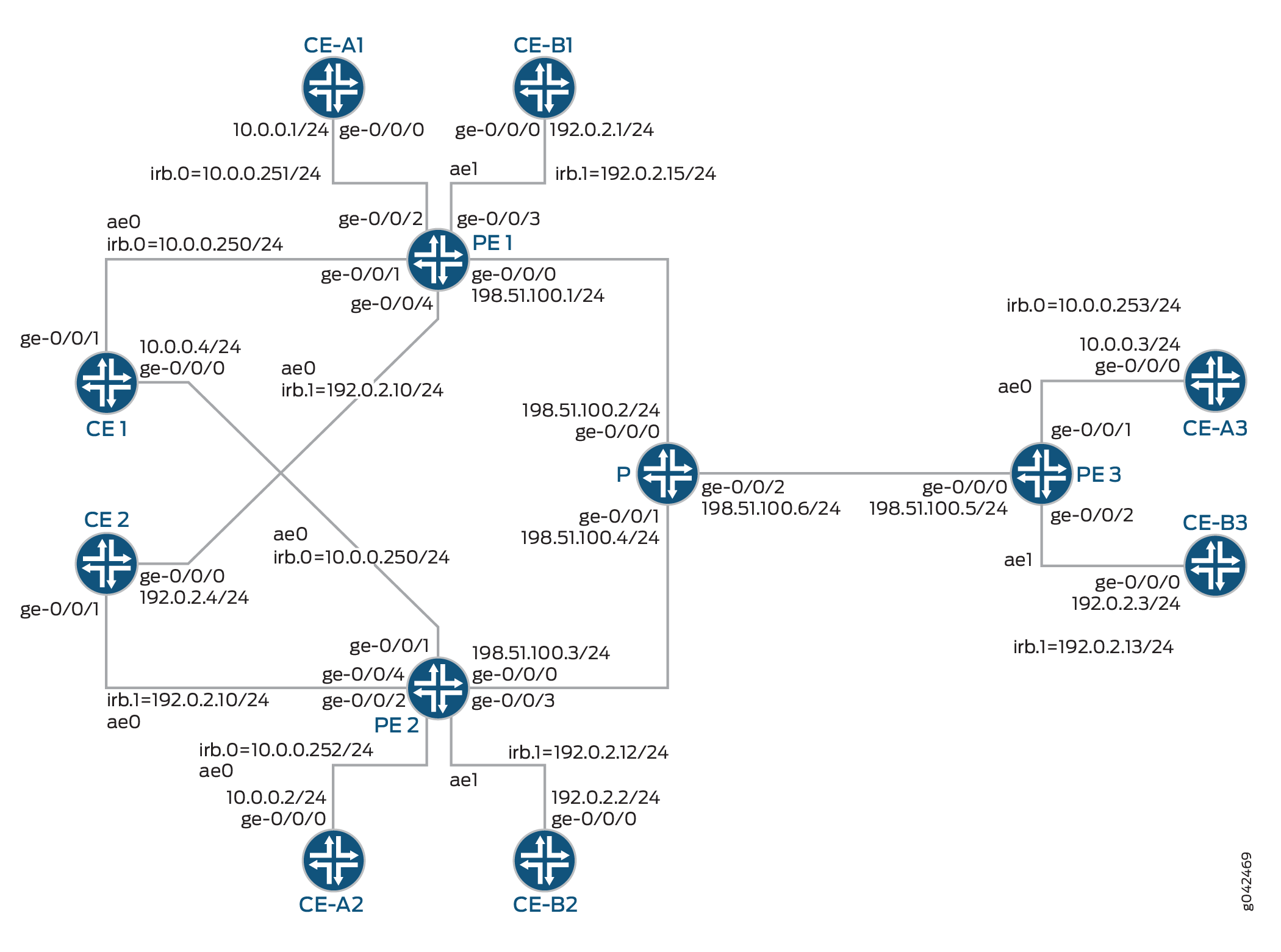
在 图 1 中:
-
路由器 PE1 和 PE2 是连接到多宿主客户边缘 (客户边缘) 设备“设备 CE1”和“设备 CE1”的提供商边缘 (PE) 路由器。
-
路由器 PE3 是连接到单宿主客户站点的远程 PE 路由器。
-
路由器 P 是连接到路由器 PE1、PE2 和 PE3 的提供商路由器。
-
拓扑中有三个路由实例运行:ALPHA、BETA 和 DELTA,分别使用虚拟交换机、EVPN 和 VRF 类型的路由实例。
-
所有 PE 路由器都连接到一个单宿主客户边缘设备,每个路由器用于 ALPHA 和 BETA 路由实例。
-
设备 CE1 属于 ALPHA 路由实例,设备 CE2 属于 BETA 路由实例。
对于路由器 PE1,设备 客户边缘-A1 和设备 客户边缘-B1 分别是路由实例 ALPHA 和 BETA 的单宿主客户边缘设备。同样,设备客户边缘-A2和设备客户边缘-A3属于ALPHA路由实例,设备客户边缘-B2和设备客户边缘-B3分别属于连接到路由器PE2和PE3的BETA路由实例。
您可以在任何 EVPN 路由实例下配置主动-备用多宿主。我们在主动-备用 EVPN 多宿主中同时支持这两种evpnvirtual-switch和实例类型。除了多宿主之外,我们还提供了此类租户 VRF 路由实例vrf的配置,以说明 EVPN IRB 功能。主动-备用 EVPN 多宿主功能不需要配置 DELTA 路由实例。
为了简化配置和保持一致性,在此示例中,我们将在层次结构级别使用[edit routing-instances name]语句为 vrf-target EVPN 实例和 VRF 实例配置路由目标扩展社区。使用此语句,设备可基于指定的社区自动设置导入和导出路由策略。在每台 PE 设备上,我们都会使用匹配的路由目标值配置相应的路由实例,以便 PE 设备可以使用这些隐式路由策略共享路由。我们不需要为路由共享显式配置导入和导出策略。
配置
CLI 快速配置
要快速配置此示例,请复制以下命令,将其粘贴到文本文件中,删除所有换行符,更改详细信息,以便与网络配置匹配,然后将命令复制并粘贴到层次结构级别的 [edit] CLI 中。
CE1
>set chassis aggregated-devices ethernet device-count 1
set interfaces ge-0/0/0 gigether-options 802.3ad ae0
set interfaces ge-0/0/1 gigether-options 802.3ad ae0
set interfaces ae0 vlan-tagging
set interfaces ae0 mac 00:00:00:00:00:04
set interfaces ae0 unit 0 vlan-id 100
set interfaces ae0 unit 0 family inet address 10.0.0.4/24
set routing-options static route 0.0.0.0/0 next-hop 10.0.0.250
客户边缘-A1
set chassis aggregated-devices ethernet device-count 1
set interfaces ge-0/0/0 gigether-options 802.3ad ae0
set interfaces ae0 vlan-tagging
set interfaces ae0 mac 00:00:00:00:00:01
set interfaces ae0 unit 0 vlan-id 100
set interfaces ae0 unit 0 family inet address 10.0.0.1/24
set routing-options static route 0.0.0.0/0 next-hop 10.0.0.251
客户边缘-A2
set chassis aggregated-devices ethernet device-count 1
set interfaces ge-0/0/0 gigether-options 802.3ad ae0
set interfaces ae0 vlan-tagging
set interfaces ae0 mac 00:00:00:00:00:02
set interfaces ae0 unit 0 vlan-id 100
set interfaces ae0 unit 0 family inet address 10.0.0.2/24
set routing-options static route 0.0.0.0/0 next-hop 10.0.0.252
客户边缘-A3
set chassis aggregated-devices ethernet device-count 1
set interfaces ge-0/0/0 gigether-options 802.3ad ae0
set interfaces ae0 vlan-tagging
set interfaces ae0 mac 00:00:00:00:00:03
set interfaces ae0 unit 0 vlan-id 100
set interfaces ae0 unit 0 family inet address 10.0.0.3/24
set routing-options static route 0.0.0.0/0 next-hop 10.0.0.253
CE2
set chassis aggregated-devices ethernet device-count 1
set interfaces ge-0/0/0 gigether-options 802.3ad ae0
set interfaces ge-0/0/1 gigether-options 802.3ad ae0
set interfaces ae0 vlan-tagging
set interfaces ae0 mac 00:00:00:00:00:04
set interfaces ae0 unit 0 vlan-id 300
set interfaces ae0 unit 0 family inet address 192.0.2.4/24
set routing-options static route 0.0.0.0/0 next-hop 192.0.2.10
客户边缘-B1
set chassis aggregated-devices ethernet device-count 1
set interfaces ge-0/0/0 gigether-options 802.3ad ae0
set interfaces ae0 vlan-tagging
set interfaces ae0 mac 00:00:00:00:00:01
set interfaces ae0 unit 0 vlan-id 300
set interfaces ae0 unit 0 family inet address 192.0.2.1/24
set routing-options static route 0.0.0.0/0 next-hop 192.0.2.15
客户边缘-B2
set chassis aggregated-devices ethernet device-count 1
set interfaces ge-0/0/0 gigether-options 802.3ad ae0
set interfaces ae0 vlan-tagging
set interfaces ae0 mac 00:00:00:00:00:02
set interfaces ae0 unit 0 vlan-id 300
set interfaces ae0 unit 0 family inet address 192.0.2.4/24
set routing-options static route 0.0.0.0/0 next-hop 192.0.2.12
客户边缘-B3
set chassis aggregated-devices ethernet device-count 1
set interfaces ge-0/0/0 gigether-options 802.3ad ae0
set interfaces ae0 vlan-tagging
set interfaces ae0 mac 00:00:00:00:00:03
set interfaces ae0 unit 0 vlan-id 300
set interfaces ae0 unit 0 family inet address 192.0.2.3/24
set routing-options static route 0.0.0.0/0 next-hop 192.0.2.13
PE1
set interfaces ge-0/0/0 unit 0 family inet address 198.51.100.1/24
set interfaces ge-0/0/0 unit 0 family mpls
set interfaces ge-0/0/1 gigether-options 802.3ad ae0
set interfaces ge-0/0/2 vlan-tagging
set interfaces ge-0/0/2 encapsulation flexible-ethernet-services
set interfaces ge-0/0/2 unit 0 encapsulation vlan-bridge
set interfaces ge-0/0/2 unit 0 vlan-id 100
set interfaces ge-0/0/3 gigether-options 802.3ad ae1
set interfaces ge-0/0/4 vlan-tagging
set interfaces ge-0/0/4 encapsulation flexible-ethernet-services
set interfaces ge-0/0/4 esi 00:22:44:66:88:00:22:44:66:88
set interfaces ge-0/0/4 esi single-active
set interfaces ge-0/0/4 unit 0 encapsulation vlan-bridge
set interfaces ge-0/0/4 unit 0 vlan-id 300
set interfaces ae0 vlan-tagging
set interfaces ae0 encapsulation flexible-ethernet-services
set interfaces ae0 esi 00:11:22:33:44:55:66:77:88:99
set interfaces ae0 esi single-active
set interfaces ae0 unit 0 encapsulation vlan-bridge
set interfaces ae0 unit 0 vlan-id 100
set interfaces ae1 vlan-tagging
set interfaces ae1 encapsulation flexible-ethernet-services
set interfaces ae1 unit 0 encapsulation vlan-bridge
set interfaces ae1 unit 0 vlan-id 300
set interfaces irb unit 0 family inet address 10.0.0.250/24
set interfaces irb unit 0 family inet address 10.0.0.251/24
set interfaces irb unit 0 mac 00:11:22:33:44:55
set interfaces irb unit 1 family inet address 192.0.2.10/24
set interfaces irb unit 1 family inet address 192.0.2.15/24
set interfaces irb unit 1 mac 00:22:44:66:88:00
set interfaces lo0 unit 0 family inet address 10.255.0.1/32 primary
set interfaces lo0 unit 0 family inet address 10.255.0.1/32 preferred
set routing-options router-id 10.255.0.1
set routing-options autonomous-system 100
set routing-options forwarding-table chained-composite-next-hop ingress evpn
set protocols mpls interface lo0.0
set protocols mpls interface ge-0/0/0.0
set protocols bgp group EVPN-PE type internal
set protocols bgp group EVPN-PE local-address 10.255.0.1
set protocols bgp group EVPN-PE family evpn signaling
set protocols bgp group EVPN-PE neighbor 10.255.0.2
set protocols bgp group EVPN-PE neighbor 10.255.0.3
set protocols ospf area 0.0.0.0 interface lo0.0 passive
set protocols ospf area 0.0.0.0 interface ge-0/0/0.0
set protocols ldp interface ge-0/0/0.0
set protocols ldp interface lo0.0
set routing-instances ALPHA instance-type virtual-switch
set routing-instances ALPHA route-distinguisher 10.255.0.1:100
set routing-instances ALPHA vrf-target target:100:100
set routing-instances ALPHA protocols evpn extended-vlan-list 100
set routing-instances ALPHA bridge-domains ONE domain-type bridge
set routing-instances ALPHA bridge-domains ONE vlan-id 100
set routing-instances ALPHA bridge-domains ONE interface ae0.0
set routing-instances ALPHA bridge-domains ONE interface ge-0/0/2.0
set routing-instances ALPHA bridge-domains ONE routing-interface irb.0
set routing-instances BETA instance-type evpn
set routing-instances BETA vlan-id 300
set routing-instances BETA interface ge-0/0/4.0
set routing-instances BETA interface ae1.0
set routing-instances BETA routing-interface irb.1
set routing-instances BETA route-distinguisher 10.255.0.1:300
set routing-instances BETA vrf-target target:300:300
set routing-instances DELTA instance-type vrf
set routing-instances DELTA interface irb.0
set routing-instances DELTA interface irb.1
set routing-instances DELTA route-distinguisher 10.255.0.1:200
set routing-instances DELTA vrf-target target:200:200
set routing-instances DELTA vrf-table-label
PE2
set interfaces ge-0/0/0 unit 0 family inet address 198.51.100.3/24
set interfaces ge-0/0/0 unit 0 family mpls
set interfaces ge-0/0/1 gigether-options 802.3ad ae0
set interfaces ge-0/0/2 vlan-tagging
set interfaces ge-0/0/2 encapsulation flexible-ethernet-services
set interfaces ge-0/0/2 unit 0 encapsulation vlan-bridge
set interfaces ge-0/0/2 unit 0 vlan-id 100
set interfaces ge-0/0/3 gigether-options 802.3ad ae1
set interfaces ge-0/0/4 vlan-tagging
set interfaces ge-0/0/4 encapsulation flexible-ethernet-services
set interfaces ge-0/0/4 esi 00:22:44:66:88:00:22:44:66:88
set interfaces ge-0/0/4 esi single-active
set interfaces ge-0/0/4 unit 0 encapsulation vlan-bridge
set interfaces ge-0/0/4 unit 0 vlan-id 300
set interfaces ae0 vlan-tagging
set interfaces ae0 encapsulation flexible-ethernet-services
set interfaces ae0 esi 00:11:22:33:44:55:66:77:88:99
set interfaces ae0 esi single-active
set interfaces ae0 unit 0 encapsulation vlan-bridge
set interfaces ae0 unit 0 vlan-id 100
set interfaces ae1 vlan-tagging
set interfaces ae1 encapsulation flexible-ethernet-services
set interfaces ae1 unit 0 encapsulation vlan-bridge
set interfaces ae1 unit 0 vlan-id 300
set interfaces irb unit 0 family inet address 10.0.0.250/24
set interfaces irb unit 0 family inet address 10.0.0.252/24
set interfaces irb unit 0 mac 00:11:22:33:44:55
set interfaces irb unit 1 family inet address 192.0.2.10/24
set interfaces irb unit 1 family inet address 192.0.2.12/24
set interfaces irb unit 1 mac 00:22:44:66:88:00
set interfaces lo0 unit 0 family inet address 10.255.0.2/32 primary
set interfaces lo0 unit 0 family inet address 10.255.0.2/32 preferred
set routing-options router-id 10.255.0.2
set routing-options autonomous-system 100
set routing-options forwarding-table chained-composite-next-hop ingress evpn
set protocols mpls interface lo0.0
set protocols mpls interface ge-0/0/0.0
set protocols bgp group EVPN-PE type internal
set protocols bgp group EVPN-PE local-address 10.255.0.2
set protocols bgp group EVPN-PE family evpn signaling
set protocols bgp group EVPN-PE neighbor 10.255.0.1
set protocols bgp group EVPN-PE neighbor 10.255.0.3
set protocols ospf area 0.0.0.0 interface lo0.0 passive
set protocols ospf area 0.0.0.0 interface ge-0/0/0.0
set protocols ldp interface ge-0/0/0.0
set protocols ldp interface lo0.0
set routing-instances ALPHA instance-type virtual-switch
set routing-instances ALPHA route-distinguisher 10.255.0.2:100
set routing-instances ALPHA vrf-target target:100:100
set routing-instances ALPHA protocols evpn extended-vlan-list 100
set routing-instances ALPHA bridge-domains ONE domain-type bridge
set routing-instances ALPHA bridge-domains ONE vlan-id 100
set routing-instances ALPHA bridge-domains ONE interface ae0.0
set routing-instances ALPHA bridge-domains ONE interface ge-0/0/2.0
set routing-instances ALPHA bridge-domains ONE routing-interface irb.0
set routing-instances BETA instance-type evpn
set routing-instances BETA vlan-id 300
set routing-instances BETA interface ge-0/0/4.0
set routing-instances BETA interface ae1.0
set routing-instances BETA routing-interface irb.1
set routing-instances BETA route-distinguisher 10.255.0.2:300
set routing-instances BETA vrf-target target:300:300
set routing-instances DELTA instance-type vrf
set routing-instances DELTA interface irb.0
set routing-instances DELTA interface irb.1
set routing-instances DELTA route-distinguisher 10.255.0.2:200
set routing-instances DELTA vrf-target target:200:200
set routing-instances DELTA vrf-table-label
PE3
set interfaces ge-0/0/0 unit 0 family inet address 198.51.100.5/24
set interfaces ge-0/0/0 unit 0 family mpls
set interfaces ge-0/0/1 gigether-options 802.3ad ae0
set interfaces ge-0/0/2 gigether-options 802.3ad ae1
set interfaces ae0 vlan-tagging
set interfaces ae0 encapsulation flexible-ethernet-services
set interfaces ae0 unit 0 encapsulation vlan-bridge
set interfaces ae0 unit 0 vlan-id 100
set interfaces ae1 vlan-tagging
set interfaces ae1 encapsulation flexible-ethernet-services
set interfaces ae1 unit 0 encapsulation vlan-bridge
set interfaces ae1 unit 0 vlan-id 300
set interfaces irb unit 0 family inet address 10.0.0.253/24
set interfaces irb unit 1 family inet address 192.0.2.13/24
set interfaces lo0 unit 0 family inet address 10.255.0.3/32 primary
set interfaces lo0 unit 0 family inet address 10.255.0.3/32 preferred
set routing-options router-id 10.255.0.3
set routing-options autonomous-system 100
set routing-options forwarding-table chained-composite-next-hop ingress evpn
set protocols mpls interface lo0.0
set protocols mpls interface ge-0/0/0.0
set protocols bgp group EVPN-PE type internal
set protocols bgp group EVPN-PE local-address 10.255.0.3
set protocols bgp group EVPN-PE family evpn signaling
set protocols bgp group EVPN-PE neighbor 10.255.0.1
set protocols bgp group EVPN-PE neighbor 10.255.0.2
set protocols ospf area 0.0.0.0 interface lo0.0 passive
set protocols ospf area 0.0.0.0 interface ge-0/0/0.0
set protocols ldp interface ge-0/0/0.0
set protocols ldp interface lo0.0
set routing-instances ALPHA instance-type virtual-switch
set routing-instances ALPHA route-distinguisher 10.255.0.3:100
set routing-instances ALPHA vrf-target target:100:100
set routing-instances ALPHA protocols evpn extended-vlan-list 100
set routing-instances ALPHA bridge-domains ONE domain-type bridge
set routing-instances ALPHA bridge-domains ONE vlan-id 100
set routing-instances ALPHA bridge-domains ONE interface ae0.0
set routing-instances ALPHA bridge-domains ONE routing-interface irb.0
set routing-instances BETA instance-type evpn
set routing-instances BETA vlan-id 300
set routing-instances BETA interface ae1.0
set routing-instances BETA routing-interface irb.1
set routing-instances BETA route-distinguisher 10.255.0.3:300
set routing-instances BETA vrf-target target:300:300
set routing-instances DELTA instance-type vrf
set routing-instances DELTA interface irb.0
set routing-instances DELTA interface irb.1
set routing-instances DELTA route-distinguisher 10.255.0.3:200
set routing-instances DELTA vrf-target target:200:200
set routing-instances DELTA vrf-table-label
P
set interfaces ge-0/0/0 unit 0 family inet address 198.51.100.2/24
set interfaces ge-0/0/0 unit 0 family mpls
set interfaces ge-0/0/1 unit 0 family inet address 198.51.100.4/24
set interfaces ge-0/0/1 unit 0 family mpls
set interfaces ge-0/0/2 unit 0 family inet address 198.51.100.6/24
set interfaces ge-0/0/2 unit 0 family mpls
set interfaces lo0 unit 0 family inet address 10.255.0.4/32 primary
set interfaces lo0 unit 0 family inet address 10.255.0.4/32 preferred
set routing-options router-id 10.255.0.4
set protocols mpls interface lo0.0
set protocols mpls interface ge-0/0/0.0
set protocols mpls interface ge-0/0/1.0
set protocols mpls interface ge-0/0/2.0
set protocols ospf area 0.0.0.0 interface lo0.0 passive
set protocols ospf area 0.0.0.0 interface ge-0/0/1.0
set protocols ospf area 0.0.0.0 interface ge-0/0/2.0
set protocols ospf area 0.0.0.0 interface ge-0/0/0.0
set protocols ldp interface ge-0/0/0.0
set protocols ldp interface ge-0/0/1.0
set protocols ldp interface ge-0/0/2.0
set protocols ldp interface lo0.0
过程
分步程序
下面的示例要求您在各个配置层级中进行导航。有关导航 CLI 的信息,请参阅在 配置模式下使用 CLI 编辑器。
要配置路由器 PE1,请执行以下操作:
修改相应的接口名称、地址和其他参数后,对路由器 PE2 重复此过程。
-
配置路由器 PE1 接口。
[edit interfaces]user@PE1# set ge-0/0/0 unit 0 family inet address 198.51.100.1/24 user@PE1# set ge-0/0/0 unit 0 family mpls user@PE1# set ge-0/0/1 gigether-options 802.3ad ae0 user@PE1# set ge-0/0/2 vlan-tagging user@PE1# set ge-0/0/2 encapsulation flexible-ethernet-services user@PE1# set ge-0/0/2 unit 0 encapsulation vlan-bridge user@PE1# set ge-0/0/2 unit 0 vlan-id 100 user@PE1# set ge-0/0/3 gigether-options 802.3ad ae1 user@PE1# set ge-0/0/4 vlan-tagging user@PE1# set ge-0/0/4 encapsulation flexible-ethernet-services user@PE1# set ge-0/0/4 esi 00:22:44:66:88:00:22:44:66:88 user@PE1# set ge-0/0/4 esi single-active user@PE1# set ge-0/0/4 unit 0 encapsulation vlan-bridge user@PE1# set ge-0/0/4 unit 0 vlan-id 300 user@PE1# set ae0 vlan-tagging user@PE1# set ae0 encapsulation flexible-ethernet-services user@PE1# set ae0 esi 00:11:22:33:44:55:66:77:88:99 user@PE1# set ae0 esi single-active user@PE1# set ae0 unit 0 encapsulation vlan-bridge user@PE1# set ae0 unit 0 vlan-id 100 user@PE1# set ae1 vlan-tagging user@PE1# set ae1 encapsulation flexible-ethernet-services user@PE1# set ae1 unit 0 encapsulation vlan-bridge user@PE1# set ae1 unit 0 vlan-id 300 user@PE1# set irb unit 0 family inet address 10.0.0.250/24 user@PE1# set irb unit 0 family inet address 10.0.0.251/24 user@PE1# set irb unit 0 mac 00:11:22:33:44:55 user@PE1# set irb unit 1 family inet address 192.0.2.10/24 user@PE1# set irb unit 1 family inet address 192.0.2.15/24 user@PE1# set irb unit 1 mac 00:22:44:66:88:00 user@PE1# set lo0 unit 0 family inet address 10.255.0.1/32 primary user@PE1# set lo0 unit 0 family inet address 10.255.0.1/32 preferred -
将路由器PE1的环路地址配置为路由器ID。
[edit routing-options]user@PE1# set router-id 10.255.0.1 -
设置路由器 PE1 的自治系统编号。
[edit routing-options]user@PE1# set autonomous-system 100 -
为 EVPN 启用链接复合下一跃点。
[edit routing-options]user@PE1# set forwarding-table chained-composite-next-hop ingress evpn -
在路由器 PE1 的环路接口和将 PE1 连接到路由器 P 的接口上启用 MPLS。
[edit protocols]user@PE1# set mpls interface lo0.0 user@PE1# set mpls interface ge-0/0/0.0 -
为路由器 PE1 配置 BGP 组。
[edit protocols]user@PE1# set bgp group EVPN-PE type internal -
将本地地址和邻居地址分配给 EVPN-PE BGP 组,以便路由器 PE1 与路由器 PE2 和 PE3 对等。
[edit protocols]user@PE1# set bgp group EVPN-PE local-address 10.255.0.1 user@PE1# set bgp group EVPN-PE neighbor 10.255.0.2 user@PE1# set bgp group EVPN-PE neighbor 10.255.0.3 -
将 EVPN 信令网络层可达性信息 (NLRI) 包括到 EVPN-PE 组。
[edit protocols]user@PE1# set bgp group EVPN-PE family evpn signaling -
在路由器 PE1 的环路接口和将 PE1 连接到路由器 P 的接口上配置 OSPF。
[edit protocols]user@PE1# set ospf area 0.0.0.0 interface lo0.0 passive user@PE1# set ospf area 0.0.0.0 interface ge-0/0/0.0 -
在路由器 PE1 的环路接口和将 PE1 连接到路由器 P 的接口上启用 LDP。
[edit protocols]user@PE1# set ldp interface lo0.0 user@PE1# set ldp interface ge-0/0/0.0 -
配置虚拟交换机路由实例 – ALPHA。
[edit routing-instances]
user@PE1# set ALPHA instance-type virtual-switch
-
为 ALPHA 路由实例配置扩展 VLAN 列表。
[edit routing-instances]
user@PE1# set ALPHA protocols evpn extended-vlan-list 100
-
在 ALPHA 路由实例中设置桥接域的类型。
[edit routing-instances]
user@PE1# set ALPHA bridge-domains ONE domain-type bridge
-
为 ALPHA 路由实例中的桥接域设置 VLAN。
[edit routing-instances]
user@PE1# set ALPHA bridge-domains ONE vlan-id 100
-
为 ALPHA 路由实例配置接口名称。
[edit routing-instances]
user@PE1# set ALPHA bridge-domains ONE interface ae0.0
user@PE1# set ALPHA bridge-domains ONE interface ge-0/0/2.0
user@PE1# set ALPHA bridge-domains ONE routing-interface irb.0
-
为 ALPHA 路由实例配置路由识别符。
[edit routing-instances]
user@PE1# set ALPHA route-distinguisher 10.255.0.1:100
-
为 ALPHA 路由实例配置 VPN 路由和转发 (VRF) 目标社区。
[edit routing-instances]
user@PE1# set ALPHA vrf-target target:100:100
-
配置 EVPN 路由实例 – 测试版。
[edit routing-instances]
user@PE1# set BETA instance-type evpn
-
在 BETA 路由实例中设置桥接域的 VLAN 标识符。
[edit routing-instances]
user@PE1# set BETA vlan-id 300
-
为 BETA 路由实例配置接口名称。
[edit routing-instances]
user@PE1# set BETA interface ge-0/0/4.0
user@PE1# set BETA interface ae1.0
user@PE1# set BETA routing-interface irb.1
-
为 BETA 路由实例配置路由识别符。
[edit routing-instances]
user@PE1# set BETA route-distinguisher 10.255.0.1:300
-
为 BETA 路由实例配置 VPN 路由和转发 (VRF) 目标社区。
[edit routing-instances]
user@PE1# set BETA vrf-target target:300:300
-
配置 VRF 路由实例 - DELTA。
[edit routing-instances]
user@PE1# set DELTA instance-type vrf
-
为 DELTA 路由实例配置接口名称。
[edit routing-instances]
user@PE1# set DELTA interface irb.0
user@PE1# set DELTA interface irb.1
-
为 DELTA 路由实例配置路由识别符。
[edit routing-instances]
user@PE1# set DELTA route-distinguisher 10.255.0.1:200
-
为 DELTA 路由实例配置 VPN 路由和转发 (VRF) 目标社区。
[edit routing-instances]
user@PE1# set DELTA vrf-target target:200:200
user@PE1# set DELTA vrf-table-label
结果
在配置模式下,输入 show interfaces、 show routing-options、 show protocols和 show routing-instances 命令以确认您的配置。如果输出未显示预期的配置,请重复此示例中的说明以更正配置。
user@PE1#

                  show interfaces


ge-0/0/0 {
    unit 0 {
        family inet {
            address 198.51.100.1/24;
        }
        family mpls;
    }
}
ge-0/0/1 {
    gigether-options {
        802.3ad ae0;
    }
}
ge-0/0/2 {
    vlan-tagging;
    encapsulation flexible-ethernet-services;
    unit 0 {
        encapsulation vlan-bridge;
        vlan-id 100;
    }
}
ge-0/0/3 {
    gigether-options {
        802.3ad ae1;
    }
}
ge-0/0/4 {
    vlan-tagging;
    encapsulation flexible-ethernet-services;
    esi {
        00:22:44:66:88:00:22:44:66:88;
        single-active;
    }
    unit 0 {
        encapsulation vlan-bridge;
        vlan-id 300;
    }
}
ae0 {
    vlan-tagging;
    encapsulation flexible-ethernet-services;
    esi {
        00:11:22:33:44:55:66:77:88:99;
        single-active;
    }
    unit 0 {
        encapsulation vlan-bridge;
        vlan-id 100;
    }
}
ae1 {
    vlan-tagging;
    encapsulation flexible-ethernet-services;
    unit 0 {
        encapsulation vlan-bridge;
        vlan-id 300;
    }
}
irb {
    unit 0 {
        family inet {
            address 10.0.0.250/24;
            address 10.0.0.251/24;
        }
        mac 00:11:22:33:44:55;
    }
    unit 1 {
        family inet {
            address 192.0.2.10/24;
            address 192.0.2.15/24;
        }
        mac 00:22:44:66:88:00;
    }
}
lo0 {
    unit 0 {
        family inet {
            address 10.255.0.1/32 {
                primary;
                preferred;
            }
        }
    }
}
user@PE1#

                  show routing-options


router-id 10.255.0.1;
autonomous-system 100;
forwarding-table {
    chained-composite-next-hop {
        ingress {
            evpn;
        }
    }
}
user@PE1#

                  show protocols


mpls {
    interface lo0.0;
    interface ge-0/0/0.0;
}
bgp {
    group EVPN-PE {
        type internal;
        local-address 10.255.0.1;
        family evpn {
            signaling;
        }
        neighbor 10.255.0.2;
        neighbor 10.255.0.3;
    }
}
ospf {
    area 0.0.0.0 {
        interface lo0.0 {
            passive;
        }
        interface ge-0/0/0.0;
    }
}
ldp {
    interface ge-0/0/0.0;
    interface lo0.0;
}
user@PE1#

                  show routing-instances


ALPHA {
    instance-type virtual-switch;
    route-distinguisher 10.255.0.1:100;
    vrf-target target:100:100;
    protocols {
        evpn {
            extended-vlan-list 100;
        }
    }
    bridge-domains {
        ONE {
            domain-type bridge;
            vlan-id 100;
            interface ae0.0;
            interface ge-0/0/2.0;
            routing-interface irb.0;
        }
    }
}
BETA {
    instance-type evpn;
    vlan-id 300;
    interface ge-0/0/4.0;
    interface ae1.0;
    routing-interface irb.1;
    route-distinguisher 10.255.0.1:300;
    vrf-target target:300:300;
}
DELTA {
    instance-type vrf;
    interface irb.0;
    interface irb.1;
    route-distinguisher 10.255.0.1:200;
    vrf-target target:200:200;
    vrf-table-label;
}
验证
确认配置在所有 PE 路由器上的以下不同区域工作正常,其中路由器 PE1 是指定转发器 (DF),路由器 PE2 是非 DF,路由器 PE3 是远程 PE:
-
EVPN 路由实例配置
-
EVPN 多宿主路由
-
DF 选择流程
-
IRB 和虚拟交换机路由实例配置
-
主机路由条目
- 验证 EVPN 实例状态
- 验证每个以太网段的自动发现路由
- 验证以太网分段路由
- 验证 DF 状态
- 验证 BDF 状态
- 验证远程 IRB MAC
- 验证远程 IRB 和主机 IP
- 验证 ARP 表
- 验证网桥 ARP 表
- 验证网桥 MAC 表
验证 EVPN 实例状态
目的
验证 EVPN 路由实例及其状态。
行动
路由器 PE1
在操作模式下,运行命令 show evpn instance extensive 。
user@PE1> show evpn instance extensive
Instance: ALPHA
  Route Distinguisher: 10.255.0.1:100
  Per-instance MAC route label: 300144
  Per-instance multicast route label: 300160
  MAC database status                Local  Remote
    Total MAC addresses:                 3       4
    Default gateway MAC addresses:       1       2
  Number of local interfaces: 2 (2 up)
    Interface name  ESI                            Mode             SH label
    ae0.0           00:11:22:33:44:55:66:77:88:99  single-active
    ge-0/0/2.0      00:00:00:00:00:00:00:00:00:00  single-homed
  Number of IRB interfaces: 1 (1 up)
    Interface name  L3 context
    irb.0           DELTA
  Number of neighbors: 2
    10.255.0.2
      Received routes
        MAC address advertisement:              2
        MAC+IP address advertisement:           3
        Inclusive multicast:                    1
        Ethernet auto-discovery:                1
    10.255.0.3
      Received routes
        MAC address advertisement:              2
        MAC+IP address advertisement:           2
        Inclusive multicast:                    1
        Ethernet auto-discovery:                0
  Number of ethernet segments: 1
    ESI: 00:11:22:33:44:55:66:77:88:99
      Designated forwarder: 10.255.0.1
      Backup forwarder: 10.255.0.2

Instance: BETA
  Route Distinguisher: 10.255.0.1:300
  VLAN ID: 300
  Per-instance MAC route label: 300176
  Per-instance multicast route label: 300192
  MAC database status                Local  Remote
    Total MAC addresses:                 3       4
    Default gateway MAC addresses:       1       2
  Number of local interfaces: 2 (2 up)
    Interface name  ESI                            Mode             SH label
    ae1.0           00:00:00:00:00:00:00:00:00:00  single-homed
    ge-0/0/4.0      00:22:44:66:88:00:22:44:66:88  single-active
  Number of IRB interfaces: 1 (1 up)
    Interface name  L3 context
    irb.1           DELTA
  Number of neighbors: 2
    10.255.0.2
      Received routes
        MAC address advertisement:              2
        MAC+IP address advertisement:           3
        Inclusive multicast:                    1
        Ethernet auto-discovery:                1
    10.255.0.3
      Received routes
        MAC address advertisement:              2
        MAC+IP address advertisement:           2
        Inclusive multicast:                    1
        Ethernet auto-discovery:                0
  Number of ethernet segments: 1
    ESI: 00:22:44:66:88:00:22:44:66:88
      Designated forwarder: 10.255.0.1
      Backup forwarder: 10.255.0.2

Instance: __default_evpn__
  Route Distinguisher: 10.255.0.1:0
  VLAN ID: 0
  Per-instance MAC route label: 300208
  Per-instance multicast route label: 300224
  MAC database status                Local  Remote
    Total MAC addresses:                 0       0
    Default gateway MAC addresses:       0       0
  Number of local interfaces: 0 (0 up)
  Number of IRB interfaces: 0 (0 up)
  Number of neighbors: 1
    10.255.0.2
      Received routes
        Ethernet auto-discovery:                0
        Ethernet Segment:                       2
  Number of ethernet segments: 0
路由器 PE2
在操作模式下,运行命令 show evpn instance extensive 。
user@PE2> show evpn instance extensive
Instance: ALPHA
  Route Distinguisher: 10.255.0.2:100
  Per-instance MAC route label: 300208
  Per-instance multicast route label: 300224
  MAC database status                Local  Remote
    Total MAC addresses:                 2       5
    Default gateway MAC addresses:       1       2
  Number of local interfaces: 2 (2 up)
    Interface name  ESI                            Mode             SH label
    ae0.0           00:11:22:33:44:55:66:77:88:99  single-active
    ge-0/0/2.0      00:00:00:00:00:00:00:00:00:00  single-homed
  Number of IRB interfaces: 1 (1 up)
    Interface name  L3 context
    irb.0           DELTA
  Number of neighbors: 2
    10.255.0.1
      Received routes
        MAC address advertisement:              3
        MAC+IP address advertisement:           4
        Inclusive multicast:                    1
        Ethernet auto-discovery:                1
    10.255.0.3
      Received routes
        MAC address advertisement:              2
        MAC+IP address advertisement:           2
        Inclusive multicast:                    1
        Ethernet auto-discovery:                0
  Number of ethernet segments: 1
    ESI: 00:11:22:33:44:55:66:77:88:99
      Designated forwarder: 10.255.0.1
      Backup forwarder: 10.255.0.2

Instance: BETA
  Route Distinguisher: 10.255.0.2:300
  VLAN ID: 300
  Per-instance MAC route label: 300240
  Per-instance multicast route label: 300256
  MAC database status                Local  Remote
    Total MAC addresses:                 2       5
    Default gateway MAC addresses:       1       2
  Number of local interfaces: 2 (2 up)
    Interface name  ESI                            Mode             SH label
    ae1.0           00:00:00:00:00:00:00:00:00:00  single-homed
    ge-0/0/4.0      00:22:44:66:88:00:22:44:66:88  single-active
  Number of IRB interfaces: 1 (1 up)
    Interface name  L3 context
    irb.1           DELTA
  Number of neighbors: 2
    10.255.0.1
      Received routes
        MAC address advertisement:              3
        MAC+IP address advertisement:           4
        Inclusive multicast:                    1
        Ethernet auto-discovery:                1
    10.255.0.3
      Received routes
        MAC address advertisement:              2
        MAC+IP address advertisement:           2
        Inclusive multicast:                    1
        Ethernet auto-discovery:                0
  Number of ethernet segments: 1
    ESI: 00:22:44:66:88:00:22:44:66:88
      Designated forwarder: 10.255.0.1
      Backup forwarder: 10.255.0.2

Instance: __default_evpn__
  Route Distinguisher: 10.255.0.2:0
  VLAN ID: 0
  Per-instance MAC route label: 300272
  Per-instance multicast route label: 300288
  MAC database status                Local  Remote
    Total MAC addresses:                 0       0
    Default gateway MAC addresses:       0       0
  Number of local interfaces: 0 (0 up)
  Number of IRB interfaces: 0 (0 up)
  Number of neighbors: 1
    10.255.0.1
      Received routes
        Ethernet auto-discovery:                0
        Ethernet Segment:                       2
  Number of ethernet segments: 0
路由器 PE3
在操作模式下,运行命令 show evpn instance extensive 。
user@PE3> show evpn instance extensive
Instance: ALPHA
  Route Distinguisher: 10.255.0.3:100
  Per-instance MAC route label: 299776
  Per-instance multicast route label: 299792
  MAC database status                Local  Remote
    Total MAC addresses:                 2       4
    Default gateway MAC addresses:       1       1
  Number of local interfaces: 1 (1 up)
    Interface name  ESI                            Mode             SH label
    ae0.0           00:00:00:00:00:00:00:00:00:00  single-homed
  Number of IRB interfaces: 1 (1 up)
    Interface name  L3 context
    irb.0           DELTA
  Number of neighbors: 2
    10.255.0.1
      Received routes
        MAC address advertisement:              3
        MAC+IP address advertisement:           4
        Inclusive multicast:                    1
        Ethernet auto-discovery:                1
    10.255.0.2
      Received routes
        MAC address advertisement:              2
        MAC+IP address advertisement:           3
        Inclusive multicast:                    1
        Ethernet auto-discovery:                1
  Number of ethernet segments: 0

Instance: BETA
  Route Distinguisher: 10.255.0.3:300
  VLAN ID: 300
  Per-instance MAC route label: 299808
  Per-instance multicast route label: 299824
  MAC database status                Local  Remote
    Total MAC addresses:                 2       4
    Default gateway MAC addresses:       1       1
  Number of local interfaces: 1 (1 up)
    Interface name  ESI                            Mode             SH label
    ae1.0           00:00:00:00:00:00:00:00:00:00  single-homed
  Number of IRB interfaces: 1 (1 up)
    Interface name  L3 context
    irb.1           DELTA
  Number of neighbors: 2
    10.255.0.1
      Received routes
        MAC address advertisement:              3
        MAC+IP address advertisement:           4
        Inclusive multicast:                    1
        Ethernet auto-discovery:                1
    10.255.0.2
      Received routes
        MAC address advertisement:              2
        MAC+IP address advertisement:           3
        Inclusive multicast:                    1
        Ethernet auto-discovery:                1
  Number of ethernet segments: 0

Instance: __default_evpn__
  Route Distinguisher: 10.255.0.3:0
  VLAN ID: 0
  Per-instance MAC route label: 299840
  Per-instance multicast route label: 299856
  MAC database status                Local  Remote
    Total MAC addresses:                 0       0
    Default gateway MAC addresses:       0       0
  Number of local interfaces: 0 (0 up)
  Number of IRB interfaces: 0 (0 up)
  Number of neighbors: 0
  Number of ethernet segments: 0
意义
输出提供以下信息:
-
EVPN 和虚拟交换机路由实例列表。
-
各接口的运维模式
-
每个路由实例的邻居。
-
从每个邻接方接收的不同路由数。
-
附加到每个路由实例的 ESI。
-
每个路由实例上的以太网段数。
-
EVI 中每个 ESI 的 DF 选择角色。
-
每个路由实例的 VLAN ID 和 MAC 标签。
-
IRB 接口详细信息
-
为虚拟交换机路由实例 (ALPHA) 接收的默认网关 MAC 地址数。
验证每个以太网段的自动发现路由
目的
验证是否已接收到每个以太网分段的自动发现路由。
行动
路由器 PE1
在操作模式下,运行命令 show route table ALPHA.evpn.0 。
user@PE1> show route table ALPHA.evpn.0
ALPHA.evpn.0: 20 destinations, 20 routes (20 active, 0 holddown, 0 hidden)
+ = Active Route, - = Last Active, * = Both

1:10.255.0.2:0::112233445566778899::0/304
                   *[BGP/170] 2d 23:51:27, localpref 100, from 10.255.0.2
                      AS path: I, validation-state: unverified
                    > to 198.51.100.2 via ge-0/0/0.0, Push 299808
2:10.255.0.1:100::100::00:00:00:00:00:01/304
                   *[EVPN/170] 2d 23:52:22
                      Indirect
2:10.255.0.1:100::100::00:00:00:00:00:04/304
                   *[EVPN/170] 2d 23:52:24
                      Indirect
2:10.255.0.1:100::100::00:11:22:33:44:55/304
                   *[EVPN/170] 2d 23:53:32
                      Indirect
2:10.255.0.2:100::100::00:00:00:00:00:02/304
                   *[BGP/170] 2d 23:51:27, localpref 100, from 10.255.0.2
                      AS path: I, validation-state: unverified
                    > to 198.51.100.2 via ge-0/0/0.0, Push 299808
2:10.255.0.2:100::100::00:11:22:33:44:55/304
                   *[BGP/170] 2d 23:51:27, localpref 100, from 10.255.0.2
                      AS path: I, validation-state: unverified
                    > to 198.51.100.2 via ge-0/0/0.0, Push 299808
2:10.255.0.3:100::100::00:00:00:00:00:03/304
                   *[BGP/170] 2d 23:39:04, localpref 100, from 10.255.0.3
                      AS path: I, validation-state: unverified
                    > to 198.51.100.2 via ge-0/0/0.0, Push 299824
2:10.255.0.3:100::100::00:05:86:71:b3:f0/304
                   *[BGP/170] 2d 23:39:24, localpref 100, from 10.255.0.3
                      AS path: I, validation-state: unverified
                    > to 198.51.100.2 via ge-0/0/0.0, Push 299824
2:10.255.0.1:100::100::00:00:00:00:00:01::10.0.0.1/304
                   *[EVPN/170] 2d 23:52:22
                      Indirect
2:10.255.0.1:100::100::00:00:00:00:00:04::10.0.0.4/304
                   *[EVPN/170] 2d 23:52:24
                      Indirect
2:10.255.0.1:100::100::00:11:22:33:44:55::10.0.0.250/304
                   *[EVPN/170] 2d 23:53:32
                      Indirect
2:10.255.0.1:100::100::00:11:22:33:44:55::10.0.0.251/304
                   *[EVPN/170] 2d 23:53:32
                      Indirect
2:10.255.0.2:100::100::00:00:00:00:00:02::10.0.0.2/304
                   *[BGP/170] 2d 23:51:27, localpref 100, from 10.255.0.2
                      AS path: I, validation-state: unverified
                    > to 198.51.100.2 via ge-0/0/0.0, Push 299808
2:10.255.0.2:100::100::00:11:22:33:44:55::10.0.0.250/304
                   *[BGP/170] 2d 23:51:27, localpref 100, from 10.255.0.2
                      AS path: I, validation-state: unverified
                    > to 198.51.100.2 via ge-0/0/0.0, Push 299808
2:10.255.0.2:100::100::00:11:22:33:44:55::10.0.0.252/304
                   *[BGP/170] 2d 23:51:27, localpref 100, from 10.255.0.2
                      AS path: I, validation-state: unverified
                    > to 198.51.100.2 via ge-0/0/0.0, Push 299808
2:10.255.0.3:100::100::00:00:00:00:00:03::10.0.0.3/304
                   *[BGP/170] 2d 23:39:04, localpref 100, from 10.255.0.3
                      AS path: I, validation-state: unverified
                    > to 198.51.100.2 via ge-0/0/0.0, Push 299824
2:10.255.0.3:100::100::00:05:86:71:b3:f0::10.0.0.253/304
                   *[BGP/170] 2d 23:39:24, localpref 100, from 10.255.0.3
                      AS path: I, validation-state: unverified
                    > to 198.51.100.2 via ge-0/0/0.0, Push 299824
3:10.255.0.1:100::100::10.255.0.1/304
                   *[EVPN/170] 2d 23:52:33
                      Indirect
3:10.255.0.2:100::100::10.255.0.2/304
                   *[BGP/170] 2d 23:51:27, localpref 100, from 10.255.0.2
                      AS path: I, validation-state: unverified
                    > to 198.51.100.2 via ge-0/0/0.0, Push 299808
3:10.255.0.3:100::100::10.255.0.3/304
                   *[BGP/170] 2d 23:39:24, localpref 100, from 10.255.0.3
                      AS path: I, validation-state: unverified
                    > to 198.51.100.2 via ge-0/0/0.0, Push 299824
路由器 PE2
在操作模式下,运行命令 show route table ALPHA.evpn.0 。
user@PE2> show show route table ALPHA.evpn.0
ALPHA.evpn.0: 20 destinations, 20 routes (20 active, 0 holddown, 0 hidden)
+ = Active Route, - = Last Active, * = Both

1:10.255.0.1:0::112233445566778899::0/304
                   *[BGP/170] 10:46:04, localpref 100, from 10.255.0.1
                      AS path: I, validation-state: unverified
                    > to 198.51.100.4 via ge-0/0/0.0, Push 299776
2:10.255.0.1:100::100::00:00:00:00:00:01/304
                   *[BGP/170] 10:43:51, localpref 100, from 10.255.0.1
                      AS path: I, validation-state: unverified
                    > to 198.51.100.4 via ge-0/0/0.0, Push 299776
2:10.255.0.1:100::100::00:00:00:00:00:04/304
                   *[BGP/170] 10:45:06, localpref 100, from 10.255.0.1
                      AS path: I, validation-state: unverified
                    > to 198.51.100.4 via ge-0/0/0.0, Push 299776
2:10.255.0.1:100::100::00:11:22:33:44:55/304
                   *[BGP/170] 10:46:04, localpref 100, from 10.255.0.1
                      AS path: I, validation-state: unverified
                    > to 198.51.100.4 via ge-0/0/0.0, Push 299776
2:10.255.0.2:100::100::00:00:00:00:00:02/304
                   *[EVPN/170] 10:43:48
                      Indirect
2:10.255.0.2:100::100::00:11:22:33:44:55/304
                   *[EVPN/170] 10:46:04
                      Indirect
2:10.255.0.3:100::100::00:00:00:00:00:03/304
                   *[BGP/170] 10:46:04, localpref 100, from 10.255.0.3
                      AS path: I, validation-state: unverified
                    > to 198.51.100.4 via ge-0/0/0.0, Push 299792
2:10.255.0.3:100::100::00:05:86:71:79:f0/304
                   *[BGP/170] 10:46:04, localpref 100, from 10.255.0.3
                      AS path: I, validation-state: unverified
                    > to 198.51.100.4 via ge-0/0/0.0, Push 299792
2:10.255.0.1:100::100::00:00:00:00:00:01::10.0.0.1/304
                   *[BGP/170] 10:41:52, localpref 100, from 10.255.0.1
                      AS path: I, validation-state: unverified
                    > to 198.51.100.4 via ge-0/0/0.0, Push 299776
2:10.255.0.1:100::100::00:00:00:00:00:04::10.0.0.4/304
                   *[BGP/170] 10:45:06, localpref 100, from 10.255.0.1
                      AS path: I, validation-state: unverified
                    > to 198.51.100.4 via ge-0/0/0.0, Push 299776
2:10.255.0.1:100::100::00:11:22:33:44:55::10.0.0.250/304
                   *[BGP/170] 10:46:04, localpref 100, from 10.255.0.1
                      AS path: I, validation-state: unverified
                    > to 198.51.100.4 via ge-0/0/0.0, Push 299776
2:10.255.0.1:100::100::00:11:22:33:44:55::10.0.0.251/304
                   *[BGP/170] 10:46:04, localpref 100, from 10.255.0.1
                      AS path: I, validation-state: unverified
                    > to 198.51.100.4 via ge-0/0/0.0, Push 299776
2:10.255.0.2:100::100::00:00:00:00:00:02::10.0.0.2/304
                   *[EVPN/170] 10:40:25
                      Indirect
2:10.255.0.2:100::100::00:11:22:33:44:55::10.0.0.250/304
                   *[EVPN/170] 10:46:04
                      Indirect
2:10.255.0.2:100::100::00:11:22:33:44:55::10.0.0.252/304
                   *[EVPN/170] 10:46:04
                      Indirect
2:10.255.0.3:100::100::00:00:00:00:00:03::10.0.0.3/304
                   *[BGP/170] 10:46:04, localpref 100, from 10.255.0.3
                      AS path: I, validation-state: unverified
                    > to 198.51.100.4 via ge-0/0/0.0, Push 299792
2:10.255.0.3:100::100::00:05:86:71:79:f0::10.0.0.253/304
                   *[BGP/170] 10:46:04, localpref 100, from 10.255.0.3
                      AS path: I, validation-state: unverified
                    > to 198.51.100.4 via ge-0/0/0.0, Push 299792
3:10.255.0.1:100::100::10.255.0.1/304
                   *[BGP/170] 10:46:04, localpref 100, from 10.255.0.1
                      AS path: I, validation-state: unverified
                    > to 198.51.100.4 via ge-0/0/0.0, Push 299776
3:10.255.0.2:100::100::10.255.0.2/304
                   *[EVPN/170] 10:46:04
                      Indirect
3:10.255.0.3:100::100::10.255.0.3/304
                   *[BGP/170] 10:46:04, localpref 100, from 10.255.0.3
                      AS path: I, validation-state: unverified
                    > to 198.51.100.4 via ge-0/0/0.0, Push 299792
路由器 PE3
在操作模式下,运行命令 show route table ALPHA.evpn.0 。
user@PE3> show route table ALPHA.evpn.0
ALPHA.evpn.0: 21 destinations, 21 routes (21 active, 0 holddown, 0 hidden)
+ = Active Route, - = Last Active, * = Both

1:10.255.0.1:0::112233445566778899::0/304
                   *[BGP/170] 10:47:43, localpref 100, from 10.255.0.1
                      AS path: I, validation-state: unverified
                    > to 198.51.100.6 via ge-0/0/0.0, Push 299776
1:10.255.0.2:0::112233445566778899::0/304
                   *[BGP/170] 10:47:34, localpref 100, from 10.255.0.2
                      AS path: I, validation-state: unverified
                    > to 198.51.100.6 via ge-0/0/0.0, Push 299808
2:10.255.0.1:100::100::00:00:00:00:00:01/304
                   *[BGP/170] 10:45:21, localpref 100, from 10.255.0.1
                      AS path: I, validation-state: unverified
                    > to 198.51.100.6 via ge-0/0/0.0, Push 299776
2:10.255.0.1:100::100::00:00:00:00:00:04/304
                   *[BGP/170] 10:46:36, localpref 100, from 10.255.0.1
                      AS path: I, validation-state: unverified
                    > to 198.51.100.6 via ge-0/0/0.0, Push 299776
2:10.255.0.1:100::100::00:11:22:33:44:55/304
                   *[BGP/170] 10:47:43, localpref 100, from 10.255.0.1
                      AS path: I, validation-state: unverified
                    > to 198.51.100.6 via ge-0/0/0.0, Push 299776
2:10.255.0.2:100::100::00:00:00:00:00:02/304
                   *[BGP/170] 10:45:18, localpref 100, from 10.255.0.2
                      AS path: I, validation-state: unverified
                    > to 198.51.100.6 via ge-0/0/0.0, Push 299808
2:10.255.0.2:100::100::00:11:22:33:44:55/304
                   *[BGP/170] 10:47:34, localpref 100, from 10.255.0.2
                      AS path: I, validation-state: unverified
                    > to 198.51.100.6 via ge-0/0/0.0, Push 299808
2:10.255.0.3:100::100::00:00:00:00:00:03/304
                   *[EVPN/170] 10:59:05
                      Indirect
2:10.255.0.3:100::100::00:05:86:71:79:f0/304
                   *[EVPN/170] 11:00:23
                      Indirect
2:10.255.0.1:100::100::00:00:00:00:00:01::10.0.0.1/304
                   *[BGP/170] 10:43:22, localpref 100, from 10.255.0.1
                      AS path: I, validation-state: unverified
                    > to 198.51.100.6 via ge-0/0/0.0, Push 299776
2:10.255.0.1:100::100::00:00:00:00:00:04::10.0.0.4/304
                   *[BGP/170] 10:46:36, localpref 100, from 10.255.0.1
                      AS path: I, validation-state: unverified
                    > to 198.51.100.6 via ge-0/0/0.0, Push 299776
2:10.255.0.1:100::100::00:11:22:33:44:55::10.0.0.250/304
                   *[BGP/170] 10:47:43, localpref 100, from 10.255.0.1
                      AS path: I, validation-state: unverified
                    > to 198.51.100.6 via ge-0/0/0.0, Push 299776
2:10.255.0.1:100::100::00:11:22:33:44:55::10.0.0.251/304
                   *[BGP/170] 10:47:43, localpref 100, from 10.255.0.1
                      AS path: I, validation-state: unverified
                    > to 198.51.100.6 via ge-0/0/0.0, Push 299776
2:10.255.0.2:100::100::00:00:00:00:00:02::10.0.0.2/304
                   *[BGP/170] 10:41:55, localpref 100, from 10.255.0.2
                      AS path: I, validation-state: unverified
                    > to 198.51.100.6 via ge-0/0/0.0, Push 299808
2:10.255.0.2:100::100::00:11:22:33:44:55::10.0.0.250/304
                   *[BGP/170] 10:47:34, localpref 100, from 10.255.0.2
                      AS path: I, validation-state: unverified
                    > to 198.51.100.6 via ge-0/0/0.0, Push 299808
2:10.255.0.2:100::100::00:11:22:33:44:55::10.0.0.252/304
                   *[BGP/170] 10:47:34, localpref 100, from 10.255.0.2
                      AS path: I, validation-state: unverified
                    > to 198.51.100.6 via ge-0/0/0.0, Push 299808
2:10.255.0.3:100::100::00:00:00:00:00:03::10.0.0.3/304
                   *[EVPN/170] 10:59:05
                      Indirect
2:10.255.0.3:100::100::00:05:86:71:79:f0::10.0.0.253/304
                   *[EVPN/170] 11:00:23
                      Indirect
3:10.255.0.1:100::100::10.255.0.1/304
                   *[BGP/170] 10:47:43, localpref 100, from 10.255.0.1
                      AS path: I, validation-state: unverified
                    > to 198.51.100.6 via ge-0/0/0.0, Push 299776
3:10.255.0.2:100::100::10.255.0.2/304
                   *[BGP/170] 10:47:34, localpref 100, from 10.255.0.2
                      AS path: I, validation-state: unverified
                    > to 198.51.100.6 via ge-0/0/0.0, Push 299808
3:10.255.0.3:100::100::10.255.0.3/304
                   *[EVPN/170] 10:59:40
                      Indirect
意义
系统会为连接到路由器 PE2 的 ESI 接收远程 1 类自动发现路由,该 ESI 是连接到多宿主客户边缘设备的另一台 PE 路由器。
验证以太网分段路由
目的
验证是否已接收到每个以太网分段的本地和播发的自动发现路由以及以太网分段路由。
行动
路由器 PE1
在操作模式下,运行命令 show route table __default_evpn__.evpn.0 。
user@PE1> show route table __default_evpn__.evpn.0
__default_evpn__.evpn.0: 6 destinations, 6 routes (6 active, 0 holddown, 0 hidden)
+ = Active Route, - = Last Active, * = Both

1:10.255.0.1:0::112233445566778899::0/304
                   *[EVPN/170] 3d 00:00:31
                      Indirect
1:10.255.0.1:0::224466880022446688::0/304
                   *[EVPN/170] 3d 00:00:31
                      Indirect
4:10.255.0.1:0::112233445566778899:10.255.0.1/304
                   *[EVPN/170] 3d 00:00:31
                      Indirect
4:10.255.0.1:0::224466880022446688:10.255.0.1/304
                   *[EVPN/170] 3d 00:00:31
                      Indirect
4:10.255.0.2:0::112233445566778899:10.255.0.2/304
                   *[BGP/170] 3d 00:00:20, localpref 100, from 10.255.0.2
                      AS path: I, validation-state: unverified
                    > to 198.51.100.2 via ge-0/0/0.0, Push 299808
4:10.255.0.2:0::224466880022446688:10.255.0.2/304
                   *[BGP/170] 3d 00:00:20, localpref 100, from 10.255.0.2
                      AS path: I, validation-state: unverified
                    > to 198.51.100.2 via ge-0/0/0.0, Push 299808
路由器 PE2
在操作模式下,运行命令 show route table __default_evpn__.evpn.0 。
user@PE2> show route table __default_evpn__.evpn.0
__default_evpn__.evpn.0: 6 destinations, 6 routes (6 active, 0 holddown, 0 hidden)
+ = Active Route, - = Last Active, * = Both

1:10.255.0.2:0::112233445566778899::0/304
                   *[EVPN/170] 10:49:26
                      Indirect
1:10.255.0.2:0::224466880022446688::0/304
                   *[EVPN/170] 10:49:26
                      Indirect
4:10.255.0.1:0::112233445566778899:10.255.0.1/304
                   *[BGP/170] 10:49:26, localpref 100, from 10.255.0.1
                      AS path: I, validation-state: unverified
                    > to 198.51.100.4 via ge-0/0/0.0, Push 299776
4:10.255.0.1:0::224466880022446688:10.255.0.1/304
                   *[BGP/170] 10:49:26, localpref 100, from 10.255.0.1
                      AS path: I, validation-state: unverified
                    > to 198.51.100.4 via ge-0/0/0.0, Push 299776
4:10.255.0.2:0::112233445566778899:10.255.0.2/304
                   *[EVPN/170] 10:49:26
                      Indirect
4:10.255.0.2:0::224466880022446688:10.255.0.2/304
                   *[EVPN/170] 10:49:26
                      Indirect
意义
输出显示本地和远程 1 类(自动发现)和 4 类(以太网段)路由:
-
1:10.255.0.1:0::112233445566778899::0/304— 对于连接到路由器 PE1 和路由器 PE2 的每个本地 ESI,每个以太网段的自动发现路由。 -
4:10.255.0.1:0::112233445566778899:10.255.0.1/304— 连接到路由器 PE1 和路由器 PE2 的每个本地 ESI 的以太网分段路由。 -
4:10.255.0.2:0::112233445566778899:10.255.0.2/304— 来自路由器 PE2 的远程以太网分段路由。
验证 DF 状态
目的
确认哪个 PE 路由器是指定转发器 (DF)。
行动
在操作模式下,运行命令 show evpn instance ALPHA esi esi designated-forwarder 。
user@PE1> show evpn instance ALPHA esi 00:11:22:33:44:55:66:77:88:99
designated-forwarder
Instance: ALPHA
  Number of ethernet segments: 1
    ESI: 00:11:22:33:44:55:66:77:88:99
      Designated forwarder: 10.255.0.1
意义
路由器 PE1 是 ALPHA 路由实例的 DF。
验证 BDF 状态
目的
确认哪个 PE 路由器是备份指定转发器 (BDF)。
行动
在操作模式下,运行命令 show evpn instance ALPHA esi esi backup-forwarder 。
user@PE1> show evpn instance ALPHA esi 00:11:22:33:44:55:66:77:88:99
backup-forwarder
Instance: ALPHA
  Number of ethernet segments: 1
    ESI: 00:11:22:33:44:55:66:77:88:99
      Backup forwarder: 10.255.0.2
意义
路由器 PE2 是 ALPHA 路由实例的 BDF。
验证远程 IRB MAC
目的
验证远程网关 MAC 地址是否在所有 PE 路由器之间同步。
行动
路由器 PE1
在操作模式下,运行命令 show bridge evpn peer-gateway-mac 。
user@PE1> show bridge evpn peer-gateway-mac
Routing instance : ALPHA
 Bridging domain : ONE, VLAN : 100
  Installed GW MAC addresses:
  00:05:86:71:79:f0
路由器 PE2
在操作模式下,运行命令 show bridge evpn peer-gateway-mac 。
user@PE2> show bridge evpn peer-gateway-mac
Routing instance : ALPHA
 Bridging domain : ONE, VLAN : 100
  Installed GW MAC addresses:
  00:05:86:71:79:f0
路由器 PE3
在操作模式下,运行命令 show bridge evpn peer-gateway-mac 。
user@PE2> show bridge evpn peer-gateway-mac
Routing instance : ALPHA
 Bridging domain : ONE, VLAN : 100
  Installed GW MAC addresses:
  00:11:22:33:44:55
意义
远程网关 MAC 地址将同步:
-
路由器 PE3 网关 MAC 安装在路由器 PE1 和 PE2 对等网关-mac 表中。
-
路由器 PE1 和 PE2 网关 MAC 地址安装在路由器 PE3 peer-gateway-mac 表中。
验证远程 IRB 和主机 IP
目的
验证是否已接收到远程 IRB IP 和主机 IP。
行动
路由器 PE1
在操作模式下,运行命令 show route table DELTA 。
user@PE1> show route table DELTA
DELTA.inet.0: 16 destinations, 18 routes (16 active, 0 holddown, 0 hidden)
+ = Active Route, - = Last Active, * = Both

10.0.0.0/24        *[Direct/0] 11:25:54
                    > via irb.0
                    [Direct/0] 11:25:54
                    > via irb.0
10.0.0.1/32        *[EVPN/7] 11:21:33
                    > via irb.0
10.0.0.2/32        *[EVPN/7] 11:20:06, metric2 1
                    > to 198.51.100.2 via ge-0/0/0.0, Push 300208, Push 299808(top)
10.0.0.3/32        *[EVPN/7] 11:25:54, metric2 1
                    > to 198.51.100.2 via ge-0/0/0.0, Push 299776, Push 299792(top)
10.0.0.4/32        *[EVPN/7] 11:24:47
                    > via irb.0
10.0.0.250/32      *[Local/0] 11:38:29
                      Local via irb.0
10.0.0.251/32      *[Local/0] 11:38:29
                      Local via irb.0
10.0.0.253/32      *[EVPN/7] 11:25:54, metric2 1
                    > to 198.51.100.2 via ge-0/0/0.0, Push 299776, Push 299792(top)
192.0.2.0/24        *[Direct/0] 11:25:55
                    > via irb.1
                    [Direct/0] 11:25:55
                    > via irb.1
192.0.2.1/24        *[EVPN/7] 11:21:20
                    > via irb.1
192.0.2.2/24        *[EVPN/7] 11:19:54, metric2 1
                    > to 198.51.100.2 via ge-0/0/0.0, Push 300240, Push 299808(top)
192.0.2.3/24       *[EVPN/7] 11:25:54, metric2 1
                    > to 198.51.100.2 via ge-0/0/0.0, Push 299808, Push 299792(top)
192.0.2.4/24        *[EVPN/7] 11:24:40
                    > via irb.1
192.0.2.10/24      *[Local/0] 11:38:29
                      Local via irb.1
192.0.2.15/24      *[Local/0] 11:38:29
                      Local via irb.1
192.0.2.13/24      *[EVPN/7] 11:25:54, metric2 1
                    > to 198.51.100.2 via ge-0/0/0.0, Push 299808, Push 299792(top)
路由器 PE2
在操作模式下,运行命令 show route table DELTA 。
user@PE2> show route table DELTA
DELTA.inet.0: 16 destinations, 18 routes (16 active, 0 holddown, 0 hidden)
+ = Active Route, - = Last Active, * = Both

10.0.0.0/24        *[Direct/0] 11:30:02
                    > via irb.0
                    [Direct/0] 11:30:02
                    > via irb.0
10.0.0.1/32        *[EVPN/7] 11:25:50, metric2 1
                    > to 198.51.100.4 via ge-0/0/0.0, Push 300144, Push 299776(top)
10.0.0.2/32        *[EVPN/7] 11:24:23
                    > via irb.0
10.0.0.3/32        *[EVPN/7] 11:30:02, metric2 1
                    > to 198.51.100.4 via ge-0/0/0.0, Push 299776, Push 299792(top)
10.0.0.4/32        *[EVPN/7] 11:29:04, metric2 1
                    > to 198.51.100.4 via ge-0/0/0.0, Push 300144, Push 299776(top)
10.0.0.250/32      *[Local/0] 11:42:33
                      Local via irb.0
10.0.0.252/32      *[Local/0] 11:42:33
                      Local via irb.0
10.0.0.253/32      *[EVPN/7] 11:30:02, metric2 1
                    > to 198.51.100.4 via ge-0/0/0.0, Push 299776, Push 299792(top)
192.0.2.0/24        *[Direct/0] 11:30:02
                    > via irb.1
                    [Direct/0] 11:30:02
                    > via irb.1
192.0.2.1/24        *[EVPN/7] 11:25:37, metric2 1
                    > to 198.51.100.4 via ge-0/0/0.0, Push 300176, Push 299776(top)
192.0.2.2/24        *[EVPN/7] 11:24:11
                    > via irb.1
192.0.2.3/24       *[EVPN/7] 11:30:02, metric2 1
                    > to 198.51.100.4 via ge-0/0/0.0, Push 299808, Push 299792(top)
192.0.2.4/24        *[EVPN/7] 11:28:57, metric2 1
                    > to 198.51.100.4 via ge-0/0/0.0, Push 300176, Push 299776(top)
192.0.2.10/24      *[Local/0] 11:42:33
                      Local via irb.1
192.0.2.12/24      *[Local/0] 11:42:33
                      Local via irb.1
192.0.2.13/24      *[EVPN/7] 11:30:02, metric2 1
                    > to 198.51.100.4 via ge-0/0/0.0, Push 299808, Push 299792(top)
路由器 PE3
在操作模式下,运行命令 show route table DELTA 。
user@PE3> show route table DELTA
DELTA.inet.0: 16 destinations, 16 routes (16 active, 0 holddown, 0 hidden)
+ = Active Route, - = Last Active, * = Both

10.0.0.0/24        *[Direct/0] 11:42:15
                    > via irb.0
10.0.0.1/32        *[EVPN/7] 11:25:56, metric2 1
                    > to 198.51.100.6 via ge-0/0/0.0, Push 300144, Push 299776(top)
10.0.0.2/32        *[EVPN/7] 11:24:29, metric2 1
                    > to 198.51.100.6 via ge-0/0/0.0, Push 300208, Push 299808(top)
10.0.0.3/32        *[EVPN/7] 11:41:39
                    > via irb.0
10.0.0.4/32        *[EVPN/7] 11:29:10, metric2 1
                    > to 198.51.100.6 via ge-0/0/0.0, Push 300144, Push 299776(top)
10.0.0.250/32      *[EVPN/7] 11:30:08, metric2 1
                    > to 198.51.100.6 via ge-0/0/0.0, Push 300208, Push 299808(top)
10.0.0.252/32      *[EVPN/7] 11:30:08, metric2 1
                    > to 198.51.100.6 via ge-0/0/0.0, Push 300208, Push 299808(top)
10.0.0.253/32      *[Local/0] 11:42:57
                      Local via irb.0
192.0.2.0/24        *[Direct/0] 11:42:15
                    > via irb.1
192.0.2.1/24        *[EVPN/7] 11:25:43, metric2 1
                    > to 198.51.100.6 via ge-0/0/0.0, Push 300176, Push 299776(top)
192.0.2.2/24        *[EVPN/7] 11:24:17, metric2 1
                    > to 198.51.100.6 via ge-0/0/0.0, Push 300240, Push 299808(top)
192.0.2.3/24       *[EVPN/7] 11:42:04
                    > via irb.1
192.0.2.4/24        *[EVPN/7] 11:29:03, metric2 1
                    > to 198.51.100.6 via ge-0/0/0.0, Push 300176, Push 299776(top)
192.0.2.10/24      *[EVPN/7] 11:30:08, metric2 1
                    > to 198.51.100.6 via ge-0/0/0.0, Push 300240, Push 299808(top)
192.0.2.12/24      *[EVPN/7] 11:30:08, metric2 1
                    > to 198.51.100.6 via ge-0/0/0.0, Push 300240, Push 299808(top)
192.0.2.13/24      *[Local/0] 11:42:57
                      Local via irb.1
意义
输出显示本地和远程 IRB 接口。还显示 VRF 表中安装的本地和远程主机:
在路由器 PE1 上:
-
10.0.0.1/32— 虚拟交换机路由实例中的本地主机。 -
10.0.0.2/32和10.0.0.3/32— 虚拟交换机路由实例中的远程主机。 -
10.0.0.250/32— 虚拟交换机路由实例中的本地 IRB。 -
10.0.0.253/32— 虚拟交换机路由实例中的远程 IRB。
验证 ARP 表
目的
验证 ARP 表条目。
行动
路由器 PE1
在操作模式下,运行命令 show evpn arp-table 。
user@PE1> show evpn arp-table
INET                MAC                Logical       Routing      Bridging
address             address            interface     instance     domain
192.0.2.1            00:00:00:00:00:01  irb.1         BETA         __BETA__
192.0.2.4            00:00:00:00:00:04  irb.1         BETA         __BETA__
路由器 PE2
在操作模式下,运行命令 show evpn arp-table 。
user@PE2> show evpn arp-table
INET                MAC                Logical       Routing      Bridging
address             address            interface     instance     domain
192.0.2.2            00:00:00:00:00:02  irb.1         BETA         __BETA__
路由器 PE3
在操作模式下,运行命令 show evpn arp-table 。
user@PE3> show evpn arp-table
INET                MAC                Logical       Routing      Bridging
address             address            interface     instance     domain
192.0.2.3            00:00:00:00:00:03  irb.1         BETA         __BETA__
意义
EVPN 实例和 ARP 与主机的 MAC 和本地主机的 IP 地址同步。
验证网桥 ARP 表
目的
验证网桥 ARP 表条目。
行动
路由器 PE1
在操作模式下,运行命令 show bridge evpn arp-table 。
user@PE3> show bridge evpn arp-table
INET                MAC                Logical       Routing      Bridging
address             address            interface     instance     domain
10.0.0.1            00:00:00:00:00:01  irb.0         ALPHA        ONE
10.0.0.4            00:00:00:00:00:04  irb.0         ALPHA        ONE
路由器 PE2
在操作模式下,运行命令 show bridge evpn arp-table 。
user@PE3> show bridge evpn arp-table
INET                MAC                Logical       Routing      Bridging
address             address            interface     instance     domain
10.0.0.2            00:00:00:00:00:02  irb.0         ALPHA        ONE
路由器 PE3
在操作模式下,运行命令 show bridge evpn arp-table 。
user@PE3> show bridge evpn arp-table
INET                MAC                Logical       Routing      Bridging
address             address            interface     instance     domain
10.0.0.3            00:00:00:00:00:03  irb.0         ALPHA        ONE
意义
虚拟交换机实例和 ARP 与本地主机的 MAC 和 IP 地址同步。
验证网桥 MAC 表
目的
验证网桥 MAC 表条目。
行动
路由器 PE1
在操作模式下,运行命令 show bridge mac-table 。
user@PE1> show bridge mac-table
MAC flags (S -static MAC, D -dynamic MAC, L -locally learned, C -Control MAC
           SE -Statistics enabled, NM -Non configured MAC, R -Remote PE MAC)

Routing instance : ALPHA
 Bridging domain : ONE, VLAN : 100
   MAC                 MAC      Logical          NH     RTR
   address             flags    interface        Index  ID
   00:00:00:00:00:01   D        ge-0/0/2.0
   00:00:00:00:00:02   DC                        1048583 1048583
   00:00:00:00:00:03   DC                        1048574 1048574
   00:00:00:00:00:04   D        ae0.0
路由器 PE2
在操作模式下,运行命令 show bridge mac-table 。
user@PE2> show bridge mac-table
MAC flags (S -static MAC, D -dynamic MAC, L -locally learned, C -Control MAC
           SE -Statistics enabled, NM -Non configured MAC, R -Remote PE MAC)

Routing instance : ALPHA
 Bridging domain : ONE, VLAN : 100
   MAC                 MAC      Logical          NH     RTR
   address             flags    interface        Index  ID
   00:00:00:00:00:01   DC                        1048577 1048577
   00:00:00:00:00:02   D        ge-0/0/2.0
   00:00:00:00:00:03   DC                        1048578 1048578
   00:00:00:00:00:04   DC                        1048577 1048577
路由器 PE3
在操作模式下,运行命令 show bridge mac-table 。
user@PE3> show bridge mac-table
MAC flags (S -static MAC, D -dynamic MAC, L -locally learned, C -Control MAC
           SE -Statistics enabled, NM -Non configured MAC, R -Remote PE MAC)

Routing instance : ALPHA
 Bridging domain : ONE, VLAN : 100
   MAC                 MAC      Logical          NH     RTR
   address             flags    interface        Index  ID
   00:00:00:00:00:01   DC                        1048575 1048575
   00:00:00:00:00:02   DC                        1048582 1048582
   00:00:00:00:00:03   D        ae0.0
   00:00:00:00:00:04   DC                        1048575 1048575
意义
虚拟交换机实例在网桥 MAC 表中安装了本地和远程主机 MAC 地址。