BGP 路由的本地优先级
了解路由优先级值(管理距离)
Junos OS 路由协议进程会为路由表接收的每个路由分配一个默认优先级值(也称为 管理距离)。默认值取决于路由的来源。优先级值是从 0 到 4,294,967,295 (232 – 1) 的 值,值越低表示更首选的路由。 表 1 列出了默认优先级值。
| 如何学习路由 |
默认首选项 |
用于修改默认 优先级的语句 |
|---|---|---|
| 直连网络 |
0 |
– |
| 系统路由 |
4 |
– |
| 静态和静态 LSP |
5 |
静态 |
| ARI-TS |
5 |
ARI-TS 优先级。 从 Junos OS 22.2R1 版开始,ARI 路由安装为 ARI-TS 协议路由,而不是早期 Junos OS 版本中安装的静态路由。 |
| 静态 LSP |
6 |
MPLS 优先级
注意:
在 10.4 之前的 Junos OS 版本中,如果使用语句配置 |
| RSVP 信号 LSP |
7 |
按照《MPLS 应用程序用户指南》中所述进行 RSVP |
| SR-流量工程 |
8 |
SR-流量工程首选项 |
| LDP 信号 LSP |
9 |
LDP |
| OSPF 内部路由 |
10 |
OSPF 优先级 |
| OSPF SR 路由 | 10 |
标记的 OSPF 首选项 |
| 访问内部路由 |
12 |
– |
| 访问路由 |
13 |
– |
| IS-IS SR 路由 |
14 |
标记为 IS-IS 优先级 |
| IS-IS 1 级 内部路由 |
15 |
IS-IS 优先级 |
| IS-IS 2 级 内部路由 |
18 |
IS-IS 优先级 |
| 重定向 |
30 |
– |
| 内核 |
40 |
– |
| SNMP |
50 |
– |
| 路由器发现 |
55 |
– |
| RIP |
100 |
RIP 首选项 |
| RIPng |
100 |
RIPng 首选项 |
| PIM |
105 |
|
| DVMRP |
110 |
|
| 聚合 |
130 |
聚合 |
| OSPF AS 外部路由 |
150 |
OSPF 外部优先级 |
| IS-IS 1 级 外部路由 |
160 |
IS-IS 外部优先 |
| IS-IS 2 级 外部路由 |
165 |
IS-IS 外部优先 |
| BGP |
170 |
BGP 首选项、导出、导入 |
| MSDP |
175 |
|
| EVPN 5 类 |
170 |
|
| EVPN Type-2(本地学习的 MAC/IP) |
7 |
EVPN 路由根据其类型具有不同的优先级值。本地获知的 MAC/IP 条目的 2 类路由优先级为 7,而 5 类路由(IP 前缀路由)的优先级为 170。
通常,语句范围越窄,其优先级值的优先级就越高,但影响的路由集就越小。要修改路由协议获知的路由的默认优先级值,通常在配置单个路由协议时应用路由策略。您还可以使用表中所示的其他配置语句修改某些首选项。
也可以看看
示例:配置 BGP 路由的优先级值
此示例说明如何指定从 BGP 获知的路由的优先级。路由信息可从多个来源获知。为了断开从多个源获知的同样特定路由之间的联系,每个源都有一个优先级值。通过显式管理操作(如静态路由)获知的路由优先于从路由协议(如 BGP 或 OSPF)获知的路由。一些供应商将此概念称为 管理距离 。
要求
配置此示例之前,不需要除设备初始化之外的特殊配置。
概述
路由信息可从多个来源获知,例如通过静态配置、BGP 或内部网关协议 (IGP)。当 Junos OS 确定路由的优先级成为活动路由时,它会选择优先级最低的路由作为活动路由,并将此路由安装到转发表中。默认情况下,路由软件会为源自 BGP 的路由分配优先级 170。在所有路由协议中,BGP 具有最高的默认优先级值,这意味着 BGP 获知的路由成为活动路由的可能性最小。
某些供应商的外部 BGP (EBGP) 优先级(距离)为 20,内部 BGP (IGBP) 的距离为 200。Junos OS 对 EBGP 和 IBGP 使用相同的值 (170)。但是,供应商之间的这种差异不会影响运维,因为 Junos OS 始终优先选择 EBGP 路由而不是 IBGP 路由。
供应商之间的另一个差异是 IGP 距离与 BGP 距离的比较。例如,某些供应商为 OSPF 路由分配了 110 的距离。这高于 EBGP 距离 20 ,并导致在等效 OSPF 路由上选择 EBGP 路由。在同一场景中,Junos OS 选择 OSPF 路由,因为内部 OSPF 路由的默认优先级为 10,外部 OSPF 路由的默认优先级为 150,这两个优先级均低于分配给所有 BGP 路由的 170 优先级。
在多供应商环境中,您可能需要更改 BGP 路由的优先级值,以便 Junos OS 选择 EBGP 路由而不是 OSPF 路由。要实现此目标,一种选择是在 EBGP 配置中包含 preference 该语句。要修改默认 BGP 优先级值,请包含该 preference 语句,指定一个从 0 到 4,294,967,295 (232 – 1) 的 值。
实现多供应商兼容性的另一种方法是将该语句包含在 advertise-inactive EBGP 配置中。这会导致路由表将 BGP 获知的最佳路由导出到 BGP,即使 Junos OS 未将其选择为活动路由也是如此。默认情况下,BGP 将从更新消息接收到的路由信息存储在 Junos OS 路由表中,路由表仅将活动路由导出到 BGP,然后 BGP 将其播发给对等方。该 advertise-inactive 语句会导致 Junos OS 播发由于 IGP 优先级而处于非活动状态的最佳 BGP 路由。使用该 advertise-inactive 语句时,Junos OS 设备使用 OSPF 路由进行转发,而其他供应商的设备使用 EBGP 路由进行转发。但是,从相邻 AS 中 EBGP 对等方的角度,两家供应商的设备看起来行为方式相同。
拓扑结构
在示例网络中,设备 R1 和设备 R2 彼此之间有 EBGP 路由,彼此之间也有 OSPF 路由。
此示例显示了以下情况下的路由表:
-
接受 BGP 的默认优先级值 170 和 OSPF 的 10。
-
将 BGP 首选项更改为 8。
图 1 显示了示例网络。

配置
CLI 快速配置
要快速配置此示例,请复制以下命令,将其粘贴到文本文件中,删除所有换行符,更改详细信息,以便与网络配置匹配,然后将命令复制并粘贴到层次结构级别的 [edit] CLI 中。
设备 R1
set interfaces fe-1/2/0 unit 4 family inet address 1.12.0.1/30
set interfaces lo0 unit 2 family inet address 10.255.71.24/32
set protocols bgp export send-direct
set protocols bgp group ext type external
set protocols bgp group ext preference 8
set protocols bgp group ext peer-as 65000
set protocols bgp group ext neighbor 1.12.0.2
set protocols ospf area 0.0.0.0 interface fe-1/2/0.4
set protocols ospf area 0.0.0.0 interface 10.255.71.24
set policy-options policy-statement send-direct term 1 from protocol direct
set policy-options policy-statement send-direct term 1 then accept
set routing-options autonomous-system 65500
设备 R2
set interfaces fe-1/2/0 unit 6 family inet address 1.12.0.2/30
set interfaces lo0 unit 3 family inet address 10.255.14.177/32
set protocols bgp export send-direct
set protocols bgp group ext type external
set protocols bgp group ext peer-as 65500
set protocols bgp group ext neighbor 1.12.0.1
set protocols ospf area 0.0.0.0 interface fe-1/2/0.6
set protocols ospf area 0.0.0.0 interface 10.255.14.177
set policy-options policy-statement send-direct term 1 from protocol direct
set policy-options policy-statement send-direct term 1 then accept
set routing-options autonomous-system 65000
过程
分步程序
下面的示例要求您在各个配置层级中进行导航。有关导航CLI的信息,请参阅《Junos OS CLI 用户指南》中的在配置模式下使用CLI编辑器。
要配置设备 R1:
-
配置接口。
[edit interfaces]
user@R1# set fe-1/2/0 unit 4 family inet address 1.12.0.1/30
user@R1# set lo0 unit 2 family inet address 10.255.71.24/32
-
配置本地自治系统。
[edit routing-options]
user@R1# set autonomous-system 65500
-
使用设备 R2 配置外部对等。
[edit protocols bgp]
user@R1# set export send-direct
user@R1# set group ext type external
user@R1# set group ext preference 8
user@R1# set group ext peer-as 65000
user@R1# set group ext neighbor 1.12.0.2
-
配置 OSPF。
[edit protocols ospf area 0.0.0.0]
user@R1# set interface fe-1/2/0.4
user@R1# set interface 10.255.71.24
-
配置路由策略。
[edit policy-options policy-statement send-direct term 1]
user@R1# set from protocol direct
user@R1# set then accept
结果
在配置模式下,输入 show interfaces、 show policy-options、 show protocols和 show routing-options 命令以确认您的配置。如果输出未显示预期的配置,请重复此示例中的说明以更正配置。
user@R1# show interfaces
fe-1/2/0 {
    unit 4 {
        family inet {
            address 1.12.0.1/30;
        }
    }
}
lo0 {
    unit 2 {
        family inet {
            address 10.255.71.24/32;
        }
    }
}
user@R1# show policy-options
policy-statement send-direct {
    term 1 {
        from protocol direct;
        then accept;
    }
}
user@R1# show protocols
protocols {
    bgp {
        export send-direct;
        group ext {
            type external;
            preference 8;
            peer-as 65000;
            neighbor 1.12.0.2;
        }
    }
    ospf {
        area 0.0.0.0 {
            interface fe-1/2/0.4;
            interface 10.255.71.24;
        }
    }
}
user@R1# show routing-options
autonomous-system 65500;
如果完成设备配置,请从配置模式输入 commit 。 在设备 R2 上重复这些步骤。
验证
确认配置工作正常。
验证偏好
目的
请确保设备 R1 和设备 R2 上的路由表反映设备 R1 使用的是配置的 EBGP 优先级 8,而设备 R2 使用的是默认 EBGP 优先级 170。
行动
在操作模式下,输入命令 show route 。
user@R1> show route
inet.0: 5 destinations, 7 routes (5 active, 0 holddown, 0 hidden)
+ = Active Route, - = Last Active, * = Both

1.12.0.0/30        *[Direct/0] 3d 07:03:01
                    > via fe-1/2/0.4
                    [BGP/8] 01:04:49, localpref 100
                      AS path: 65000 I
                    > to 1.12.0.2 via fe-1/2/0.4
1.12.0.1/32        *[Local/0] 3d 07:03:01
                      Local via fe-1/2/0.4
10.255.14.177/32   *[BGP/8] 01:04:49, localpref 100
                      AS path: 65000 I
                    > to 1.12.0.2 via fe-1/2/0.4
                    [OSPF/10] 3d 07:02:16, metric 1
                    > to 1.12.0.2 via fe-1/2/0.4
10.255.71.24/32    *[Direct/0] 3d 07:03:01
                    > via lo0.2
224.0.0.5/32       *[OSPF/10] 5d 03:42:16, metric 1
                      MultiRecv
user@R2> show route
inet.0: 5 destinations, 7 routes (5 active, 0 holddown, 0 hidden)
+ = Active Route, - = Last Active, * = Both

1.12.0.0/30        *[Direct/0] 3d 07:03:30
                    > via fe-1/2/0.6
                    [BGP/170] 00:45:36, localpref 100
                      AS path: 65500 I
                    > to 1.12.0.1 via fe-1/2/0.6
1.12.0.2/32        *[Local/0] 3d 07:03:30
                      Local via fe-1/2/0.6
10.255.14.177/32   *[Direct/0] 3d 07:03:30
                    > via lo0.3
10.255.71.24/32    *[OSPF/10] 3d 07:02:45, metric 1
                    > to 1.12.0.1 via fe-1/2/0.6
                    [BGP/170] 00:45:36, localpref 100
                      AS path: 65500 I
                    > to 1.12.0.1 via fe-1/2/0.6
224.0.0.5/32       *[OSPF/10] 5d 03:42:45, metric 1
                      MultiRecv
意义
输出显示,在设备 R1 上,到设备 R2 环路接口 (10.255.14.177/32) 的活动路径是 BGP 路由。输出还显示,在设备 R2 上,到设备 R1 的环路接口 (10.255.71.24/32) 的活动路径是 OSPF 路由。
示例:使用路由策略为 BGP 路由设置优先级值
此示例说明如何使用路由策略设置从 BGP 获知的路由的首选项。路由信息可从多个来源获知。为了断开从多个源获知的同样特定路由之间的联系,每个源都有一个优先级值。通过显式管理操作(如静态路由)获知的路由优先于从路由协议(如 BGP 或 OSPF)获知的路由。一些供应商将此概念称为 管理距离 。
要求
配置此示例之前,不需要除设备初始化之外的特殊配置。
概述
路由信息可从多个来源获知,例如通过静态配置、BGP 或内部网关协议 (IGP)。当 Junos OS 确定路由的优先级成为活动路由时,它会选择优先级最低的路由作为活动路由,并将此路由安装到转发表中。默认情况下,路由软件会为源自 BGP 的路由分配优先级 170。在所有路由协议中,BGP 具有最高的默认优先级值,这意味着 BGP 获知的路由成为活动路由的可能性最小。
某些供应商的外部 BGP (EBGP) 优先级(距离)为 20,内部 BGP (IGBP) 的距离为 200。Junos OS 对 EBGP 和 IBGP 使用相同的值 (170)。但是,供应商之间的这种差异不会影响运维,因为 Junos OS 始终优先选择 EBGP 路由而不是 IBGP 路由。
供应商之间的另一个差异是 IGP 距离与 BGP 距离的比较。例如,某些供应商为 OSPF 路由分配了 110 的距离。这高于 EBGP 距离 20,并导致在等效 OSPF 路由上选择 EBGP 路由。在同一场景中,Junos OS 选择 OSPF 路由,因为内部 OSPF 路由的默认优先级为 10,外部 OSPF 路由的默认优先级为 150,这两个优先级均低于分配给所有 BGP 路由的 170 优先级。
此示例显示了匹配来自特定下一跃点的路由并设置优先级的路由策略。如果路由与第一个术语不匹配,则由第二个术语对其进行评估。
拓扑结构
在示例网络中,设备 R1 和设备 R3 与设备 R2 具有 EBGP 会话。
在设备 R2 上,导入策略会执行以下操作:
-
对于通过下一跃点 10.0.0.1(设备 R1)通过 BGP 接收的路由,请将路由优先级设置为 10。
-
对于通过下一跃点 10.1.0.2(设备 R3)通过 BGP 接收的路由,请将路由优先级设置为 15。
图 2 显示了示例网络。
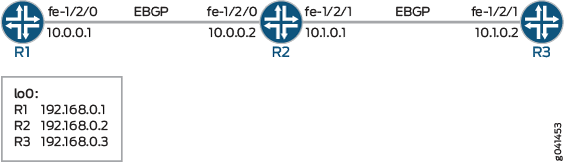
第 #d11e86__d11e235 节介绍了设备 R2 上的步骤。
配置
CLI 快速配置
要快速配置此示例,请复制以下命令,将其粘贴到文本文件中,删除所有换行符,更改详细信息,以便与网络配置匹配,然后将命令复制并粘贴到层次结构级别的 [edit] CLI 中。
设备 R1
set interfaces fe-1/2/0 unit 0 family inet address 10.0.0.1/30
set interfaces lo0 unit 0 family inet address 192.168.0.1/32
set protocols bgp group ext type external
set protocols bgp group ext export send-direct
set protocols bgp group ext peer-as 200
set protocols bgp group ext neighbor 10.0.0.2
set policy-options policy-statement send-direct term 1 from protocol direct
set policy-options policy-statement send-direct term 1 then accept
set routing-options autonomous-system 100
设备 R2
set interfaces fe-1/2/0 unit 0 family inet address 10.0.0.2/30
set interfaces fe-1/2/1 unit 0 family inet address 10.1.0.1/30
set interfaces lo0 unit 0 family inet address 192.168.0.2/32
set protocols bgp group ext type external
set protocols bgp group ext import set-preference
set protocols bgp group ext export send-direct
set protocols bgp group ext neighbor 10.0.0.1 peer-as 100
set protocols bgp group ext neighbor 10.1.0.2 peer-as 300
set policy-options policy-statement send-direct term 1 from protocol direct
set policy-options policy-statement send-direct term 1 then accept
set policy-options policy-statement set-preference term term1 from protocol bgp
set policy-options policy-statement set-preference term term1 from next-hop 10.0.0.1
set policy-options policy-statement set-preference term term1 then preference 10
set policy-options policy-statement set-preference term term2 from protocol bgp
set policy-options policy-statement set-preference term term2 from next-hop 10.1.0.2
set policy-options policy-statement set-preference term term2 then preference 15
set routing-options autonomous-system 200
设备 R3
set interfaces fe-1/2/1 unit 0 family inet address 10.1.0.2/30
set interfaces lo0 unit 0 family inet address 192.168.0.3/32
set protocols bgp group ext type external
set protocols bgp group ext export send-direct
set protocols bgp group ext peer-as 200
set protocols bgp group ext neighbor 10.1.0.1
set policy-options policy-statement send-direct term 1 from protocol direct
set policy-options policy-statement send-direct term 1 then accept
set routing-options autonomous-system 300
过程
分步程序
下面的示例要求您在各个配置层级中进行导航。有关导航CLI的信息,请参阅《Junos OS CLI 用户指南》中的在配置模式下使用CLI编辑器。
要配置设备 R2:
-
配置设备接口。
[edit interfaces]
user@R2# set fe-1/2/0 unit 0 family inet address 10.0.0.2/30
user@R2# set fe-1/2/1 unit 0 family inet address 10.1.0.1/30
user@R2# set lo0 unit 0 family inet address 192.168.0.2/32
-
配置本地自治系统。
[edit routing-options]
user@R2# set autonomous-system 200
-
配置发送直接路由的路由策略。
[edit policy-options policy-statement send-direct term 1]
user@R2# set from protocol direct
user@R2# set then accept
-
配置用于更改接收路由的优先级的路由策略。
[edit policy-options policy-statement set-preference]
user@R2# set term term1 from protocol bgp
user@R2# set term term1 from next-hop 10.0.0.1
user@R2# set term term1 then preference 10
user@R2# set term term2 from protocol bgp
user@R2# set term term2 from next-hop 10.1.0.2
user@R2# set term term2 then preference 15
-
使用设备 R2 配置外部对等。
[edit protocols bgp group ext]
user@R2# set type external
user@R2# set export send-direct
user@R2# set neighbor 10.0.0.1 peer-as 100
user@R2# set neighbor 10.1.0.2 peer-as 300
-
将策略应用
set-preference为导入策略。这会影响设备 R2 的路由表,对设备 R1 和设备 R3 没有影响。
[edit protocols bgp group ext]
user@R2# set import set-preference
结果
在配置模式下,输入 show interfaces、 show protocols、 show policy-options和 show routing-options 命令以确认您的配置。如果输出未显示预期的配置,请重复此示例中的说明以更正配置。
user@R2# show interfaces
fe-1/2/0 {
    unit 0 {
        family inet {
            address 10.0.0.2/30;
        }
    }
}
fe-1/2/1 {
    unit 0 {
        family inet {
            address 10.1.0.1/30;
        }
    }
}
lo0 {
    unit 0{
        family inet {
            address 192.168.0.2/32;
        }
    }
}
user@R2# show protocols
bgp {
    group ext {
        type external;
        import set-preference;
        export send-direct;
        neighbor 10.0.0.1 {
            peer-as 100;
        }
        neighbor 10.1.0.2 {
            peer-as 300;
        }
    }
}
user@R2# show policy-options
policy-statement send-direct {
    term 1 {
        from protocol direct;
        then accept;
    }
}
policy-statement set-preference {
    term term1 {
        from {
            protocol bgp;
            next-hop 10.0.0.1;
        }
        then {
            preference 10;
        }
    }
    term term2 {
        from {
            protocol bgp;
            next-hop 10.1.0.2;
        }
        then {
            preference 15;
        }
    }
}
user@R2# show routing-options
autonomous-system 200;
如果完成设备配置,请从配置模式进入。commit
验证
确认配置工作正常。
验证偏好
目的
请确保设备 R1 和设备 R2 上的路由表反映设备 R1 使用的是配置的 EBGP 优先级 8,而设备 R2 使用的是默认 EBGP 优先级 170。
行动
在操作模式下,输入命令 show route protocols bgp 。
user@R2> show route protocols bgp
inet.0: 7 destinations, 9 routes (7 active, 0 holddown, 0 hidden)
+ = Active Route, - = Last Active, * = Both

10.0.0.0/30         [BGP/10] 04:42:23, localpref 100
                      AS path: 100 I, validation-state: unverified
                    > to 10.0.0.1 via fe-1/2/0.0
10.1.0.0/30         [BGP/15] 04:42:23, localpref 100
                      AS path: 300 I, validation-state: unverified
                    > to 10.1.0.2 via fe-1/2/1.0
192.168.0.1/32     *[BGP/10] 04:42:23, localpref 100
                      AS path: 100 I, validation-state: unverified
                    > to 10.0.0.1 via fe-1/2/0.0
192.168.0.3/32     *[BGP/15] 04:42:23, localpref 100
                      AS path: 300 I, validation-state: unverified
                    > to 10.1.0.2 via fe-1/2/1.0
意义
输出显示,在设备 R2 上,从设备 R3 获知的路由的优先级值已更改为 15,而从设备 R1 获知的路由的优先级值已更改为 10。
了解内部 BGP 路由的本地优先指标
内部BGP (IBGP) 会话使用称为 本地优先级的指标,该指标在路径属性LOCAL_PREF的 IBGP 更新数据包中传输。当一个自治系统 (AS) 有到其他 AS 的多个路由时,本地优先级指示一个 BGP 路由优先于其他 BGP 路由的程度。首选具有最高本地优先级值的 BGP 路由。
LOCAL_PREF 路径属性始终播发至 IBGP 对等方和相邻联合体。它永远不会播发给外部 BGP (EBGP) 对等方。默认行为是不修改LOCAL_PREF路径属性(如果存在)。
默认LOCAL_PREF路径属性值 100 仅在导出时将路径从路由表导出到 BGP 时适用。
如果收到的BGP路由没有LOCAL_PREF属性,则路由将存储在路由表中,并由BGP进行通告,就像接收LOCAL_PREF值为 100 一样。默认情况下,由 BGP 播发的非BGP路由的LOCAL_PREF值 为 100。
也可以看看
示例:配置 BGP 路由的本地优先级值
此示例说明如何在内部 BGP (IBGP) 对等会话中配置本地优先级。
要求
配置此示例之前,不需要除设备初始化之外的特殊配置。
概述
要更改路径属性中播发的本地偏好指标,您必须包含该 local-preference 语句,指定从 0 到 4,294,967,295 (232 – 1) 的 值。
您可能希望更喜欢一条路径而不是另一条路径,原因有多种。例如,与其他路径相比,一条路径的使用成本可能更低、带宽更高或更稳定。
图 3 显示了一个典型网络,其中包含内部对等会话和相邻 AS 的多个出口点。
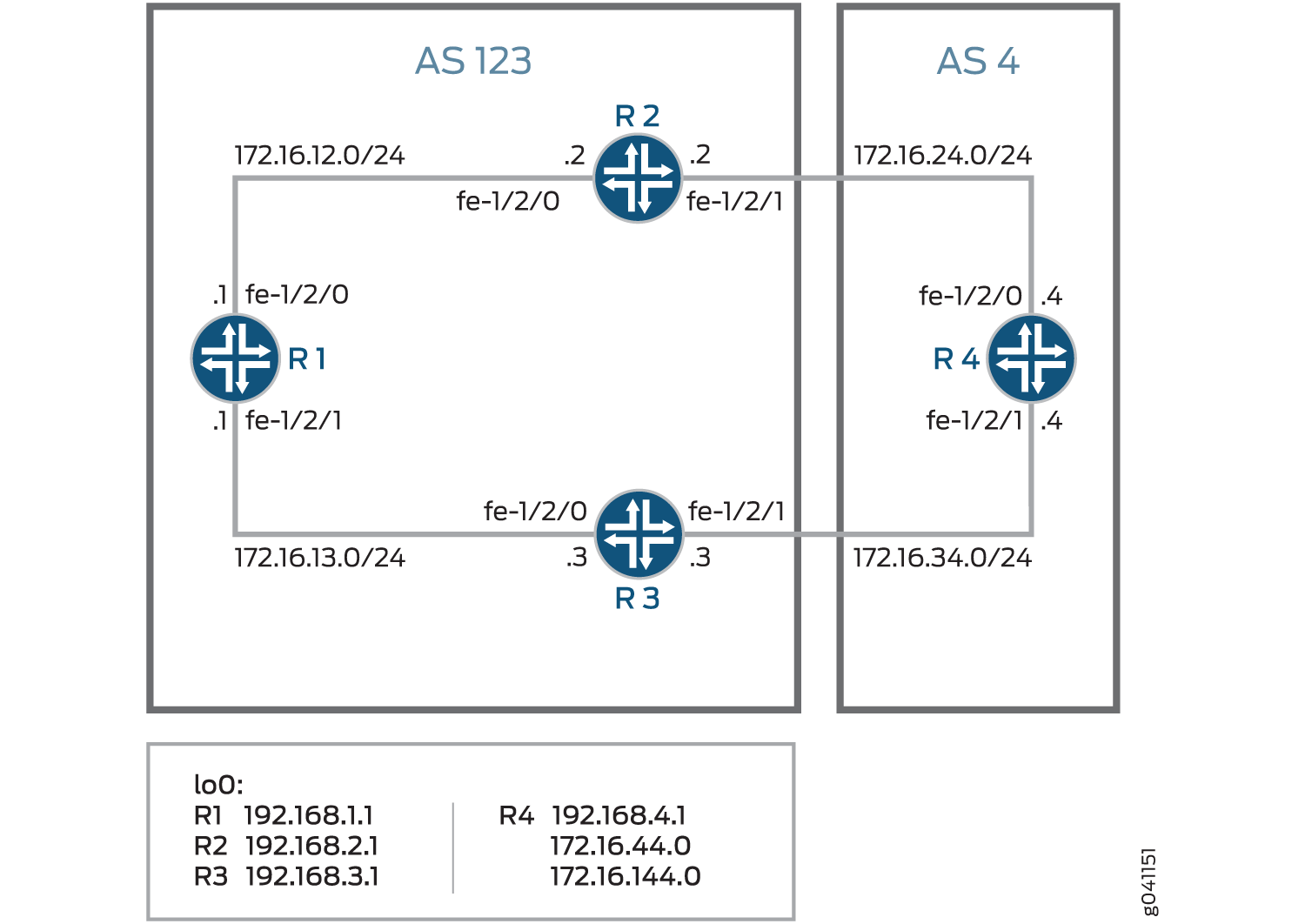 的典型网络
的典型网络
要到达设备 R4,设备 R1 可以采用穿过设备 R2 或设备 R3 的路径。默认情况下,任一路由的本地优先级为 100。当本地优先级相等时,Junos OS 会制定打破平局和选择路径的规则。(请参阅 了解 BGP 路径选择。)在此示例中,活动路由通过设备 R2,因为设备 R2 的路由器 ID 低于设备 R3 的路由器 ID。以下示例演示如何使用本地首选项的显式设置覆盖默认行为。此示例在设备 R3 上配置了 300 的本地优先级,从而使设备 R3 成为到达设备 R4 的首选路径。
配置
CLI 快速配置
要快速配置此示例,请复制以下命令,将其粘贴到文本文件中,删除所有换行符,更改详细信息,以便与网络配置匹配,然后将命令复制并粘贴到层次结构级别的 [edit] CLI 中。
设备 R1
set interfaces fe-1/2/0 unit 1 family inet address 12.12.12.1/24
set interfaces fe-1/2/1 unit 2 family inet address 13.13.13.1/24
set interfaces lo0 unit 1 family inet address 192.168.1.1/32
set protocols bgp group internal type internal
set protocols bgp group internal local-address 192.168.1.1
set protocols bgp group internal export send-direct
set protocols bgp group internal neighbor 192.168.2.1
set protocols bgp group internal neighbor 192.168.3.1
set protocols ospf area 0.0.0.0 interface lo0.1 passive
set protocols ospf area 0.0.0.0 interface fe-1/2/0.1
set protocols ospf area 0.0.0.0 interface fe-1/2/1.2
set policy-options policy-statement send-direct term 1 from protocol direct
set policy-options policy-statement send-direct term 1 then accept
set routing-options autonomous-system 123
set routing-options router-id 192.168.1.1
设备 R2
set interfaces fe-1/2/0 unit 3 family inet address 12.12.12.2/24
set interfaces fe-1/2/1 unit 4 family inet address 24.24.24.2/24
set interfaces lo0 unit 2 family inet address 192.168.2.1/32
set protocols bgp group internal type internal
set protocols bgp group internal local-address 192.168.2.1
set protocols bgp group internal export send-direct
set protocols bgp group internal neighbor 192.168.1.1
set protocols bgp group internal neighbor 192.168.3.1
set protocols bgp group external type external
set protocols bgp group external export send-direct
set protocols bgp group external peer-as 4
set protocols bgp group external neighbor 24.24.24.4
set protocols ospf area 0.0.0.0 interface lo0.2 passive
set protocols ospf area 0.0.0.0 interface fe-1/2/0.3
set protocols ospf area 0.0.0.0 interface fe-1/2/1.4
set policy-options policy-statement send-direct term 1 from protocol direct
set policy-options policy-statement send-direct term 1 then accept
set routing-options autonomous-system 123
set routing-options router-id 192.168.2.1
设备 R3
set interfaces fe-1/2/0 unit 5 family inet address 13.13.13.3/24
set interfaces fe-1/2/1 unit 6 family inet address 34.34.34.3/24
set interfaces lo0 unit 3 family inet address 192.168.3.1/32
set protocols bgp group internal type internal
set protocols bgp group internal local-address 192.168.3.1
set protocols bgp group internal export send-direct
set protocols bgp group internal neighbor 192.168.1.1
set protocols bgp group internal neighbor 192.168.2.1
set protocols bgp group external type external
set protocols bgp group external export send-direct
set protocols bgp group external peer-as 4
set protocols bgp group external neighbor 34.34.34.4
set protocols ospf area 0.0.0.0 interface lo0.3 passive
set protocols ospf area 0.0.0.0 interface fe-1/2/0.5
set protocols ospf area 0.0.0.0 interface fe-1/2/1.6
set policy-options policy-statement send-direct term 1 from protocol direct
set policy-options policy-statement send-direct term 1 then accept
set routing-options autonomous-system 123
set routing-options router-id 192.168.3.1
设备 R4
set interfaces fe-1/2/0 unit 7 family inet address 24.24.24.4/24
set interfaces fe-1/2/1 unit 8 family inet address 34.34.34.4/24
set interfaces lo0 unit 4 family inet address 192.168.4.1/32
set protocols bgp group external type external
set protocols bgp group external export send-direct
set protocols bgp group external peer-as 123
set protocols bgp group external neighbor 34.34.34.3
set protocols bgp group external neighbor 24.24.24.2
set policy-options policy-statement send-direct term 1 from protocol direct
set policy-options policy-statement send-direct term 1 then accept
set routing-options autonomous-system 4
set routing-options router-id 192.168.4.1
配置设备 R1
分步程序
下面的示例要求您在各个配置层级中进行导航。有关导航CLI的信息,请参阅《Junos OS CLI 用户指南》中的在配置模式下使用CLI编辑器。
要配置设备 R1:
-
配置接口。
[edit interfaces fe-1/2/0 unit 1]
user@R1# set family inet address 12.12.12.1/24
[edit interfaces fe-1/2/1 unit 2]
user@R1# set family inet address 13.13.13.1/24
[edit interfaces lo0 unit 1]
user@R1# set family inet address 192.168.1.1/32
-
配置 BGP。
[edit protocols bgp group internal]
user@R1# set type internal
user@R1# set local-address 192.168.1.1
user@R1# set export send-direct
user@R1# set neighbor 192.168.2.1
user@R1# set neighbor 192.168.3.1
-
配置 OSPF。
[edit protocols ospf area 0.0.0.0]
user@R1# set interface lo0.1 passive
user@R1# set interface fe-1/2/0.1
user@R1# set interface fe-1/2/1.2
-
配置接受直接路由的策略。
注意:此方案的其他有用选项可能是接受通过 OSPF 或本地路由获知的路由。
[edit policy-options policy-statement send-direct term 1]
user@R1# set from protocol direct
user@R1# set then accept
-
配置路由器 ID 和自治系统 (AS) 编号。
[edit routing-options]
user@R1# set autonomous-system 123
user@R1# set router-id 192.168.1.1
结果
在配置模式下,输入 show interfaces、 show policy-options、 show protocols和 show routing-options 命令以确认您的配置。如果输出未显示预期的配置,请重复此示例中的说明以更正配置。
user@R1# show interfaces
fe-1/2/0 {
    unit 1 {
        family inet {
            address 12.12.12.1/24;
        }
    }
}
fe-1/2/1 {
    unit 2 {
        family inet {
            address 13.13.13.1/24;
        }
    }
}
lo0 {
    unit 1 {
        family inet {
            address 192.168.1.1/32;
        }
    }
}
user@R1# show policy-options
policy-statement send-direct {
    term 1 {
        from protocol direct;
        then accept;
    }
}
user@R1# show protocols
bgp {
    group internal {
        type internal;
        local-address 192.168.1.1;
        export send-direct;
        neighbor 192.168.2.1;
        neighbor 192.168.3.1;
    }
}
ospf {
    area 0.0.0.0 {
        interface lo0.1 {
            passive;
        }
        interface fe-1/2/0.1;
        interface fe-1/2/1.2;
    }
}
user@R1# show routing-options
autonomous-system 123;
router-id 192.168.1.1;
如果完成设备配置,请从配置模式进入。commit
配置设备 R2
分步程序
下面的示例要求您在各个配置层级中进行导航。有关导航CLI的信息,请参阅《Junos OS CLI 用户指南》中的在配置模式下使用CLI编辑器。
要配置设备 R2:
-
配置接口。
[edit interfaces fe-1/2/0 unit 3]
user@R2# set family inet address 12.12.12.21/24
[edit interfaces fe-1/2/1 unit 4]
user@R2# set family inet address 24.24.24.2/24
[edit interfaces lo0 unit 2]
user@R2# set family inet address 192.168.2.1/32
-
配置 BGP。
[edit protocols bgp group internal]
user@R2# set type internal
user@R2# set local-address 192.168.2.1
user@R2# set export send-direct
user@R2# set neighbor 192.168.1.1
user@R2# set neighbor 192.168.3.1
[edit protocols bgp group external]
user@R2# set type external
user@R2# set export send-direct
user@R2# set peer-as 4
user@R2# set neighbor 24.24.24.4
-
配置 OSPF。
[edit protocols ospf area 0.0.0.0]
user@R2# set interface lo0.2 passive
user@R2# set interface fe-1/2/0.3
user@R2# set interface fe-1/2/1.4
-
配置接受直接路由的策略。
注意:此方案的其他有用选项可能是接受通过 OSPF 或本地路由获知的路由。
[edit policy-options policy-statement send-direct term 1]
user@R2# set from protocol direct
user@R2# set then accept
-
配置路由器 ID 和自治系统 (AS) 编号。
[edit routing-options]
user@R2# set autonomous-system 123
user@R2# set router-id 192.168.2.1
结果
在配置模式下,输入 show interfaces、 show policy-options、 show protocols和 show routing-options 命令以确认您的配置。如果输出未显示预期的配置,请重复此示例中的说明以更正配置。
user@R2# show interfaces
fe-1/2/0 {
    unit 3 {
        family inet {
            address 12.12.12.2/24;
        }
    }
}
fe-1/2/1 {
    unit 4 {
        family inet {
            address 24.24.24.2/24;
        }
    }
}
lo0 {
    unit 2 {
        family inet {
            address 192.168.2.1/32;
        }
    }
}
user@R2# show policy-options
policy-statement send-direct {
    term 1 {
        from protocol direct;
        then accept;
    }
}
user@R2# show protocols
bgp {
    group internal {
        type internal;
        local-address 192.168.2.1;
        export send-direct;
        neighbor 192.168.1.1;
        neighbor 192.168.3.1;
    }
    group external {
        type external;
        export send-direct;
        peer-as 4;
        neighbor 24.24.24.4;
    }
}
ospf {
    area 0.0.0.0 {
        interface lo0.2 {
            passive;
        }
        interface fe-1/2/0.3;
        interface fe-1/2/1.4;
    }
}
user@R2# show routing-options
autonomous-system 123;
router-id 192.168.2.1;
如果完成设备配置,请从配置模式进入。commit
配置设备 R3
分步程序
下面的示例要求您在各个配置层级中进行导航。有关导航CLI的信息,请参阅《Junos OS CLI 用户指南》中的在配置模式下使用CLI编辑器。
要配置设备 R3:
-
配置接口。
[edit interfaces fe-1/2/0 unit 5]
user@R3# set family inet address 13.13.13.3/24
[edit interfaces fe-1/2/1 unit 6]
user@R3# set family inet address 34.34.34.3/24
[edit interfaces lo0 unit 3]
user@R3# set family inet address 192.168.3.1/32
-
配置 BGP。
[edit protocols bgp group internal]
user@R3# set type internal
user@R3# set local-address 192.168.3.1
user@R3# set export send-direct
user@R3# set neighbor 192.168.1.1
user@R3# set neighbor 192.168.2.1
[edit protocols bgp group external]
user@R3# set type external
user@R3# set export send-direct
user@R3# set peer-as 4
user@R3# set neighbor 34.34.34.4
-
配置 OSPF。
[edit protocols ospf area 0.0.0.0]
user@R3# set interface lo0.3 passive
user@R3# set interface fe-1/2/0.5
user@R3# set interface fe-1/2/1.6
-
配置接受直接路由的策略。
注意:此方案的其他有用选项可能是接受通过 OSPF 或本地路由获知的路由。
[edit policy-options policy-statement send-direct term 1]
user@R3# set from protocol direct
user@R3# set then accept
-
配置路由器 ID 和自治系统 (AS) 编号。
[edit routing-options]
user@R3# set autonomous-system 123
user@R3# set router-id 192.168.3.1
结果
在配置模式下,输入 show interfaces、 show policy-options、 show protocols和 show routing-options 命令以确认您的配置。如果输出未显示预期的配置,请重复此示例中的说明以更正配置。
user@R3# show interfaces
fe-1/2/0 {
    unit 5 {
        family inet {
            address 13.13.13.3/24;
        }
    }
}
fe-1/2/1 {
    unit 6 {
        family inet {
            address 34.34.34.3/24;
        }
    }
}
lo0 {
    unit 3 {
        family inet {
            address 192.168.3.1/32;
        }
    }
}
user@R3# show policy-options
policy-statement send-direct {
    term 1 {
        from protocol direct;
        then accept;
    }
}
user@R3# show protocols
bgp {
    group internal {
        type internal;
        local-address 192.168.3.1;
        export send-direct;
        neighbor 192.168.1.1;
        neighbor 192.168.2.1;
    }
    group external {
        type external;
        export send-direct;
        peer-as 4;
        neighbor 34.34.34.4;
    }
}
ospf {
    area 0.0.0.0 {
        interface lo0.3 {
            passive;
        }
        interface fe-1/2/0.5;
        interface fe-1/2/1.6;
    }
}
user@R3# show routing-options
autonomous-system 123;
router-id 192.168.3.1;
如果完成设备配置,请从配置模式进入。commit
配置设备 R4
分步程序
下面的示例要求您在各个配置层级中进行导航。有关导航CLI的信息,请参阅《Junos OS CLI 用户指南》中的在配置模式下使用CLI编辑器。
要配置设备 R4:
-
配置接口。
[edit interfaces fe-1/2/0 unit 7]
user@R4# set family inet address 24.24.24.4/24
[edit interfaces fe-1/2/1 unit 8]
user@R4# set family inet address 34.34.34.4/24
[edit interfaces lo0 unit 4]
user@R4# set family inet address 192.168.4.1/32
-
配置 BGP。
[edit protocols bgp group external]
user@R4# set type external
user@R4# set export send-direct
user@R4# set peer-as 123
user@R4# set neighbor 34.34.34.3
user@R4# set neighbor 24.24.24.2
-
配置接受直接路由的策略。
注意:此方案的其他有用选项可能是接受通过 OSPF 或本地路由获知的路由。
[edit policy-options policy-statement send-direct term 1]
user@R4# set from protocol direct
user@R4# set then accept
-
配置路由器 ID 和自治系统 (AS) 编号。
[edit routing-options]
user@R4# set autonomous-system 4
user@R4# set router-id 192.168.4.1
结果
在配置模式下,输入 show interfaces、 show policy-options、 show protocols和 show routing-options 命令以确认您的配置。如果输出未显示预期的配置,请重复此示例中的说明以更正配置。
user@R4# show interfaces
fe-1/2/0 {
    unit 7 {
        family inet {
            address 24.24.24.4/24;
        }
    }
}
fe-1/2/1 {
    unit 8 {
        family inet {
            address 34.34.34.4/24;
        }
    }
}
lo0 {
    unit 4 {
        family inet {
            address 192.168.4.1/32;
        }
    }
}
user@R4# show policy-options
policy-statement send-direct {
    term 1 {
        from protocol direct;
        then accept;
    }
}
user@R4# show protocols
bgp {
    group external {
        type external;
        export send-direct;
        peer-as 123;
        neighbor 34.34.34.3;
        neighbor 24.24.24.2;
    }
}
user@R4# show routing-options
autonomous-system 4;
router-id 192.168.4.1;
如果完成设备配置,请从配置模式进入。commit
验证
确认配置工作正常。
检查从设备 R1 到设备 R4 的活动路径
目的
验证从设备 R1 到设备 R4 的活动路径是否通过设备 R2。
行动
在操作模式下,输入命令 show route protocol bgp 。
user@R1> show route protocol bgp
inet.0: 11 destinations, 18 routes (11 active, 0 holddown, 0 hidden)
+ = Active Route, - = Last Active, * = Both

12.12.12.0/24       [BGP/170] 00:11:48, localpref 100, from 192.168.2.1
                      AS path: I
                    > to 12.12.12.2 via fe-1/2/0.1
13.13.13.0/24       [BGP/170] 00:11:48, localpref 100, from 192.168.3.1
                      AS path: I
                    > to 13.13.13.3 via fe-1/2/1.2
24.24.24.0/24       [BGP/170] 00:11:48, localpref 100, from 192.168.2.1
                      AS path: I
                    > to 12.12.12.2 via fe-1/2/0.1
34.34.34.0/24       [BGP/170] 00:11:48, localpref 100, from 192.168.3.1
                      AS path: I
                    > to 13.13.13.3 via fe-1/2/1.2
192.168.2.1/32      [BGP/170] 00:11:48, localpref 100, from 192.168.2.1
                      AS path: I
                    > to 12.12.12.2 via fe-1/2/0.1
192.168.3.1/32      [BGP/170] 00:11:48, localpref 100, from 192.168.3.1
                      AS path: I
                    > to 13.13.13.3 via fe-1/2/1.2
192.168.4.1/32     *[BGP/170] 00:05:14, localpref 100, from 192.168.2.1
                      AS path: 4 I
                    > to 12.12.12.2 via fe-1/2/0.1
                    [BGP/170] 00:05:14, localpref 100, from 192.168.3.1
                      AS path: 4 I
                    > to 13.13.13.3 via fe-1/2/1.2
意义
星号 (*) 表示首选路径通过设备 R2。在默认配置中,设备 R2 的路由器 ID 低于设备 R3。路由器 ID 控制路径选择。
更改本地首选项以更改路径选择
目的
更改路径,使其通过设备 R3。
行动
从配置模式,输入命令 set local-preference 300 。
[edit protocols bgp group internal]
user@R3# set local-preference 300
user@R3# commit
重新检查从设备 R1 到设备 R4 的活动路径
目的
验证从设备 R1 到设备 R4 的活动路径是否通过设备 R3。
行动
在操作模式下,输入命令 show route protocol bgp 。
user@R1> show route protocol bgp
inet.0: 11 destinations, 17 routes (11 active, 0 holddown, 0 hidden)
+ = Active Route, - = Last Active, * = Both

12.12.12.0/24       [BGP/170] 00:16:48, localpref 100, from 192.168.2.1
                      AS path: I
                    > to 12.12.12.2 via fe-1/2/0.1
13.13.13.0/24       [BGP/170] 00:00:22, localpref 300, from 192.168.3.1
                      AS path: I
                    > to 13.13.13.3 via fe-1/2/1.2
24.24.24.0/24       [BGP/170] 00:16:48, localpref 100, from 192.168.2.1
                      AS path: I
                    > to 12.12.12.2 via fe-1/2/0.1
34.34.34.0/24       [BGP/170] 00:00:22, localpref 300, from 192.168.3.1
                      AS path: I
                    > to 13.13.13.3 via fe-1/2/1.2
192.168.2.1/32      [BGP/170] 00:16:48, localpref 100, from 192.168.2.1
                      AS path: I
                    > to 12.12.12.2 via fe-1/2/0.1
192.168.3.1/32      [BGP/170] 00:00:22, localpref 300, from 192.168.3.1
                      AS path: I
                    > to 13.13.13.3 via fe-1/2/1.2
192.168.4.1/32     *[BGP/170] 00:00:21, localpref 300, from 192.168.3.1
                      AS path: 4 I
                    > to 13.13.13.3 via fe-1/2/1.2
意义
星号 (*) 表示首选路径通过设备 R3。在更改后的配置中,设备 R3 的本地优先级高于设备 R2。本地优先级是控制路径选择。
示例:配置 BGP 以通告非活动路由
默认情况下,BGP 仅重新播发活动路由。要将路由表导出为BGP BGP获知的最佳路由(即使Junos OS未将其选择为活动路由),请包含以下 advertise-inactive 语句:
advertise-inactive;
在 Junos OS 中,BGP 通告已安装或处于活动状态的 BGP 路由,这些路由是根据 BGP 路径选择规则选择的最佳路由。该 advertise-inactive 语句允许将非活动 BGP 路由播发至其他对等方。
如果路由表有两个 BGP 路由,其中一个处于活动状态,另一个处于非活动状态, advertise-inactive 则该语句不会播发非活动 BGP 前缀。如果存在其他活动 BGP 路由,此语句不会播发非活动 BGP 路由。但是,如果活动路由是静态路由, advertise-inactive 则该语句会播发非活动 BGP 路由。
当路由器配置为路由反射器时,该 advertise-inactive 语句无助于从 VRF 播发非活动路由。
Junos OS 还支持配置与播发路由状态匹配的 BGP 导出策略。您可以匹配活动或非活动路由,如下所示:
policy-options {
    policy-statement name{
        from state (active|inactive);
    }
}
仅当在导出策略的上下文中使用时,此限定符才匹配。当路由由可播发非活动路由(如 BGP)的协议播发时,state inactive匹配由于 (or advertise-external) 语句而advertise-inactive播发的路由。
例如,以下配置可用作 BGP 导出策略,以标记由于 advertise-inactive 用户定义社区的设置而播发的路由。接收路由器稍后可以使用该社区从转发表中过滤掉此类路由。此类机制可用于解决发送方未用于转发的播发路径可能导致转发环路的担忧。
user@host# show policy-options
policy-statement mark-inactive {
    term inactive {
        from state inactive;
        then {
            community set comm-inactive;
        }
    }
    term default {
        from protocol bgp;
        then accept;
    }
    then reject;
}
community comm-inactive members 65536:65284;
要求
配置此示例之前,不需要除设备初始化之外的特殊配置。
概述
在此示例中,设备 R2 有两个外部 BGP (EBGP) 对等方,设备 R1 和设备 R3。
设备 R1 有到 172.16.5/24 的静态路由。同样,设备 R2 也有到 172.16.5/24 的静态路由。设备 R1 通过 BGP 向设备 R2 发送有关其静态路由的信息。设备 R2 现在有来自两个来源的有关 172.16.5/24 的信息:设备 R2 自己的静态路由和从设备 R1 接收的 BGP 获知路由。静态路由优先于 BGP 获知的路由,因此 BGP 路由在设备 R2 上处于非活动状态。通常,设备 R2 会将 BGP 获知的信息发送到设备 R3,但设备 R2 不会这样做,因为 BGP 路由处于非活动状态。因此,设备 R3 没有关于 172.16.5/24 的信息,除非您在设备 R2 上启用命令 advertise-inactive ,这会导致设备 R2 将 BGP 获知的请求发送到设备 R3。
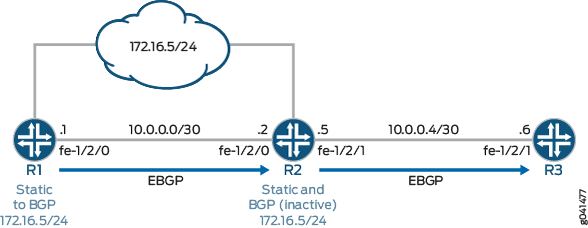
配置
CLI 快速配置
要快速配置此示例,请复制以下命令,将其粘贴到文本文件中,删除所有换行符,更改详细信息,以便与网络配置匹配,然后将命令复制并粘贴到层次结构级别的 [edit] CLI 中。
设备 R1
set interfaces fe-1/2/0 unit 0 family inet address 10.0.0.1/30
set interfaces lo0 unit 0 family inet address 192.168.0.1/32
set protocols bgp group to_R2 type external
set protocols bgp group to_R2 export send-static
set protocols bgp group to_R2 neighbor 10.0.0.2 peer-as 200
set policy-options policy-statement send-static term 1 from protocol static
set policy-options policy-statement send-static term 1 then accept
set routing-options static route 172.16.5.0/24 discard
set routing-options static route 172.16.5.0/24 install
set routing-options autonomous-system 100
设备 R2
set interfaces fe-1/2/0 unit 0 family inet address 10.0.0.2/30
set interfaces fe-1/2/1 unit 0 family inet address 10.0.0.5/30
set interfaces lo0 unit 0 family inet address 192.168.0.2/32
set protocols bgp group to_R1 type external
set protocols bgp group to_R1 neighbor 10.0.0.1 peer-as 100
set protocols bgp group to_R3 type external
set protocols bgp group to_R3 advertise-inactive
set protocols bgp group to_R3 neighbor 10.0.0.6 peer-as 300
set routing-options static route 172.16.5.0/24 discard
set routing-options static route 172.16.5.0/24 install
set routing-options autonomous-system 200
设备 R3
set interfaces fe-1/2/1 unit 0 family inet address 10.0.0.6/30
set interfaces fe-1/2/0 unit 9 family inet address 10.0.0.9/30
set interfaces lo0 unit 0 family inet address 192.168.0.3/32
set protocols bgp group ext type external
set protocols bgp group ext peer-as 200
set protocols bgp group ext neighbor 10.0.0.5
set routing-options autonomous-system 300
过程
分步程序
下面的示例要求您在各个配置层级中进行导航。有关导航CLI的信息,请参阅《Junos OS CLI 用户指南》中的在配置模式下使用CLI编辑器。
要配置设备 R2:
-
配置设备接口。
[edit interfaces]
user@R2# set fe-1/2/0 unit 0 family inet address 10.0.0.2/30
user@R2# set fe-1/2/1 unit 0 family inet address 10.0.0.5/30
user@R2# set lo0 unit 0 family inet address 192.168.0.2/32
-
配置到设备 R1 的 EBGP 连接。
[edit protocols bgp group to_R1]
user@R2# set type external
user@R2# set neighbor 10.0.0.1 peer-as 100
-
配置到设备 R3 的 EBGP 连接。
[edit protocols bgp group to_R3]
user@R2# set type external
user@R2# set neighbor 10.0.0.6 peer-as 300
-
将该
advertise-inactive语句添加到与设备 R3 的 EBGP 组对等会话中。[edit protocols bgp group to_R3] user@R2# set advertise-inactive
-
配置到 172.16.5.0/24 网络的静态路由。
[edit routing-options static]
user@R2# set route 172.16.5.0/24 discard
user@R2# set route 172.16.5.0/24 install
-
配置自治系统 (AS) 编号。
[edit routing-options]
user@R2# set autonomous-system 200
结果
在配置模式下,输入 show interfaces、 show protocols、 show policy-options和 show routing-options 命令以确认您的配置。如果输出未显示预期的配置,请重复此示例中的说明以更正配置。
user@R2# show interfaces
fe-1/2/0 {
    unit 0 {
        family inet {
            address 10.0.0.2/30;
        }
    }
}
fe-1/2/1 {
    unit 0 {
        family inet {
            address 10.0.0.5/30;
        }
    }
}
lo0 {
    unit 0 {
        family inet {
            address 192.168.0.2/32;
        }
    }
}
user@R2# show protocols
bgp {
    group to_R1 {
        type external;
        neighbor 10.0.0.1 {
            peer-as 100;
        }
    }
    group to_R3 {
        type external;
        advertise-inactive;
        neighbor 10.0.0.6 {
            peer-as 300;
        }
    }
}
user@R2# show routing-options
static {
    route 172.16.5.0/24 {
        discard;
        install;
    }
}
autonomous-system 200;
如果完成设备配置,请从配置模式进入。commit
验证
确认配置工作正常。
验证 BGP 活动路径
目的
在设备 R2 上,确保 172.16.5.0/24 前缀位于路由表中,并具有预期的活动路径。
行动
user@R2> show route 172.16.5

inet.0: 7 destinations, 8 routes (7 active, 0 holddown, 0 hidden)
+ = Active Route, - = Last Active, * = Both

172.16.5.0/24      *[Static/5] 21:24:38
                      Discard
                    [BGP/170] 21:21:41, localpref 100
                      AS path: 100 I, validation-state: unverified
                    > to 10.0.0.1 via fe-1/2/0.0
意义
设备 R2 从设备 R1 和其自己的静态配置路由接收 172.16.5.0/24 路由。静态路由是由星号 (*) 指定的活动路径。与 BGP 优先级 (170) 相比,静态路由路径具有最低的路由优先级 (5)。因此,静态路由将变为活动状态。
验证外部路由通告
目的
在设备 R2 上,确保向设备 R3 播发 172.16.5.0/24 路由。
行动
user@R2> show route advertising-protocol bgp 10.0.0.6


inet.0: 6 destinations, 7 routes (6 active, 0 holddown, 0 hidden)
  Prefix                  Nexthop              MED     Lclpref    AS path
  172.16.5.0/24           Self                                    100 I
意义
设备 R2 正在向设备 R3 播发 172.16.5.0/24 路由
验证设备 R3 上的路由
目的
确保 172.16.6.0/24 前缀位于设备 R3 的路由表中。
行动
user@R3> show route 172.16.5.0/24

inet.0: 5 destinations, 5 routes (5 active, 0 holddown, 0 hidden)
+ = Active Route, - = Last Active, * = Both

172.16.5.0/24      *[BGP/170] 00:01:19, localpref 100
                      AS path: 200 100 I, validation-state: unverified
                    > to 10.0.0.5 via fe-1/2/1.0
意义
设备 R3 具有 172.16.5.0/24 的 BGP 获知路由。
试验 advertise-inactive 语句
目的
查看从设备 R2 上的 BGP 配置中移除该语句后 advertise-inactive 会发生什么情况。
行动
-
在设备 R2 上,停用该
advertise-inactive语句。[edit protocols bgp group to_R3] user@R2# deactivate advertise-inactive user@R2# commit
-
在设备 R2 上,检查是否向设备 R3 播发了 172.16.5.0/24 路由。
user@R2> show route advertising-protocol bgp 10.0.0.6
正如预期一样,不再对路由进行播发。
-
在设备 R3 上,确保路由表中没有 172.16.5/24 路由。
user@R3> show route 172.16.5/24
意义
设备 R1 将路由 172.16.5/24 播发至设备 R2,但设备 R2 为此前缀手动配置了静态路由。静态路由优先于 BGP 路由,因此设备 R2 会将 BGP 路由安装为非活动路由。由于 BGP 路由未处于活动状态,设备 R2 不会将 BGP 路由重新播发至设备 R3。这是 Junos OS 中的默认行为。如果将该 advertise-inactive 语句添加到设备 R2 上的 BGP 配置中,设备 R2 将重新播发非活动路由。
变更历史表
是否支持某项功能取决于您使用的平台和版本。使用 功能资源管理器 确定您的平台是否支持某个功能。
static-label-switched-path 首选项值为 6。