BGP 最佳路由反射
了解 BGP 最佳路由反射
当 BGP 执行最佳路径选择时,它会按定义的顺序评估多个属性。其中一个步骤是首选下一跃点通过指标最低的 IGP 解析的路径。此比较是从做出路径选择决策的路由器的角度执行的。
有关 BGP 路径选择的更多信息,请参阅 了解 BGP 路径选择。
在基于每个接入点部署路由反射器的网络中,这种行为通常会产生所需的转发结果。每个路由反射器都会根据与客户端的转发拓扑紧密关联的 IGP 成本反映到其客户端的路由。
但是,在大规模网络中,路由反射器可以为分布在多个地理位置的客户端和非客户端对等方提供服务。在这些部署中,路径选择期间使用的IGP指标反映BGP路由反射器位置的拓扑,而不是接收客户端的角度。
因此,对于路由反射器来说,看起来最佳的路由可能并不代表所有客户端的最佳转发路径。即使 BGP 路径选择运行正常,这种不匹配也可能导致流量转发质量欠佳。
BGP 最佳路由反射通过允许路径选择更好地与接收反射路由的客户端的 IGP 拓扑保持一致,而不是仅仅依赖路由反射器的本地视图,从而解决了这一限制。
您可以配置 RFC 9107 中所述的 BGP 最佳路由反射 (BGP-ORR),并将 IS-IS 和 OSPF 用作路由反射器上的内部网关协议 (IGP),以便向 BGP-ORR 客户端组通告最佳路径。这是通过使用客户端角度的最短 IGP 指标(而不是路由反射器视图)来完成的。
共享相同或类似 IGP 拓扑的客户端组可以分组为一个 BGP 对等体组。您可以配置 optimal-route-reflection 为在该 BGP 对等体组中启用 BGP-ORR。您还可以将其中一个反射器节点配置为 BGP 对等体组中的主节点 (igp-primary),以便使用该主节点的 IGP 指标选择最佳路径,并将其播发给同一 BGP 对等体组中的客户端。或者,您还可以选择另一个反射器节点作为备份节点 (igp-backup) ,当主反射器节点 (igp-primary) 关闭或无法访问时使用该节点。
要启用 BGP-ORR,请在 [edit protocols bgp group group-name] 层次结构级别包含该optimal-route-reflection语句。
仅当 IGP 用于 BGP 路由解析时,BGP-ORR 才有效。当 MPLS/LDP/RSVP 用于路由解析时,BGP-ORR 不起作用。
要使 BGP-ORR 正常工作,应通过 IGP 解析 BGP 前缀。在正常的第 3 层 VPN、第 2 层 VPN、VPLS、MVPN 或 EVPN 方案中,前缀通过 inet.3 进行解析。在 inet.3 中,前缀的协议下一跃点的主路由将是 RSVP 或 LDP(而不是 IS-IS 或 OSPF 等 IGP 协议)。要使 BGP-ORR 正常工作,您需要将路由器配置为使用 inet.0 来解析第 3 层 VPN、第 2 层 VPN、VPLS、MVPN 或 EVPN 前缀的路由解析。您可以通过以下命令执行此操作:
-
对于第 3 层 VPN 前缀:
user@host# set routing-options resolution rib bgp.l3vpn.0 resolution-ribs inet.0
-
对于第 2 层 VPN 或 VPLS 前缀:
user@host# set routing-options resolution rib bgp.l2vpn.0 resolution-ribs inet.0
-
对于 EVPN 前缀:
user@host# set routing-options resolution rib bgp.evpn.0 resolution-ribs inet.0
-
对于 MVPN 前缀:
user@host# set routing-options resolution rib bgp.mvpn.0 resolution-ribs inet.0
另一种方法是将 IGP 路由泄漏到 inet.3 中,并使其成为 inet.3 中的主路由。
使用以下 CLI 层次结构配置 BGP-ORR:
[edit protocols bgp]
group group-name{
    optimal-route-reflection {
        igp-primary ipv4-address;
        igp-backup ipv4-address;
    }
}
也可以看看
在路由反射器上配置 BGP 最佳路由反射以通告最佳路径
您可以将BGP最佳路由反射 (BGP-ORR),并将 IS-IS 和 OSPF 配置为路由反射器上的内部网关协议 (IGP),以便向 BGP-ORR 客户端组通告最佳路径。这是通过使用客户端角度的最短 IGP 指标(而不是路由反射器视图)来完成的。
要启用 BGP-ORR,请在 [edit protocols bgp group group-name] 层次结构级别包含该optimal-route-reflection语句。
共享相同或类似 IGP 拓扑的客户端组可以分组为一个 BGP 对等体组。您可以配置 optimal-route-reflection 为在该 BGP 对等体组中启用 BGP-ORR。
要配置 BGP-ORR:
使用以下 CLI 命令监控 BGP-ORR 的配置并排除故障:
-
show bgp group—查看BGP-ORR的主配置和备份配置。 -
show isis bgp-orr—查看 IS-IS BGP-ORR 度量 (RIB)。 -
show ospf bgp-orr—查看 OSPF BGP-ORR 度量 (RIB)。 -
show ospf route— 查看 OSPF 路由表中的条目 -
show route- 查看路由表中的活动条目。 -
show route advertising protocol bgp peer— 验证路由是否根据 BGP-ORR 规则进行播发。
也可以看看
示例:在 BGP 网络中配置最佳路由反射
使用此示例可配置最佳路由反射,并将 OSPF 作为路由反射器上的内部网关协议 (IGP),以便向 BGP 客户端组通告最佳路径。路由反射器使用最短 IGP 指标从客户端的角度计算最佳路由。
我们的内容测试团队已经验证了这个示例。
|
可读性分数 |
64.26 |
|
阅读时间 |
30 分钟 |
|
配置时间 |
30 分钟 |
先决条件示例
|
硬件要求 |
五台 MX 系列路由器。 |
|
软件要求 |
Junos OS 15.2R1 或更高版本 |
开始之前
|
优势 |
|
|
了解更多 |
|
|
实践经验 |
|
|
了解更多 |
功能概述
同一 BGP 自治系统中的路由器通常会相互交换路由。IBGP 需要全网状连接,既繁琐又缓慢。在大型部署中,维护全网状架构的扩展能力不佳。路由反射器不是创建全网状,而是将从内部对等方获知的路由重新播发至其他内部对等方,从而简化全网状配置。路由反射要求路由反射器与所有内部对等方完全网状化。共享类似 IGP 拓扑的客户端组可以分组为一个 BGP 对等体组。将其中一个反射器节点配置为 BGP 对等体组中的主节点和可选备份节点。最佳路由反射仅适用于 IGP,使用 MPLSLDP 或 RSVP 进行路由解析时不起作用。
|
使用的技术 |
路由协议:OSPF、BGP |
|
主要验证任务 |
|
拓扑概述
设备 RR 是使用 ORR(最佳路由反射)的路由反射器。设备 R1 为入口 PE,设备 R2 和 R3 为出口 PE。配置 ORR 后,RR 会根据入口 PE (R1) 视图(而非其自己的)视图以最佳方式反映路由。OSPF 配置为 IGP,设备之间存在 IBGP 对等。
为了便于说明起见,我们将 R1 到 R3 指标增加到 100,并让设备 R2 和 R3 播发相同的前缀 10.10.10.0/24。在 R1 上,“show route”输出应将 R2 作为协议下一跃点(出口 PE)。在 RR 上停用 BGP-ORR 配置并重复相同的步骤时,我们看到 R3 是播发前缀的出口 PE。
|
主机名 |
角色 |
功能 |
|---|---|---|
| RR | RR 被配置为路由反射器,并配置了最佳路由反射。 | RR 配置了 OSPF 和内部 BGP。RR 根据 R1 的视图(而非其自己的视图)以最佳方式反映路由。 |
| R1 | 设备是入口 PE | OSPF 配置为 IGP,而 BGP 配置为设备之间的内部 BGP 对等。 |
|
R2、R3 和 R11 |
这些设备即为出口 PE。 |
OSPF 配置为 IGP 和内部 BGP。 |
拓扑图示
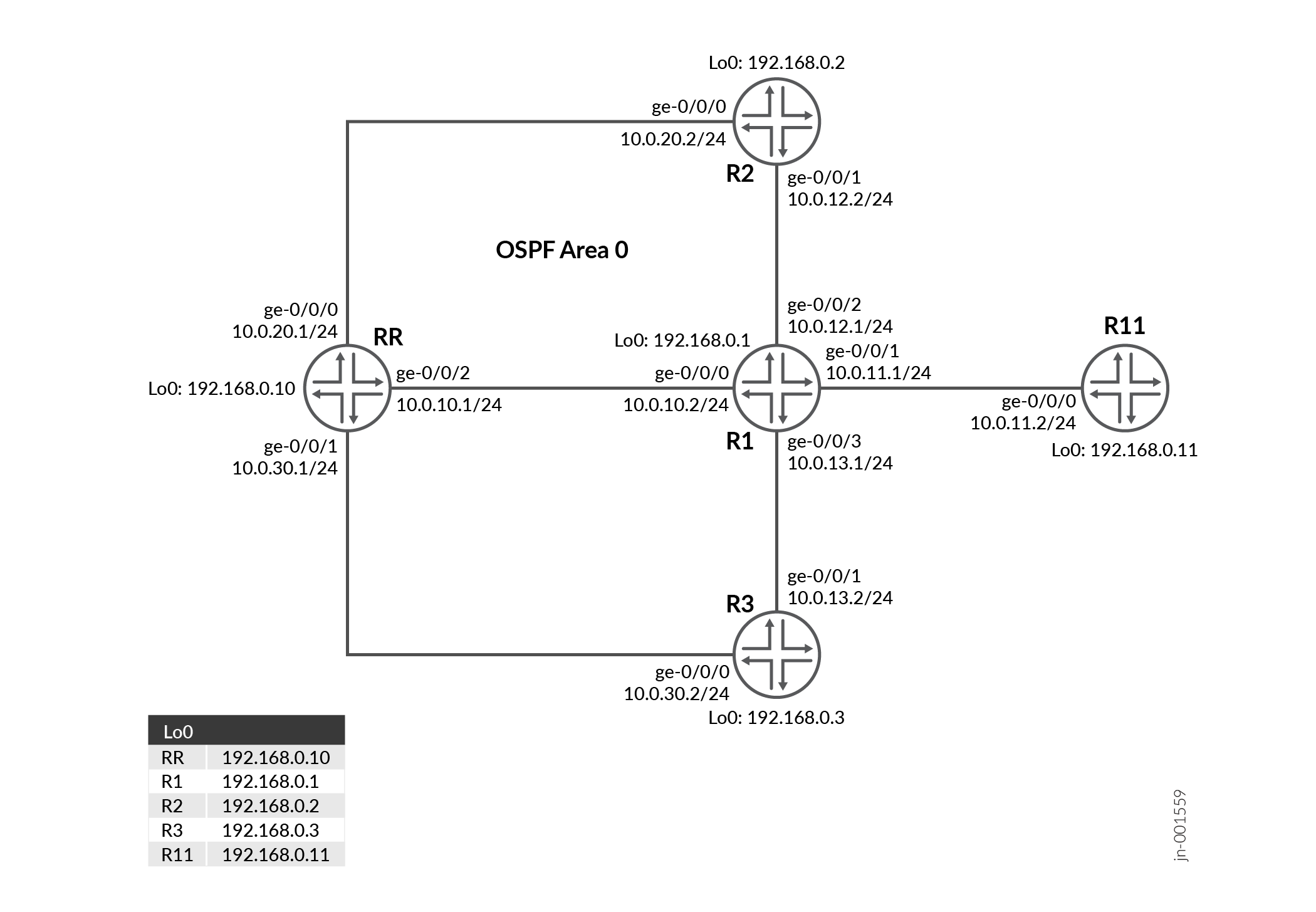
在 RR 上配置最佳路由反射
验证
| 命令 | 验证任务 |
|---|---|
| show bgp group | 验证分配的 BGP 最佳路由反射器 |
| show ospf bgp-orr | 验证配置的 OSPF BGP 最佳路由反射器指标 |
| show route advertising-protocol bgp | 验证路由反射器是否以最佳方式播发了路由 |
验证分配的 BGP-ORR
目的
查看配置的 BGP 组以及分配为 BGP-ORR 的主和备份的设备。
行动
在操作模式下,运行命令 show bgp group 以验证分配的 BGP-ORR。
View the configured BGP group and devices assigned as primary and backup for BGP-ORR.
user@RR> show bgp group
Group Type: Internal    AS: 65412                  Local AS: 65412
  Name: Client          Index: 0                   Flags: <>
  Options: <Cluster>
  Options: <GracefulShutdownRcv>
  Holdtime: 90 Preference: 0
  Graceful Shutdown Receiver local-preference: 0
  Optimal route reflection: igp-primary 192.168.0.1 igp-backup 192.168.0.11
  Total peers: 4        Established: 4
  192.168.0.1+59852
  192.168.0.2+56933
  192.168.0.3+52883
  192.168.0.11+65170
  inet.0: 1/2/2/0
Default eBGP mode: advertise - accept, receive - accept

Groups: 1  Peers: 4    External: 0    Internal: 4    Down peers: 0   Flaps: 0
Table          Tot Paths  Act Paths Suppressed    History Damp State    Pending
inet.0
                       2          1          0          0          0          0
意义
输出包括配置的主路由反射器和备份最佳路由反射器及其环路地址。
验证路由信息库 (RIB) 中配置的 OSPF BGP-ORR 指标
目的
验证路由信息库 (RIB) 中配置的 OSPF BGP-ORR 指标
行动
在操作模式下,运行命令 show ospf bgp-orr 。
user@RR> show ospf bgp-orr
Topology default Route Table:

BGP ORR Peer Group: Client
  Primary: 192.168.0.1, active
  Backup: 192.168.0.11
Prefix             Path  Route      Metric
                   Type  Type
192.168.0.2        Intra Router          1
192.168.0.3        Intra Router          2
192.168.0.10       Intra Router          1
192.168.0.11       Intra Router          1
10.0.10.0/24       Intra Network         1
10.0.11.0/24       Intra Network         1
10.0.12.0/24       Intra Network         1
10.0.13.0/24       Intra Network         3
10.0.20.0/24       Intra Network         2
10.0.30.0/24       Intra Network         2
192.168.0.1/32     Intra Network         0
192.168.0.2/32     Intra Network         1
192.168.0.3/32     Intra Network         2
192.168.0.10/32    Intra Network         1
192.168.0.11/32    Intra Network         1
意义
输出显示主路由反射器和备份最佳路由反射器的分配度量。
验证路由反射器是否以最佳方式播发了路由
目的
验证路由是否根据 BGP-ORR 规则进行播发。
行动
在操作模式下,运行命令 show route advertising-protocol bgp 。
user@RR> show route advertising-protocol bgp 192.168.0.1

inet.0: 22 destinations, 23 routes (22 active, 0 holddown, 0 hidden)
  Prefix                  Nexthop              MED     Lclpref    AS path
* 10.10.10.0/24           192.168.0.2                  100        I


user@R1> show route 10.10.10.0/24

inet.0: 23 destinations, 24 routes (23 active, 0 holddown, 0 hidden)
+ = Active Route, - = Last Active, * = Both

10.10.10.0/24      *[BGP/170] 00:01:38, localpref 100, from 192.168.0.10
                      AS path: I, validation-state: unverified
                    >  to 10.0.12.2 via ge-0/0/2.0
意义
输出说明:当在 RR 上启用 BGP ORR 时,设备 R2 的 IP 地址被选为下一跃点。
在 RR 上停用 BGP ORR 配置时,系统会选择设备 R3 作为选择到达设备 R1 的出口 PE。
[edit]
user@RR# show | compare rollback 1
[edit protocols bgp group Client]
!      inactive: optimal-route-reflection { ... }

user@R1> show route 10.10.10.0/24

inet.0: 22 destinations, 22 routes (22 active, 0 holddown, 0 hidden)
+ = Active Route, - = Last Active, * = Both

10.10.10.0/24      *[BGP/170] 00:00:01, localpref 100, from 192.168.0.10
                      AS path: I, validation-state: unverified
                    >  to 10.0.13.2 via ge-0/0/3.0
意义
输出说明:当 RR 上的 BGP ORR 停用时,设备 R3 的 IP 地址被选为下一跃点。
在所有设备上设置命令
要快速配置此示例,请复制以下命令,将其粘贴到文本文件中,移除所有换行符,更改任何必要的详细信息以匹配您的网络配置,然后将命令复制粘贴到 [edit] 层级的 CLI 中。
RR
set system host-name RR
set system ports console log-out-on-disconnect
set interfaces ge-0/0/0 unit 0 description "Connected to R2"
set interfaces ge-0/0/0 unit 0 family inet address 10.0.20.1/24
set interfaces ge-0/0/1 unit 0 description "Connected to R3"
set interfaces ge-0/0/1 unit 0 family inet address 10.0.30.1/24
set interfaces ge-0/0/2 unit 0 description "Connected to R1"
set interfaces ge-0/0/2 unit 0 family inet address 10.0.10.1/24
set interfaces lo0 unit 0 family inet address 192.168.0.10/32
set routing-options router-id 192.168.0.10
set routing-options autonomous-system 65412
set protocols bgp group Client type internal
set protocols bgp group Client local-address 192.168.0.10
set protocols bgp group Client family inet unicast
set protocols bgp group Client cluster 192.168.0.10
set protocols bgp group Client peer-as 65412
set protocols bgp group Client optimal-route-reflection igp-primary 192.168.0.1
set protocols bgp group Client optimal-route-reflection igp-backup 192.168.0.11
set protocols bgp group Client neighbor 192.168.0.1
set protocols bgp group Client neighbor 192.168.0.2
set protocols bgp group Client neighbor 192.168.0.3
set protocols bgp group Client neighbor 192.168.0.11
set protocols ospf area 0.0.0.0 interface all
set protocols ospf area 0.0.0.0 interface fxp0.0 disable
R1(入口 PE)
set system host-name R1
set interfaces ge-0/0/0 unit 0 description "Connected to RR"
set interfaces ge-0/0/0 unit 0 family inet address 10.0.10.2/24
set interfaces ge-0/0/1 unit 0 description "Connected to R11"
set interfaces ge-0/0/1 unit 0 family inet address 10.0.11.1/24
set interfaces ge-0/0/2 unit 0 description "Connected to R2"
set interfaces ge-0/0/2 unit 0 family inet address 10.0.12.1/24
set interfaces ge-0/0/3 unit 0 description "Connected to R3"
set interfaces ge-0/0/3 unit 0 family inet address 10.0.13.1/24
set interfaces lo0 unit 0 family inet address 192.168.0.1/32
set routing-options router-id 192.168.0.1
set routing-options autonomous-system 65412
set protocols bgp group Client type internal
set protocols bgp group Client local-address 192.168.0.1
set protocols bgp group Client family inet unicast
set protocols bgp group Client neighbor 192.168.0.10 peer-as 65412
set protocols ospf area 0.0.0.0 interface all
set protocols ospf area 0.0.0.0 interface fxp0.0 disable
set protocols ospf area 0.0.0.0 interface ge-0/0/3.0 metric 100
R2
set system host-name R2
set interfaces ge-0/0/0 unit 0 description "Connected to RR"
set interfaces ge-0/0/0 unit 0 family inet address 10.0.20.2/24
set interfaces ge-0/0/1 unit 0 description "Connected to R1"
set interfaces ge-0/0/1 unit 0 family inet address 10.0.12.2/24
set interfaces lo0 unit 0 family inet address 192.168.0.2/32
set policy-options policy-statement export-static term 1 from protocol static
set policy-options policy-statement export-static term 1 from route-filter 10.10.10.0/24 exact
set policy-options policy-statement export-static term 1 then accept
set routing-options router-id 192.168.0.2
set routing-options autonomous-system 65412
set routing-options static route 10.10.10.0/24 discard
set protocols bgp group Client type internal
set protocols bgp group Client local-address 192.168.0.2
set protocols bgp group Client family inet unicast
set protocols bgp group Client export export-static
set protocols bgp group Client neighbor 192.168.0.10 peer-as 65412
set protocols ospf area 0.0.0.0 interface all
set protocols ospf area 0.0.0.0 interface fxp0.0 disable
R3
set system host-name R3
set interfaces ge-0/0/0 unit 0 description "Connected to RR"
set interfaces ge-0/0/0 unit 0 family inet address 10.0.30.2/24
set interfaces ge-0/0/1 unit 0 description "Connected to R1"
set interfaces ge-0/0/1 unit 0 family inet address 10.0.13.2/24
set interfaces lo0 unit 0 family inet address 192.168.0.3/32
set policy-options policy-statement export-static term 1 from protocol static
set policy-options policy-statement export-static term 1 from route-filter 10.10.10.0/24 exact
set policy-options policy-statement export-static term 1 then accept
set routing-options router-id 192.168.0.3
set routing-options autonomous-system 65412
set routing-options static route 10.10.10.0/24 discard
set protocols bgp group Client type internal
set protocols bgp group Client local-address 192.168.0.3
set protocols bgp group Client family inet unicast
set protocols bgp group Client export export-static
set protocols bgp group Client neighbor 192.168.0.10 peer-as 65412
set protocols ospf area 0.0.0.0 interface all
set protocols ospf area 0.0.0.0 interface fxp0.0 disable
R11
set system host-name R11
set interfaces ge-0/0/0 unit 0 description "Connected to R1"
set interfaces ge-0/0/0 unit 0 family inet address 10.0.11.2/24
set interfaces lo0 unit 0 family inet address 192.168.0.11/32
set routing-options router-id 192.168.0.11
set routing-options autonomous-system 65412
set protocols bgp group Client type internal
set protocols bgp group Client local-address 192.168.0.11
set protocols bgp group Client family inet unicast
set protocols bgp group Client neighbor 192.168.0.10 peer-as 65412
set protocols ospf area 0.0.0.0 interface all
set protocols ospf area 0.0.0.0 interface fxp0.0 disable
在所有设备上显示配置输出
RR 和其他设备上的 show 命令输出。
RR
interfaces {
    ge-0/0/0 {
        unit 0 {
            description "Connected to R2";
            family inet {
                address 10.0.20.1/24;
            }
        }
    }
    ge-0/0/1 {
        unit 0 {
            description "Connected to R3";
            family inet {
                address 10.0.30.1/24;
            }
        }
    }
    ge-0/0/2 {
        unit 0 {
            description "Connected to R1";
            family inet {
                address 10.0.10.1/24;
            }
        }
    }
    lo0 {
        unit 0 {
            family inet {
                address 192.168.0.10/32;
            }
        }
    }
}
routing-options {
    router-id 192.168.0.10;
    autonomous-system 65412;
}
protocols {
    bgp {
        group Client {
            type internal;
            local-address 192.168.0.10;
            family inet {
                unicast;
            }
            cluster 192.168.0.10;
            peer-as 65412;
            optimal-route-reflection {
                igp-primary 192.168.0.1;
                igp-backup 192.168.0.11;
            }
            neighbor 192.168.0.1;
            neighbor 192.168.0.2;
            neighbor 192.168.0.3;
            neighbor 192.168.0.11;
        }
    }
    ospf {
        area 0.0.0.0 {
            interface all;
            interface fxp0.0 {
                disable;
            }
        }
    }
}
入口设备 R1
R1
interfaces {
    ge-0/0/0 {
        unit 0 {
            description "Connected to RR";
            family inet {
                address 10.0.10.2/24;
            }
        }
    }
    ge-0/0/1 {
        unit 0 {
            description "Connected to R11";
            family inet {
                address 10.0.11.1/24;
            }
        }
    }
    ge-0/0/2 {
        unit 0 {
            description "Connected to R2";
            family inet {
                address 10.0.12.1/24;
            }
        }
    }
    ge-0/0/3 {
        unit 0 {
            description "Connected to R3";
            family inet {
                address 10.0.13.1/24;
            }
        }
    }
    lo0 {
        unit 0 {
            family inet {
                address 192.168.0.1/32;
            }
        }
    }
}
routing-options {
    router-id 192.168.0.1;
    autonomous-system 65412;
}
protocols {
    bgp {
        group Client {
            type internal;
            local-address 192.168.0.1;
            family inet {
                unicast;
            }
            neighbor 192.168.0.10 {
                peer-as 65412;
            }
        }
    }
    ospf {
        area 0.0.0.0 {
            interface all;
            interface fxp0.0 {
                disable;
            }
            interface ge-0/0/3.0 {
                metric 100;
            }
        }
    }
}
设备 R2
R2
interfaces {
    ge-0/0/0 {
        unit 0 {
            description "Connected to RR";
            family inet {
                address 10.0.20.2/24;
            }
        }
    }
    ge-0/0/1 {
        unit 0 {
            description "Connected to R1";
            family inet {
                address 10.0.12.2/24;
            }
        }
    }
    lo0 {
        unit 0 {
            family inet {
                address 192.168.0.2/32;
            }
        }
    }
}
policy-options {
    policy-statement export-static {
        term 1 {
            from {
                protocol static;
                route-filter 10.10.10.0/24 exact;
            }
            then accept;
        }
    }
}
routing-options {
    router-id 192.168.0.2;
    autonomous-system 65412;
    static {
        route 10.10.10.0/24 discard;
    }
}
protocols {
    bgp {
        group Client {
            type internal;
            local-address 192.168.0.2;
            family inet {
                unicast;
            }
            export export-static;
            neighbor 192.168.0.10 {
                peer-as 65412;
            }
        }
    }
    ospf {
        area 0.0.0.0 {
            interface all;
            interface fxp0.0 {
                disable;
            }
        }
    }
}
设备 R3
R3
interfaces {
    ge-0/0/0 {
        unit 0 {
            description "Connected to RR";
            family inet {
                address 10.0.30.2/24;
            }
        }
    }
    ge-0/0/1 {
        unit 0 {
            description "Connected to R1";
            family inet {
                address 10.0.13.2/24;
            }
        }
    }
    lo0 {
        unit 0 {
            family inet {
                address 192.168.0.3/32;
            }
        }
    }
}
policy-options {
    policy-statement export-static {
        term 1 {
            from {
                protocol static;
                route-filter 10.10.10.0/24 exact;
            }
            then accept;
        }
    }
}
routing-options {
    router-id 192.168.0.3;
    autonomous-system 65412;
    static {
        route 10.10.10.0/24 discard;
    }
}
protocols {
    bgp {
        group Client {
            type internal;
            local-address 192.168.0.3;
            family inet {
                unicast;
            }
            export export-static;
            neighbor 192.168.0.10 {
                peer-as 65412;
            }
        }
    }
    ospf {
        area 0.0.0.0 {
            interface all;
            interface fxp0.0 {
                disable;
            }
        }
    }
}
设备 R11
R11
interfaces {
    ge-0/0/0 {
        unit 0 {
            description "Connected to R1";
            family inet {
                address 10.0.11.2/24;
            }
        }
    }
    lo0 {
        unit 0 {
            family inet {
                address 192.168.0.11/32;
            }
        }
    }
}
routing-options {
    router-id 192.168.0.11;
    autonomous-system 65412;
}
protocols {
    bgp {
        group Client {
            type internal;
            local-address 192.168.0.11;
            family inet {
                unicast;
            }
            neighbor 192.168.0.10 {
                peer-as 65412;
            }
        }
    }
    ospf {
        area 0.0.0.0 {
            interface all;
            interface fxp0.0 {
                disable;
            }
        }
    }
}