维护 PTX10002-36QDD 固态硬盘

从 PTX10002-36QDD 中卸下固态驱动器

我们在运送时预装了两个固态硬盘 (SSD) 的 PTX10002-36QDD。

从 PTX10002-36QDD 卸下 SSD 之前,请确保已采取必要的预防措施来防止静电放电 (ESD) 损坏(请参阅 防止静电放电损坏)。

确保您有以下可用的零件和工具:

  • ESD 接地带 - 未提供

  • 防静电袋或防静电垫 - 未提供

  • 1 号十字 (+) 螺丝刀 - 未提供

要卸下 SSD:

  1. 将 ESD 腕带的一端缠绕并系在裸露的手腕上,然后将腕带的另一端连接到站点 ESD 点。
  2. 将 防静电袋或防静电垫放在平坦、稳定的表面上。
  3. 关闭路由器电源(请参阅关闭 PTX10002-36QDD 路由器电源)。
  4. 使用十字螺丝刀松开将 SSD 插槽盖固定在机箱顶部面板上的螺钉(向左转 3 或 4 圈)。
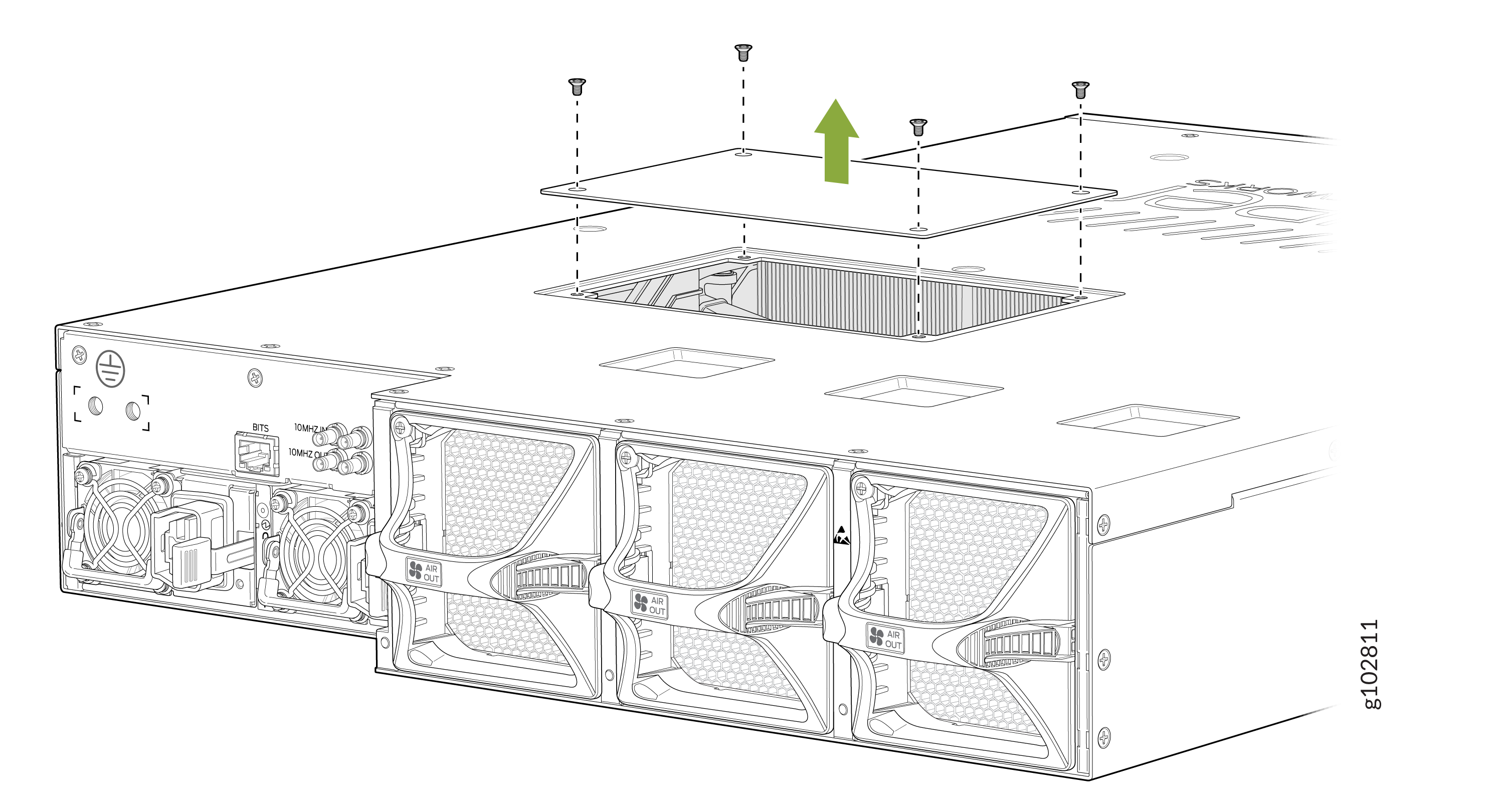
    Technical illustration of a server chassis with top cover removal, showing screws being unscrewed. Rear side displays cooling fans, ports, connectors, and AIR OUT sections for airflow management.
  5. 使用十字螺丝刀松开固定 SSD 的螺钉(向左转 3 或 4 圈)。
    Removing or installing a module within a rectangular enclosure with a green arrow indicating movement direction and visible screws and connectors.
  6. 轻轻地将 SSD 从机箱中拉出。
  7. 将 SSD 放入防静电袋或防静电垫上。
  8. 如果您不打算更换 SSD,请更换 SSD 插槽盖。
    Server chassis illustration showing cover removal. Green arrow indicates lift direction. Visible: cooling fans, power connectors, BITS, and 10MHz ports.
  9. 拧 紧螺钉(向右转 3 或 4 圈),以使用螺丝刀将 SSD 插槽盖固定到机箱上。

在 PTX10002-36QDD 中安装固态硬盘

在安装 SSD 之前,请确保已采取必要的预防措施来防止静电放电 (ESD) 损坏(请参阅 防止静电放电损坏)。

确保您有以下可用的零件和工具:

  • ESD 接地带 - 未提供

  • 1 号十字 (+) 螺丝刀 - 未提供

要安装 SSD:

  1. 将 ESD 腕带的一端缠绕并系在裸露的手腕上,然后将腕带的另一端连接到站点 ESD 点。
  2. 使用十字螺丝刀松开将 SSD 插槽盖固定在机箱顶部面板上的螺钉(向左转 3 或 4 圈)。
    Technical illustration of a server chassis with top cover removal, showing screws being unscrewed. Rear side displays cooling fans, ports, connectors, and AIR OUT sections for airflow management.
  3. 注意不要接触连接器,从袋子中取出 SSD。
  4. 将 SSD 与 PTX10002-36QDD 中的空位插槽对齐,然后将其滑入,直至其完全就位。
    Green arrow indicating direction for installing or removing a component in a device with screws and connectors visible.
  5. 使用十字螺丝刀拧紧螺钉(向右转 3 或 4 圈)以将 SSD 固定到机箱上。
  6. 装回 SSD 盖板插槽盖板。
    Server chassis illustration showing cover removal. Green arrow indicates lift direction. Visible: cooling fans, power connectors, BITS, and 10MHz ports.
  7. 拧 紧螺钉(向右转 3 或 4 圈),以使用螺丝刀将 SSD 插槽盖固定到机箱上。